

Your online time recording for projects and billing
Record your employees’ times via online check-in. Bill project times to the customer and manage vacation and illness.
Your software for online time recording
With projectfacts, you can record working times quickly, easily and reliably. All data is stored online in the cloud. This means you and your employees can check in and out at any time and from anywhere – whether in the office, home office or on the move.
The obligation introduced by the ECJ makes a time recording system essential. With projectfacts, you can already meet all requirements and create real added value for your company.
Advantages of online time recording
In the office, home office or on the move
With projectfacts, employees can record their attendance times quickly and easily. We offer a web-based program that allows you to check in and out from anywhere.
Via smartphone, PC or terminal
Check in flexibly – whether via smartphone, PC or at the terminal in the company. This ensures that working times are always recorded reliably and accurately.
Book and bill project times
Your employees simply record their attendance time on projects. The assigned times appear on the timesheet and in the billing for the customer.
Highlights of your online time recording
For all common working models
Document working hours
Reliably document your employees’ working hours. Recording is quick and easy and is suitable for all common working time models such as part-time or flexitime. Breaks can also be recorded. The fast and intuitive handling makes time recording child’s play. A positive side effect: you always receive up-to-date working times for your bookkeeping and project analyses.

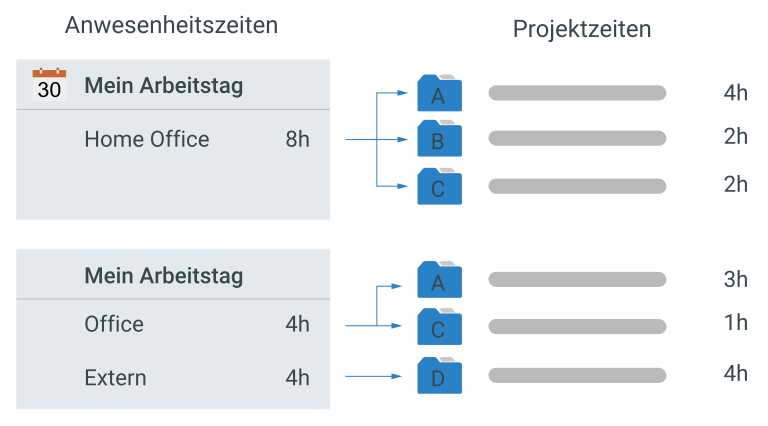
Working hours vs. project hours
Record and bill project times
Employees assign their working time recorded with the time recording software directly to the projects, sub-projects or work packages to which the corresponding effort has been allocated. The advantage? The progress of projects can be seen from the hours booked and the recorded times are automatically billed.
Documenting and accounting for working hours
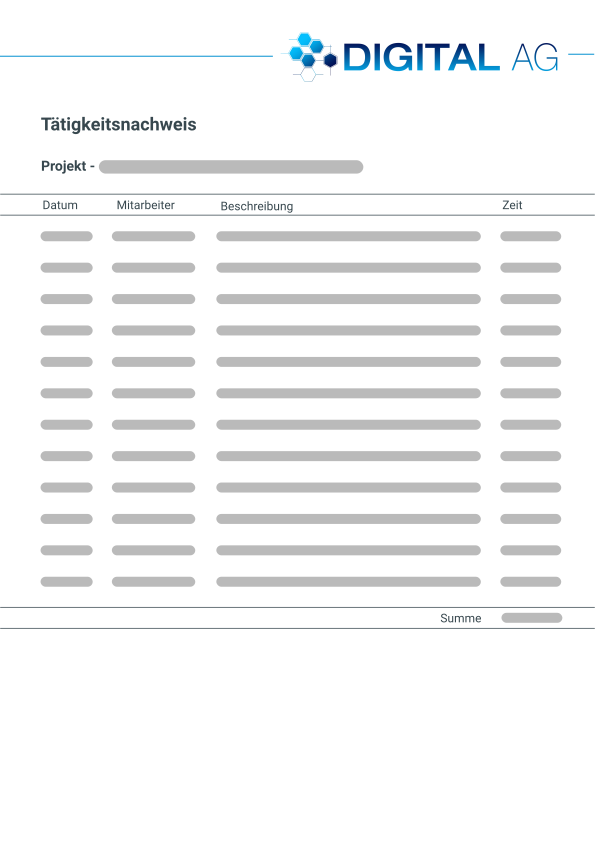
Time sheet
Digital time recording is an excellent basis for creating timesheets and invoices. With projectfacts, you collect recorded times automatically on an ongoing basis. This means you don’t have to laboriously collate them or maintain them in long Excel lists.
You can easily generate a timesheet at the touch of a button. This allows you to document all booked and billable activities to the customer. The assignment to invoice items is fully automatic, so that invoicing is always carried out exactly according to the current progress of the project.

Your digital vacation account
Vacation management
Manage vacations in a central online system. Your employees can keep an overview via the digital leave account. You can apply for, check and approve new leave directly in the software. Approved vacations are automatically transferred to the team calendar and taken into account in capacity planning.
Managing illnesses and co.
Absence management
Your employees can call in sick directly online. The doctor’s certificate can also be uploaded directly. This saves your employees having to send their sick notes by post and your HR department is always up to date. Other forms of absence, e.g. for parental leave or vocational school, can also be created and managed individually. The calendar keeps your team informed at all times.

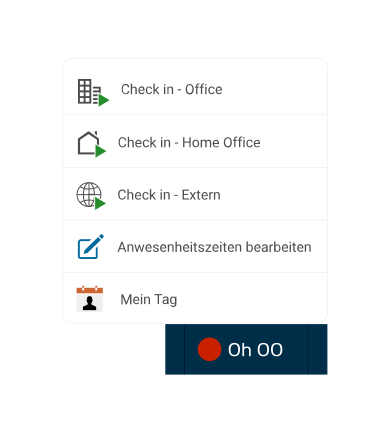
Check-in and check-out
Record times online
With projectfacts, your employees are as flexible as possible. Whether they are in the office, working from home or on the move. They can check in and out at the touch of a button.
The end device does not matter. As a web app, projectfacts runs on almost any device, in particular PCs, smartphones or terminals.
PC, terminal or mobile?
Time recording systems
projectfacts offers you a complete time recording system for your company. The time recording program is available online anywhere and at any time. This means you can access it on almost any mobile or stationary device.
On request, we can also set up projectfacts on a time recording terminal in your company. This allows your employees to check in and out conveniently using a chip or ID card.
Start directly with online time recording from projectfacts!
Record and book your working times quickly, easily and reliably. With projectfacts, you always have an overview of all your attendance and project times and can even bill them directly.
Central functions for time recording in your company
Attendance and project time
The attendance time shows how long an employee has worked on a particular day. Project times tell you what your employee worked on during this time. To do this, your employees post individual parts of their attendance time to projects in which they were working.
Full-time, part-time or flexitime
With projectfacts, you can map all common working time models: Full-time and part-time work, flexitime, trust-based work, night and shift work, working time accounts and much more. No matter which working model is used in your company, with projectfacts you have a suitable solution.
Home office & external appointments
If your employees are working from home, they can check in via the web interface. Even for external projects, time recording can be started, paused and stopped on the move at any time. The check-in/check-out function gives you maximum flexibility.
Absences, illness & vacation
Employee absences such as illnesses or vacations can be easily managed. You can also define individual times, e.g. for vocational school, further training, external customer appointments, etc. You can define your own rules for each time. This gives you maximum flexibility.
Break rules and times
The law prescribes certain minimum breaks depending on the duration of the activity. If this break time is not reached, the employee receives a message if required. If the recorded break time is less than prescribed, the difference can also be filled automatically.
ECJ ruling
The ECJ requires companies to record time. With projectfacts, you are equipped for the time recording obligation. You fulfill all legal requirements 100%. You can also enjoy the many benefits that time recording brings for your business and your employees.
Time recording obligation according to ECJ
The recording of working hours is mandatory in all EU member states. Specifically, the ECJ requires a reliable, objective and accessible time recording system for employees. projectfacts offers you a software solution with which you can meet all the requirements of the time recording obligation.
Time recording for tickets, sales opportunities, appointments …
With projectfacts, you have one system for all company processes. This offers considerable advantages. For example, if you use the ticket system, times can be booked directly from tickets. Appointments and sales opportunities can also be booked directly with times. This ensures two things at once:
- Times can always be booked exactly to the work process in which they occur
- Employees can book their times from anywhere, no matter where they are in the system
Simply post times
Recording times is just as easy as the time recording itself. Projects can be selected from a predefined list and new projects can be easily created. Templates can be used to determine whether the booked time is billable or not. If so, the external time used for billing is also displayed.
Service intervals such as quarter or half-hourly cycles can be easily integrated into the system in this way. But the most important thing is: Your effort is reduced and the degree of automation increases.
Monitor projects with your online time recording
Project controlling via time recording
A digital project time recording system online offers you numerous possibilities to Monitor the progress and success of projects. Based on the recorded times, you can quickly see whether your projects are developing as desired or whether there are any problems at certain points. The time recording software links the working time directly to your projects and allows you to clean evaluation and billing.
Analyze automatically and make informed decisions
By integrating time recording with other business processes in your company, you are able to make informed decisions quickly. projectfacts helps you to maintain an overview and enables you to make timely, data-driven decisions:
- Which projects are particularly labor-intensive and possibly unprofitable?
- Which employees are active in which projects and how busy are they?
- How do your projects perform in a target/actual comparison of relevant project KPIs?
- How efficiently are your projects likely to be completed (earned value analysis)?
Record your working time online now with projectfacts
Document your working time in projectfacts with immediate effect. This opens up many possibilities for you: You can bill project times, carry out working time analyses – and above all: you are on the safe side legally!
Further functions of online time recording
- Attendance times
- Project times
- Proof of activity
- Week view / Month view
- Overtime account
- Sick days
- Vacation management
- Billable via the invoice
- Stopwatch function
- Mobile access
- Various holiday calendars
- Absences
- Budget and expense calculation
- Individual templates
- Internal & external hourly rates