Working Hours: Configure Different Break Rules
Comply with statutory break regulations and additionally define individual rules for your employees. Find out how here.
Individual break rules for your employees
With automatic break rules, you can ensure in projectfacts that your colleagues comply with the statutory break times. Previously, defined rules applied to all employees in the company. With pf 6.6, you now have the option to determine more individually who should take a break after how long and for how long. To do this, you can set up different break rules and assign them to individual employees.
Define different rules
To define break times, navigate to “Configuration” and select “Time recording” under Categories on the left. Here you will find the “Break rules” tile. You will first see a list of all the rules currently set up in the system. On the left under Actions, you can “Create new” rule.
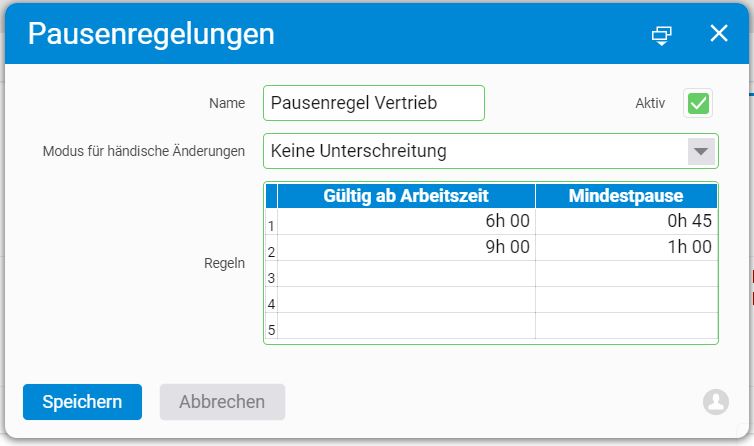
Give the rule a name and check the “Active” box. You can now enter in the “Mode for manual changes” field what conditions apply when an employee wants to change their break.
- “No restriction” means that the colleague can adjust the break time as they wish.
- With “Flag individual changes”, the change must be documented.
- “No underrun” allows the break to be changed as long as it does not fall below the defined minimum time.
- “Dynamic” means that breaks taken after the end of the first 6 working hours, for example, are still counted against the minimum break. So if you were only able to take a break after 7 hours, it will not be counted as an additional break on top of the automatic minimum break.
In the “Rules” table, enter from what working time a break should be recorded and how long each break should be.
Assign break rules to your employees
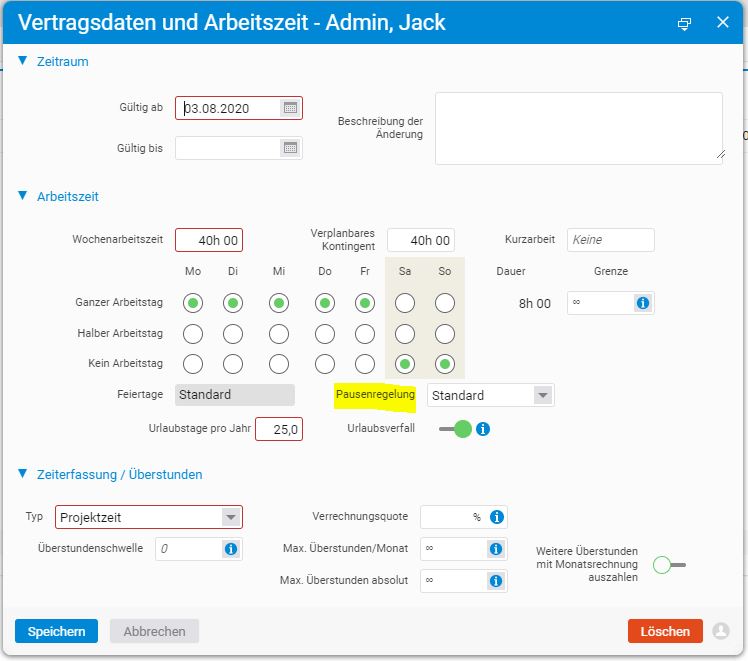
In the “HR” module, under “Employees”, you can select a colleague to whom you want to assign a new break rule. Under the “HR” tab, you will find “Contract data and working hours”. Edit the current entry there or create a new one. In the “Break rule” selection field, you can now choose from the defined rules which one should apply to the colleague.