
Create and offset down payment invoices
Large orders tie up your resources for months. With down payment invoices you bring the money in while the work is still running.
Enquire nowWhat is a down payment invoice?
A down payment invoice is an invoice for part of an order that you issue before the overall service is complete. Your customer pays in several steps and you receive your money earlier. At the end comes the final invoice, in which all down payments already made are offset.
This arrangement is not required by law: as a rule, legislators assume that payment is due once the service has been delivered in full. How many instalments you agree, and how large they are, is therefore purely a matter of contract between you and your customer.
Secure your liquidity
Salaries and upfront costs are due immediately, while the final invoice only arrives months later. Instalments close that gap.
Spread the risk
You do not carry the full order value yourself. If a payment fails to arrive, you notice early rather than at the end of the project.
Predictable for both sides
Your customer does not have to settle one large sum at the end, but pays along the way in agreed steps.
Down payment invoice or partial invoice?
What belongs on a down payment invoice?
A down payment invoice needs the same mandatory details as any other invoice, plus two things that clearly identify it as an instalment.
The usual mandatory details
Name and address of both parties, tax number or VAT identification number, invoice date, a sequential invoice number, the description of the service, the date or period in which it was delivered, plus the net amount, the tax rate and the tax amount.
What has to be added
First, the explicit wording down payment invoice, so that it cannot be mistaken for a final settlement. Second, a reference to the underlying order and to the position of the instalment, for example 'second instalment of three, order 2026-0147'.
- Sequential numbering of the instalments
- Reference to the order or contract
- A note that a final invoice will follow
How VAT is handled
You state and pay VAT on every instalment. The final invoice then bills the entire service and deducts the instalments already charged, including the VAT attributable to them. That way no amount is taxed twice.
How you proceed in an individual case depends on the contract and on your method of accounting for VAT. Agree the details with your tax adviser.
An example: two instalments and a final invoice
A software company agrees a total of 200,000 euros net with its customer for a large customisation, split into two instalments and a final invoice. Because investment is needed at the start, the larger instalment comes first.
First down payment invoice
Net 100,000 euros, VAT at 19 per cent 19,000 euros, invoice total 119,000 euros gross.
Second down payment invoice
Net 50,000 euros, VAT at 19 per cent 9,500 euros, invoice total 59,500 euros gross.
Final invoice
Total service 200,000 euros net, VAT 38,000 euros, 238,000 euros gross. After deducting the first instalment of 119,000 euros and the second of 59,500 euros, a remaining balance of 59,500 euros gross is left.
Bill instalments without keeping lists on the side
Anyone tracking down payment invoices in spreadsheets eventually loses sight of which instalment has been issued and which has been paid. In projectfacts both sit with the order.
Enquire now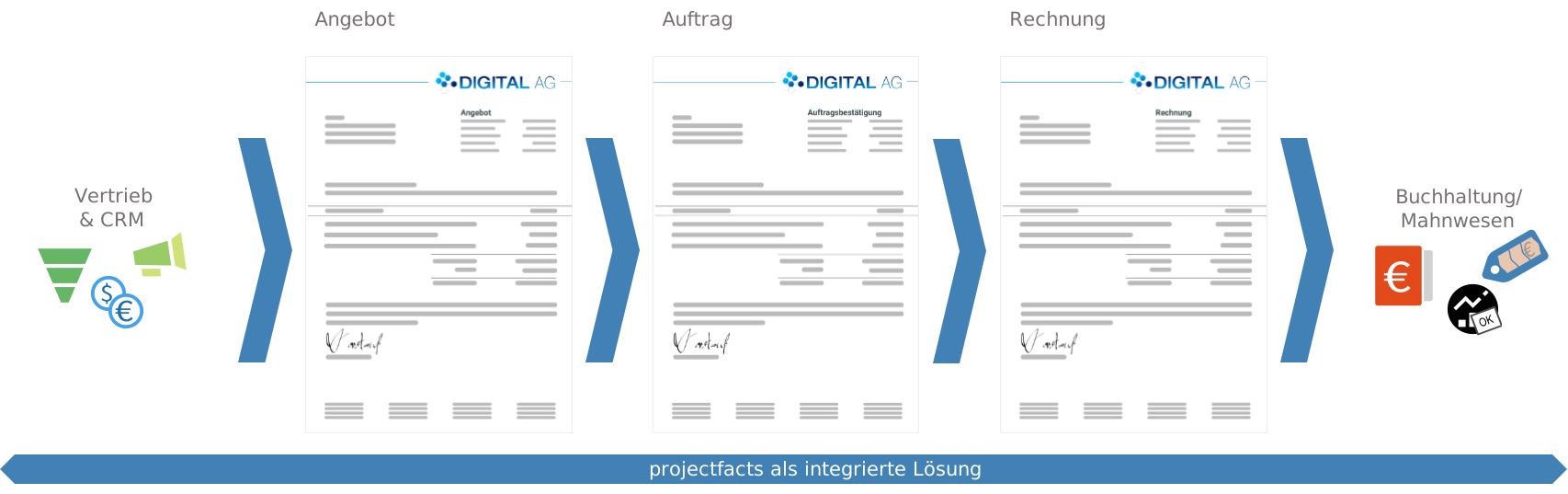
Creating down payment invoices in projectfacts
You set up the specifics of the instalments once in the order, not in the individual invoice. Under the contract and billing data you choose payment plan as the billing mode and define the individual instalments within it.
The final invoice matters here: it automatically adds up the down payments already made and the amount still outstanding, and carries both into the closing invoice. So there is nothing left for you to reconcile by hand.
- Payment plan and billing rules directly in the order
- Instalments defined freely as a percentage or a fixed amount
- The final invoice offsets the instalments automatically
Tie instalments to project progress
Because project management and billing in projectfacts share the same data, you can break your order items down into subprojects and work packages and attach the instalments to them.
When a work package that forms the basis for a down payment is set to 'completed', projectfacts lets you know. You see the note in the system and the billable amount is shown along with it. Forgotten instalments are no longer an issue.
- A note in the system as soon as an instalment falls due
- The billable amount is determined automatically
- Invoicing and dispatch at the push of a button
Posting down payment invoices and keeping track
A down payment invoice is not finished once it has been sent. It has to be posted, monitored and correctly offset at the end.
Monitoring open instalments
The document overview shows you, for every order, which instalments have been issued, which have been paid and which are still open. If a payment fails to arrive, receivables management steps in with reminder levels and payment reminders.
- The status of every instalment visible on the order
- Open items and due dates at a glance
Handover to accounting
Down payment and final invoices flow into financial accounting together with all other documents and can be passed to your tax adviser through the DATEV interface. As an e-invoice in ZUGFeRD or XRechnung format you send instalments just like any other invoice.
- DATEV export for down payment and final invoices
- Dispatch as ZUGFeRD or XRechnung possible
Down payment invoices with projectfacts at a glance
Payment plan
Define instalments once in the order instead of per invoice
Automatic offsetting
The final invoice deducts the instalments already paid
Tied to progress
A note in the system as soon as a work package triggers an instalment
Open items
Issued, paid and open instalments visible per order
E-invoicing
Send instalments as ZUGFeRD or XRechnung
DATEV
Handover to your tax adviser through the DATEV interface
Take a proper look at the payment plan
In 30 minutes we will show you, using a concrete example, how instalments, project progress and the final invoice fit together in projectfacts.
Enquire nowStill have questions? We have the right answer!
Give us a call, send us an e-mail or take a look at our FAQ section! We will be happy to answer your questions!