
Microsoft 365 Authentication Method for E-Mail Accounts in projectfacts
Secure your mail account in projectfacts with the Microsoft 365 authentication method.
Microsoft is changing the authentication method for its services
Previously: Basic Authentication
Many companies currently protect their mail inboxes with only basic authentication (“Basic Auth”). This method does not provide sufficient security and will be discontinued by Microsoft in the near future. In the future it will be replaced by the authentication method known from Microsoft 365 (“Modern Auth”).
“Basic Auth” means that the username and password are entered by the user or transmitted by the application with every login. This makes it easier for potential attackers to obtain the data and misuse it with other services – especially in the absence of TLS protection. Multi-factor authentication (MFA) is also difficult to implement with “Basic Auth”.
New: Modern Authentication
As the modern authentication method for Microsoft 365 accounts, projectfacts now uses OAuth 2.0. It has three key characteristics:
- The tokens are application-specific
- The user can determine which areas the token is valid for
- The application no longer comes into contact with the user’s login credentials
The limited reusability makes potential misuse considerably more difficult. Combined with multi-factor authentication, this method offers a significantly better security standard and is therefore recommended for companies.
The Transition Roadmap
Originally, “Basic Auth” was to be discontinued as early as October 2020 for Exchange ActiveSync (EAS), POP, IMAP and Remote PowerShell. As a result of the pandemic, the timeline was postponed until further notice. Nevertheless, Microsoft is sticking to the transition; affected customers will receive a corresponding notice in the Message Center 30 days in advance. Microsoft is already deactivating “Basic Auth” for protocols that customer companies are not currently actively using. More detailed information on the planned transition process can be found in this Microsoft article.
Microsoft 365 login with projectfacts
In projectfacts you can already set up e-mail accounts with the new authentication standard. To do this, switch to the configuration in the “Messages” or “Tickets” menu item. There you set up new e-mail accounts under the “Mail Accounts” tab.
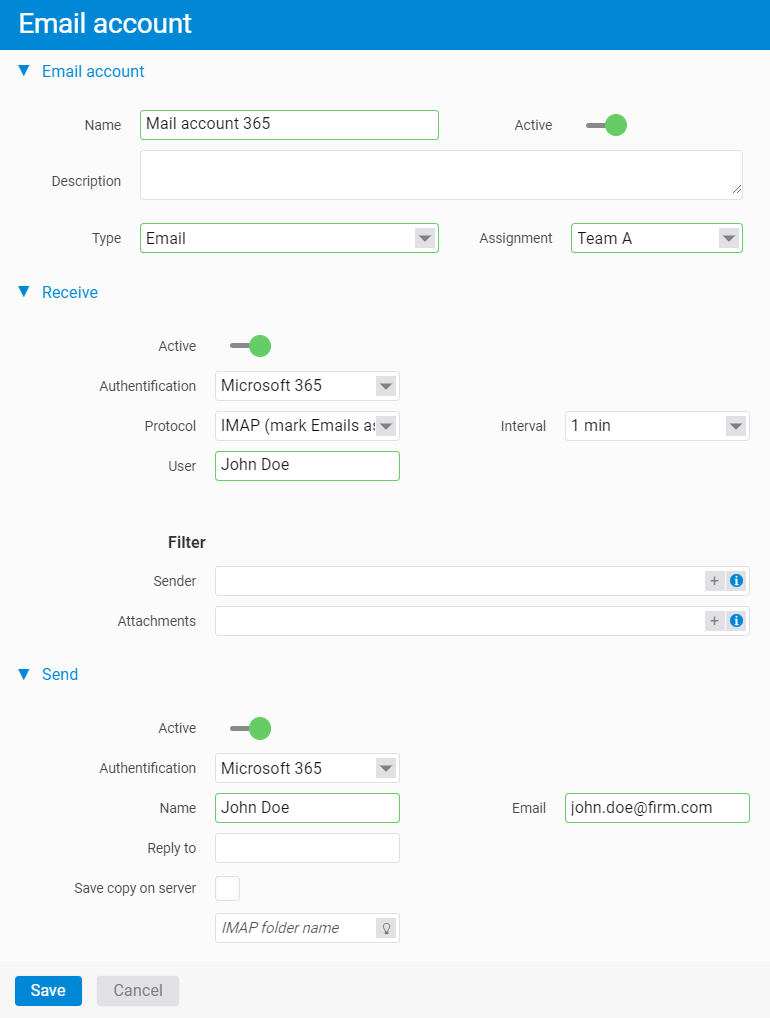
A dialog opens in which you can set the authentication type for e-mail reception and sending separately. Here you will find the option “Microsoft 365” in the “Authentication” fields respectively. After saving, the newly created mail account is displayed and a login button for Microsoft 365 appears. Clicking on it takes you to the login dialog and you can log in as usual if you are authorised for the mailbox.
Note: For “Shared Mailboxes”, enter the e-mail address of the shared mailbox as the username.