
5 Typical Mistakes in Software Implementation
We show 5 typical mistakes when introducing new business software and give tips on how you can do it better in your company.
1. Neither a Goal nor a Clear Concept
The trigger for introducing new software is often that companies feel a certain “pain” in their processes. As a rule, business is going well — otherwise there would be no budget for new software — but there are one or two areas where things simply are not working smoothly.
First optimise processes, then digitise
Setting out to find new software with the idea of making minor improvements here and there is often a poor approach. Decision-makers tend to overlook two aspects:
- Existing processes are frequently not the most efficient solution to the underlying problem, but have simply grown historically and have not yet been questioned.
- No software in the world will be able, straight out of the box, to replicate all processes exactly as they are handled in company X, because company Y will certainly do things differently.
There are two possible approaches to this:
Option A consists of spending a lot of money to customise the software so that it fits the existing processes as closely as possible. With this approach you will probably make your employees happy, but you leave the opportunity to improve your business processes unused.
With Option B, you work together with the software provider and your employees to first develop an optimal solution for your processes. This approach takes time and requires active participation from your team, but it generally delivers significantly better results.
Document the objective and draft a rough concept
To be optimally prepared for this, you should first think about what main objective you want to achieve with the new business software. The more specific, the better. Write the objective down and, if possible, tie it to a concrete figure, e.g.:
With the new business software, we will create and send invoices entirely digitally. The monthly time spent on invoicing should be reduced by at least 50%.
In the second step, you can think about what concept you want to use to achieve this goal. At a high level, it might look something like this:
Ms Mustermann creates new invoices online, which she can also do from home. She draws on pre-made layouts, items, and prices. The recipient of the invoice is automatically pulled from the CRM database. Completed invoices are sent directly from the software by email. She can also make corrections and cancellations in the system and send them on.
Do not lose yourself in technical details when drafting your first concept; instead, focus on the benefit and the workflow. Free yourself from the existing processes in the company and imagine how you would ideally want the process to work.
- Define a concrete goal that you want to achieve with new business software.
- Develop a rough (!) concept of how you can achieve this goal with business software.
2. Wrong Expectations in Software Implementation
Even in business-to-business (B2B), good communication is extremely important for the success of a customer relationship. This is especially true in project business, because projects often fail not because of the solution itself, but because of inadequate communication and false expectations.
Expectations are one-sided contracts the other party knows nothing about.
– Karlheinz Wolfgang
This quote from Karlheinz Wolfgang highlights two very fundamental mistakes:
- Clients do not communicate their expectations fully.
- Contractors do not capture expectations concretely enough.
Regardless of whether the mistake lies more on the contractor’s or the client’s side, this miscommunication sooner or later leads to problems. This is particularly frustrating when it involves the costly introduction of new business or ERP software.
Of Chinese whispers and passing the buck
Expectations often arise in the first place through the interplay between supply and demand:
- A prospective client wants a software tool for a specific task or a concrete problem and describes their requirements.
- The software provider presents a solution that, in their opinion, is suitable for solving the task or problem.
- The prospective client processes the proposed solution and in turn adjusts their expectations.
The more people and the more intermediate steps involved in this process, the greater the risk that completely different expectations develop. Every communication carries an element of ambiguity, because what the provider understands does not necessarily correspond exactly to what the customer means, and vice versa. It is often even the case that contractor and client start with a different understanding and only find common ground during the course of the project.
Many people know this classic image1 from IT project management. It illustrates how inadequate communication and false expectations can reduce the result of a software project to absurdity.
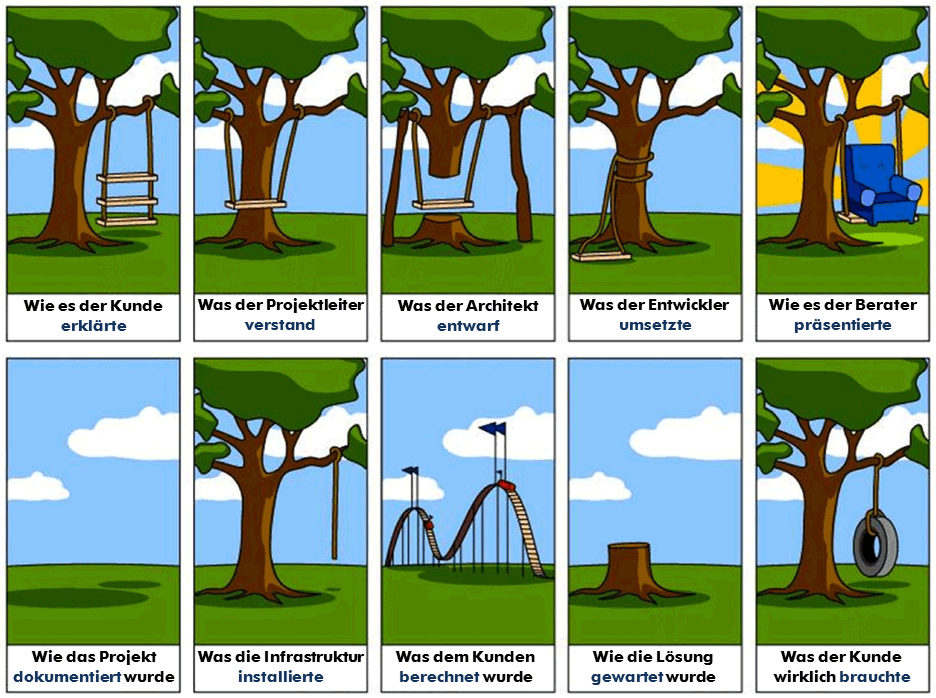
A certain degree of ambiguity cannot be avoided. That is why the following points are important for a software implementation, just as they are for projects in general:
- Express and document expectations as clearly as possible.
- Always mirror expectations back and confirm that everything has been understood correctly.
- Regularly and transparently compare the current state of work against expectations.
3. Unclear Framework Conditions and Responsibilities
Introducing new software often affects a very large number of areas within a company. This leads to many people wanting to have a say, but nobody being responsible. This is a very unfavourable starting position for a software implementation, as it generally results in the rollout being abandoned or not properly completed.
Appoint a project manager, set a timeline and budget
That is why you should clearly name the project manager from the outset. They should have the time and the necessary resources to accompany the project from start to finish. Equally important is a clear time and budget framework. If no cost framework is defined, the project could turn out to be very expensive. If there is no timeline, you can expect the project to drag on longer than desired. When setting both parameters, make sure they are realistic. No software project is free of charge and finished within two weeks.
IT department vs. lead user
Another pitfall often lies in the question of who defines the requirements for the software. Typically, two departments are in the running: the IT department and the area that will presumably make the most intensive use of the software — we call them the lead user.
Since both departments have their own perspective and their own interests in the software implementation, you quickly run the risk of the concerns of the other side being neglected. If the IT department takes the lead, you can be fairly confident that the new software will integrate well into your existing system landscape. Whether it will also help users in their day-to-day work is another question. If, on the other hand, only the lead user looks after their own concerns, you may find that the interfaces to other systems are a problem. That is why you should always involve responsible parties from both departments in the decision-making process.
- Appoint a suitable project manager to oversee the entire system implementation.
- Set a clear and realistic time and budget framework.
- Involve both the IT department and the lead user in the decision and the implementation.
4. Resistance to Software Implementation
Introducing new software requires systematic change management. In doing so, you will inevitably provoke resistance within the company, because people do not like change. This applies particularly to software implementations, because a new business system brings fundamental changes with it. Two different forms of resistance can be distinguished.
Open resistance
In this form of resistance, employees openly voice their concerns. Constructive criticism focuses on addressing and improving weaknesses in the software or the implementation process. Some employees, however, also use the opportunity to express purely negative views in order to derail the entire project (“This is pointless anyway”).
Covert resistance
In the case of covert resistance, employees do not openly show their disapproval to superiors, but only to colleagues or through their behaviour. Employees then try to slow down the commissioning process by continually raising new requirements or insisting on peripheral requirements. Once the new system is already in use, they fail to follow new process guidelines or criticise inadequate training or user-friendliness.
Fear is a poor adviser
Resistance to new software is often rooted in various fears among employees. Depending on role and personality, a wide variety of causes may be relevant:
- Fear of losing influence: New software generally makes information available across departments or throughout the entire company. This apparently strips individual employees of their “information sovereignty”.
- Fear of being overwhelmed: New software usually requires a shift in mindset and getting used to new processes and operating concepts. Long-serving employees, however, have generally become comfortable with existing business practices. They are afraid of not being able to cope with the changes and perhaps even having to admit this.
- Fear of losing control: New software generally brings new processes and responsibilities with it. Employees fear that their performance will become more transparent and that they will be measured against new benchmarks.
It is important to understand that resistance can never be ruled out in advance. The secret to success lies rather in being aware of it and dealing with it correctly. The following tips can help:
- Identify the resistance that arises, determine its causes, and develop counter-arguments.
- Give the entire team the opportunity to express ideas, criticism, and feedback.
- Talk to employees calmly, factually, and respectfully about their fears and concerns.
- Always accompany the introduction of new business software with sufficient training sessions that focus specifically on individual departments.
5. The Dilemma of Shared Resources
Based on a series of expert interviews, Stefan Tretter and Sarah Diefenbach1 of LMU Munich identified an interesting effect of new software, which they call the “dilemma of shared resources”. We present this effect in the following:
Sharing information and wielding power
New business software often serves to make internal company processes simpler and more efficient. For this to work, data generally needs to be entered and maintained. Only then do all users benefit from it and workflows actually become simpler. However, data maintenance in particular often appears tedious and brings no direct benefit for the individual user. This effect can be well illustrated using the example of a CRM system.
One of the key advantages of CRM software is the digital customer history. It allows all interactions with the customer to be recorded and traced later. After a lengthy customer phone call, however, it is not very appealing for a support employee to reflect on the conversation and document its content digitally — especially since the customer apparently received help.
However, further contacts frequently follow, involving other employees as well. Ideally, these employees should be up to speed when the customer contacts them again. The support employee who handled the customer previously knows about the underlying problem and the proposed solution, but their colleague does not. If the colleague then has to be briefed by the customer first, this comes across as highly unprofessional.
Setting the right incentives
Unfortunately, the employee who would need to share information is generally not the same one who benefits most from doing so. Each individual is therefore tempted to invest little effort in documentation while extracting as much benefit as possible from it. If too large a proportion of the team follows this tendency, the whole system eventually becomes useless.
This leads Tretter and Diefenbach to a simple conclusion:
“The system is not used because the system is not used.”
A poorly maintained system does not help employees, which is why they do not maintain it further. However, the same spiral can also be reversed in a positive direction. If the individual user finds information in the system helpful, they are also more inclined to enter data themselves. To make use of this effect, the introduction of new software should always be accompanied by incentives to use and maintain it actively and conscientiously. Various mechanisms are suitable for this:
- Reward employees in a playful way for their documentation, e.g. with a points system for free drinks (gamification)
- Make entering information as simple as possible, e.g. through an intuitive interface and automatically pre-filled data.
- Ensure that employees have quick and easy access to the information they need, e.g. through bookmarks or a search function
- Limit the scope to important information, e.g. through a permissions system that makes information accessible only to those user groups for whom the data is relevant.
Consulting for the Introduction of New Business Software
As a digital consultancy and software provider with over 20 years of experience, we are very familiar with the challenges involved in introducing a new software solution. Feel free to contact our consulting team. We will help you with the planning and implementation of your digitalisation project.
Would you like to get a first impression of our software projectfacts? Follow the link below to access a free trial version that you can test without obligation for 14 days.
1 Tretter, S. & Diefenbach, S., (2016). Von der Datenverwaltung zur erfolgreichen Kommunikation – UX-Design für Customer-Relationship-Management (CRM) Systeme aus psychologischer Perspektive. In: Hess, S. & Fischer, H. (Hrsg.), UP 2016. Aachen: Gesellschaft für Informatik e.V. und die German UPA e.V. DOI: 10.18420/muc2016-up-0045