
New Expense Billing Analogous to Time Entries
Simply bill your travel and material costs with projectfacts!
What is changing in expense billing?
Previously, you assigned costs recorded by your employees to the respective billing line item after creating the invoice. This approach is still possible. However, the new expense billing allows you to view billable cost items directly in the order via a dedicated tab. This gives you an even better overview of the costs that will appear on the next invoice.
Assigning times or costs to an order line item
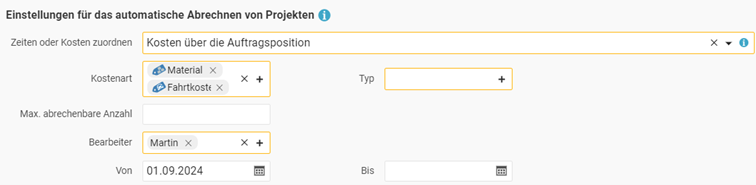
To allow you to see the billing-relevant cost items already in the order, we have added a new function to the effort line items in your order. You can now assign either times OR costs.
This means that costs can now be billed in the same convenient way that you are already used to with time entries. Set the order line item to costs, and it will collect all matching billable costs and automatically transfer them to the next invoice. You no longer need to assign the costs retrospectively.
The assignment can be narrowed down by certain criteria, just as you already know from time entries. These include:
• Cost type: Materials, travel costs, etc.
• Type: 19% VAT, 7% VAT, etc.
• Editor: The person who submitted the costs.
• Period: The time span within which costs are taken into account.
• Maximum number: The number of cost items that can be billed via this line item at most.
In addition, you have the choice of whether the cost items are listed individually on the invoice (costs via collective billing) or whether all assigned cost items flow into the underlying order line item and increase the amount there (costs via the order line item).
Recording costs and defining the billing method
Cost recording is carried out in the same way you are already used to. You can continue to define per cost item,
- whether the costs flow into the project contribution margin,
- are reimbursed to the employee, and
- are to be invoiced to the customer.
However, the customer billing receives additional options. The following are now possible:
- Manual billing: Enter the billable amount manually.
- Billing via the cost item: The billable amount is taken directly from the cost item.
- Billing via the price list: The billable amount is derived from the article price linked to the cost type.
- Billing via the order line item: The billable amount is based on the price of the line item in the order.
The last option is completely new and allows individual billing of costs depending on the order. This makes it easier to bill services where the determining factor is not time but quantity. In concrete terms, this means: the price is based on how often the service was performed and not on how long it took. Examples of this include measurements, inspections, or site visits. For each new measurement, inspection, or site visit carried out, you create a cost item, which is then billed at the price defined in the order.
Passing on incoming invoices
With the extended billing, you can even convert incoming invoices into cost items and bill them to your customers in the same way. Passing on external services thus becomes significantly easier. This process works particularly conveniently when you have already received the incoming invoice in the new e-invoice formats ZUGFeRD and XRechnung, as the invoice data is then read out digitally and transferred directly into your document.
PS: The conversion also works in reverse. In this way, you can quickly and easily generate a hotel invoice with cost items for accommodation and breakfast that have different VAT rates.