The Overtime Indicator – Keep Track of Time Accounts
The overtime indicator in the projectfacts HR software: keep track of your employees' workload with the help of the traffic light system for overtime.
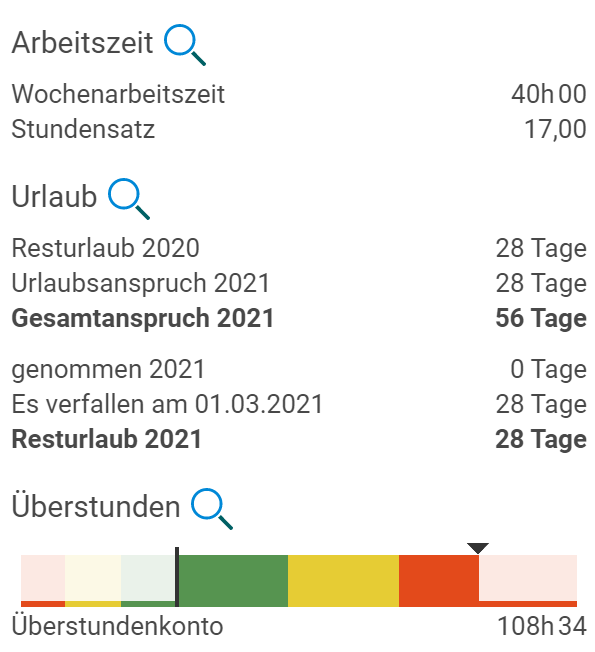
With projectfacts version 6.8 we are introducing the overtime indicator. It shows you intuitively how heavily your employees are utilised. Define individual hour allocations per colour for departments or individual employees. A valuable addition for your personnel management.
Keeping Track of Overtime
Overtime is a central topic in time tracking for your employees. It is handled very differently across companies. However, certain statutory regulations apply uniformly in Germany:
- Employees may not work more than 48 hours per week. Any additional work beyond this must be compensated within 24 weeks.
- Employees may not work more than 10 hours per day.
- There must be a rest period of at least 11 hours between the end of work and the start of work.
- With a few exceptions, working on Sundays is prohibited.
With suitable time tracking software, you no longer need to worry about implementing these regulations. Thanks to a convenient check-in/check-out system, individual office hours, and break rules, you are well equipped with projectfacts.
Using the Overtime Indicator for Planning
In addition to complying with statutory and company-internal standards, it is often advantageous to keep track of your employees’ overtime situation. This allows you to quickly and intuitively assess which departments are particularly affected by overtime.
This information assists you with personnel planning. You can use it to directly compare your financial key figures (for example for cost centres or profit centres) with the time-based workload. This lets you see at a glance which revenues are truly profitable and which were achieved at great expense.
Your employees’ time is also extremely valuable in project work. It is therefore all the more important to ensure that overtime — if necessary — flows into the right projects. Deciding which are the “right” projects is not always easy, however.
With projectfacts you can analyse your project times and weight them by, for example, the importance of the customer (A, B, C customer). Or you can orientate yourself by the contribution margins of your projects. However you proceed, with the new projectfacts overtime indicator you can see at a glance whether your employees’ working time is sensibly distributed.
Activating the Overtime Indicator in projectfacts
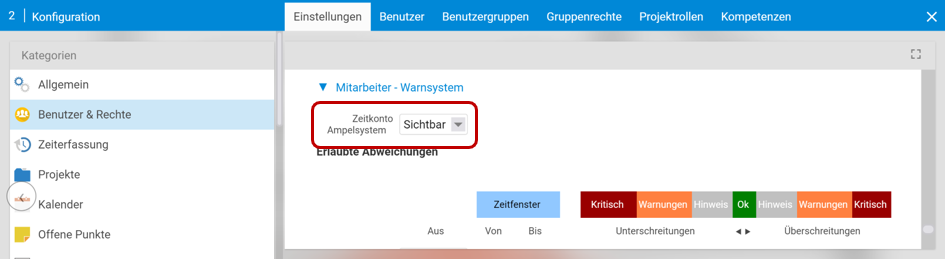
To use the traffic light system, activate it in the configuration under “Users & Rights” in “Settings”. Expand the “Employees – Warning System” section. Here you can now switch the time account traffic light system to visible.
Configuring Traffic Light Phases Individually
You can now define individual traffic light phases for your employees depending on the status of their working time account. To do this, switch to the HR module and select an employee. In this example, we want to set up the overtime indicator for Pia Personal.
Under “HR” > “Contract Data and Working Hours” we can edit the existing entry for Pia Personal. The time account traffic light system now appears as an additional field under “Time Tracking / Overtime”. In the employee list, you can also set up the traffic light system for multiple employees at the same time. To do so, select the “Time Account Traffic Light System” option via the multiple selection.
Here you can set the threshold values at which the traffic light should change colour from green to yellow and from yellow to red. In our example, the yellow zone should start at 40 and the red zone at 80 overtime hours. For shortfalls in working time, we choose the limits analogously, but in our case each at half the size.
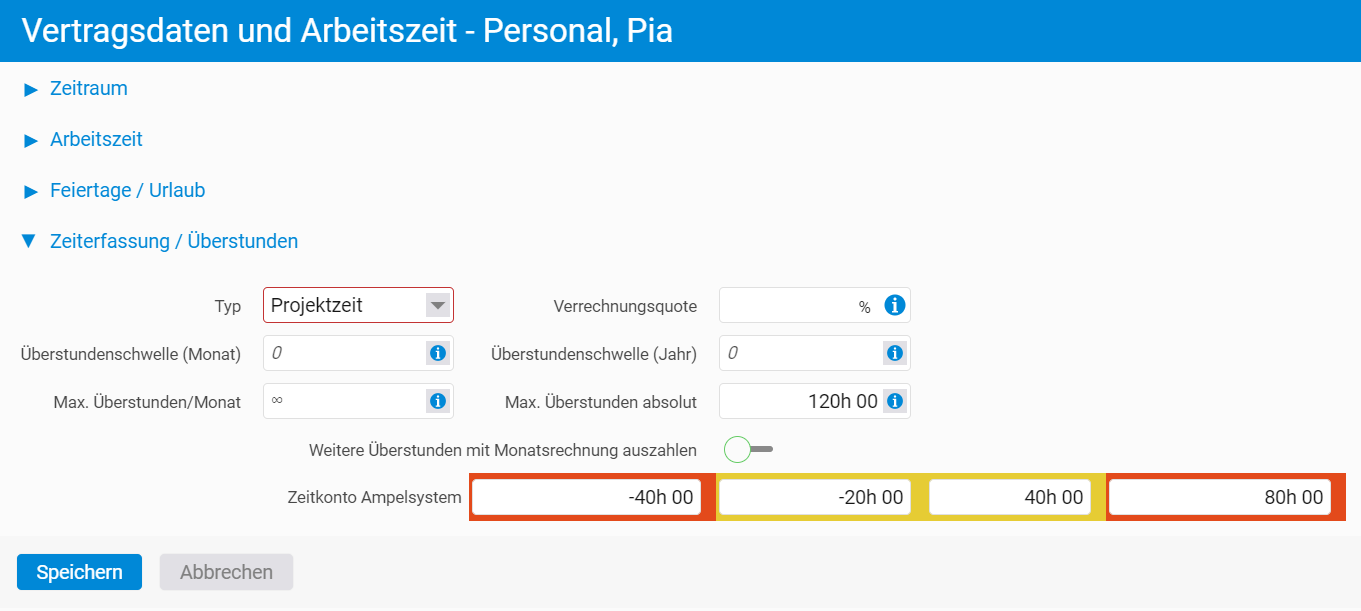
In addition, you have the option to define a monthly or absolute overtime limit. In contrast to the traffic light, which is only a visual indicator, these limit values are strictly enforced. Your employees can therefore not exceed them.
Monitoring the Status of the Time Account with the Overtime Indicator
Your employees can view and use the overtime indicator themselves. Pia Personal can access the time tracking module overview at any time. There she can see the current status of her working time account. In this way, Pia Personal can assess at a glance whether she can accumulate more overtime or should rather reduce it.