
Control Ticket Channels by Customer
Discover new types of ticket channels and how you can use them to best effect.
Ticket channel by email address vs. by customer
A ticket system sorts emails into different channels depending on which address they were received through. For example, there is a sales channel linked to the “sales@” address and a service channel linked to the “service@” address. When a customer writes to the service address, the associated ticket automatically ends up in the assigned channel. Service staff have access there and can handle the request. This approach helps companies bundle emails and process them efficiently.
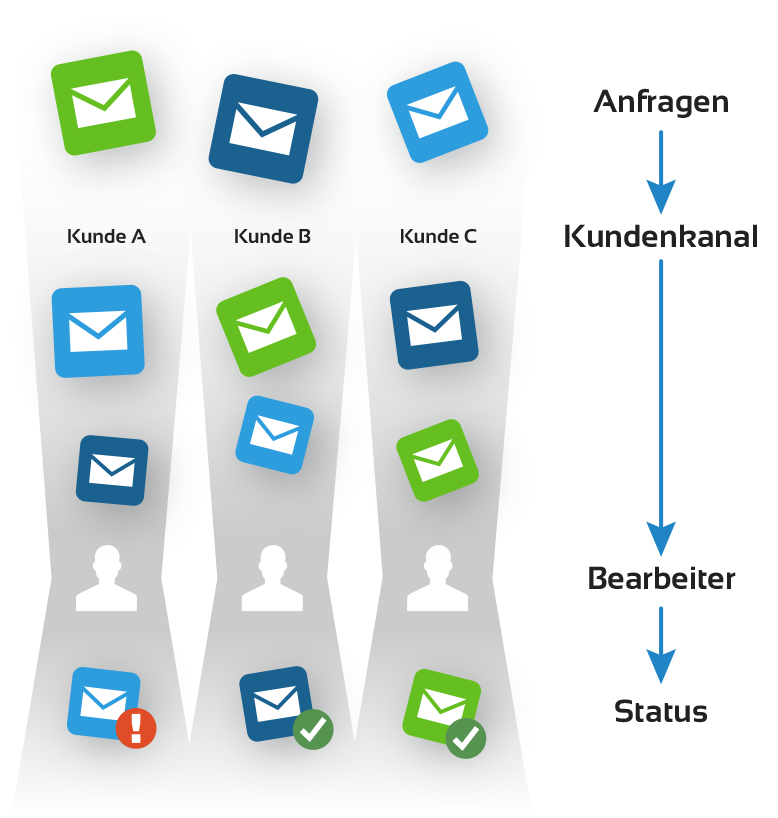
Sometimes, however, you want emails from a specific partner or customer to land in a dedicated channel. This is now possible. To do this, you store a dedicated ticket channel in the CRM entry of the customer. Whenever a person sends an email that is assigned to that customer, the system automatically moves the email to the customer’s dedicated ticket channel. The effect: you can sort even more precisely.
Use Case: Key Account Management
Service desks often work in such a way that customer requests are collected in a central “pool.” From there they are dispatched — i.e., assigned to an agent — or the agent picks their own requests.
If assignments are always made individually, this is a workable approach. However, many companies work with key account managers — employees in your company who specifically look after certain customers.
In this case, you can manage the service desk more smartly by creating a dedicated ticket channel for each key account manager and linking it to the respective key accounts. As a result, all of the customer’s requests land directly and automatically with the right point of contact. The benefit for you: less work. The benefit for your customer: faster processing.
If a key account manager is ever sick or on vacation, escalation mechanisms ensure that the ticket is released and can then be handled by a deputy.
Use Case: Large Project
Large projects often have a long duration and many participants involved. To avoid losing track sooner or later, automatic documentation of email correspondence is especially valuable for such projects.
Thanks to channel control, this is now very convenient. Simply store a dedicated ticket channel for the companies involved in the project. The system then recognizes when a person contacts you who belongs to one of the participating companies. The email is automatically moved to the appropriate channel. Replies to the email also remain in the channel and are assigned to the correct ticket based on the ticket ID.
In this way, you automatically and intelligently pre-sort your incoming emails. This saves time and ensures you have complete project documentation.
More Information on Intelligent Ticket Channels
Do you have further questions or would you like to see the intelligent ticket channels in action? Feel free to contact our support and consulting team. Not yet a teamspace user? Contact our sales team here.