
Everything You Need to Know About Time Recording – A Checklist for Companies
The ECJ ruling of 2019 requires companies to record their employees' working hours. What do you need to bear in mind? Take the check!
Time recording: obligation or optional extra?
Time recording is a topic that tends to be neglected in most companies. A study by CLBO Groß & Cie from 2019 shows: half of the German companies surveyed do not record their employees’ working hours at all.
At the same time, more than 40 percent of participants would like all work to be recorded “regardless of when, where and how”. Among those respondents whose working hours are already fully recorded, the figure is even more than 60 percent. The European Court of Justice (ECJ) also calls for systematic time recording in all companies.
The ECJ ruling
As early as May 2019, the ECJ ruled that time recording for companies should become mandatory. The background to the decision is that without reliable time recording, it would not be possible to track weekly maximum working and rest periods.
The obligation applies equally to all companies. Specifically, this means that companies that rely on a trust-based working model will also have to record their employees’ hours in future.
The ECJ does not stipulate how recording is to be done, but it does specify requirements that the time recording system must meet. Specifically, the judges require a system that is:
- reliable,
- objective and
- accessible
Case law in Germany
So far, the obligation to record working hours arising from the ECJ ruling has not been transposed into national law. Legal experts therefore disagree on the extent to which the ruling is already effective in Germany.
The first landmark decision in favour of time recording was handed down by the Emden Labour Court in February 2020. An obligation to record working hours arises directly from the EU Charter of Fundamental Rights, according to which every employee has a right to maximum working hours, rest periods and paid annual leave.
Although a supreme court ruling is still pending, the decision is an important guide for the further handling of the time recording obligation in Germany.
Obligations under the Working Hours Act in Germany
To date, §16 para. 2 of the Working Hours Act only requires employers to record overtime worked beyond the contractually agreed working hours. A corresponding recording obligation also applies to Sundays and public holidays.
However, restricting oneself to the pure recording of overtime is risky for companies. The Evidence Act stipulates in §2 para. 1 that agreed working hours and the resulting remuneration must be recorded in writing. In the event of a dispute, the burden of proof lies with the employer. However, providing such proof is virtually impossible without systematic time recording.
What do I want to achieve with time recording?
As with all fundamental decisions, companies should first ask themselves which specific goals they want to achieve by introducing time recording.
Different “expansion levels” of time recording can be distinguished, depending on how comprehensive and how deeply the time recording is to be integrated into the company. We refer to these below as “levels”:
- Level 1: Meet all labour law requirements for a time recording system.
- Level 2: Link employee billing directly to recorded working hours.
- Level 3: Bill customers for working hours recorded for customer orders.
The levels build on each other, with each level further increasing the degree of automation of internal company processes. In the following, we take a look at the individual levels and clarify what options they offer you and what requirements a suitable time recording system should meet in each case.
Level 1: Meeting labour law requirements
The first expansion level of time recording aims to cover all labour law requirements – those already arising from the Working Hours Act and those that will arise in future from the ECJ ruling – with a single system.
Of central importance here is the recording of weekly attendance time. In general, the following rules apply:
- Maximum eight hours of working time per day (on average over 6 months/24 weeks).
- Maximum six working days per week.
- No work on Sundays and public holidays.
- Uninterrupted rest period of at least eleven hours between two working days.
- At least a 30-minute break after six hours at the latest.
- At least 45 minutes’ break after nine hours.
It quickly becomes clear that even to check these basic rules, all attendance and break times must be recorded. In order to be able to distinguish ordinary working days from sick days or holiday days, the time recording system should also offer the option of managing absences.
Managing holiday, sickness and more
It is almost always useful to combine the recording of working hours with the management of holiday and sickness. This gives you a comprehensive overview of your employees’ availability.
In the time recording software projectfacts, employees have the option of submitting leave requests online (e.g. from their regular leave entitlement, from overtime or in the form of special leave). This request can be approved by an authorised person (e.g. the line manager or project manager).
Sick leave notifications can also be submitted directly in the system and the associated sick note stored. Networked systems such as projectfacts automatically notify and take into account projects, colleagues, line managers, time accounts, deputies etc. in both cases.
projectfacts also offers the option of flexibly creating further types of absence such as special leave, overtime reduction, vocational school, child illness etc.
However, not every absence is the same as holiday or sickness. Due to the increasing flexibility of the world of work, home office and mobile working are commonplace in many companies.
A suitable time recording system should therefore offer the option of recording work independently of time and location. With cloud-based systems such as projectfacts, employees access time recording online and can thus check in and out regardless of their location and device.
Checklist for Level 1 of time recording: Labour law
- All employees must be able to use the time recording system.
- Employees must be able to record their hours anywhere and at any time.
- Break times must be explicitly recorded.
- A calendar including public holidays must be stored.
- Absences due to holiday, illness etc. must be manageable.
- Working hours must be stored securely and in a data-protection-compliant manner over the long term.
Level 2: Linking employee billing to time recording
Time recording is directly relevant to employee billing when payment is made only for hours actually worked. More often, however, a specific working hours per week is agreed, which serves as the basis for billing.
Overtime beyond the employment contract must be recorded in writing and compensated. The employee has the choice of compensating overtime within the next six months so that the average working time is eight hours per day. Alternatively, the overtime worked can be paid out if compensatory time off is not possible.
Handling overtime
Overtime arises from the difference between target and actual times. Each day, a comparison of both values is made and excess times (actual > target) are credited to the overtime account. A whole range of rules can apply here:
- Monthly or annual offset: overtime is only counted from a certain threshold.
- Monthly or annual maximum: overtime can only accumulate up to a threshold. The limit can be soft or hard.
- General maximum: Absolute limit for accumulated overtime.
Individual adjustments are also possible, e.g. exchanging overtime for holiday and vice versa. Additional clarity is provided by an overtime indicator, which always shows employees and managers in projectfacts the current status of the hours account.
A time recording system that is to be used for employee billing must draw on the contractually defined working hours. If employees also work at night or on Sundays and public holidays, the following surcharges must also be taken into account:
- For night work: Surcharge of between 25 and 30 percent of the gross hourly wage (unless otherwise stipulated by collective agreement).
- For Sunday work: Depending on the collective agreement area, between 50 and 70 percent surcharge on the gross hourly wage.
- For public holiday work: Depending on the collective agreement area and public holiday, between 50 and 150 percent surcharge.
Especially in sales, employees often receive a performance-related additional payment in the form of a commission. The commission can be linked to different value parameters, for example the turnover generated by a new customer order.
Commissions are relevant for time recording when they are calculated on an effort basis, for example when looking after customers. A time recording system like projectfacts offers the option of automatically calculating commissions and releasing them for billing. What is relevant here is not the total attendance time, but only the time spent within the scope of the commissioned service (see info box on “Attendance time and project time”).
Checklist for Level 2 of time recording: Employee billing
- The system must know and take into account contractually agreed working hours.
- Overtime must be documented in a traceable manner.
- The system must know hourly and surcharge rates and calculate them correctly.
- Night work, Sunday work and public holiday work must be billed separately.
- Commissioned services must be individually definable.
- Commissions must be recorded and billed according to fixed rules.
Level 3: Billing times for customer orders
Service companies often handle customer orders in the form of projects. In this case, in addition to physical items, the working hours performed must also be billed.
In order to be able to assign working hours to the correct order, time recording systems such as projectfacts offer the option of booking attendance times to specific projects. Employees distribute individual “slices” of their attendance time to the projects they are working on.
Attendance time and project time
Level 3 of time recording requires an explicit distinction between attendance and project times.
- Attendance times document the total working time of an employee on a given day including breaks.
- Project times document which activities an employee was engaged in during that time.
To record project times, employees book their attendance time proportionally to the projects they are working on. If it is a customer project and the service is billable, the booked times are automatically added to the relevant invoice.
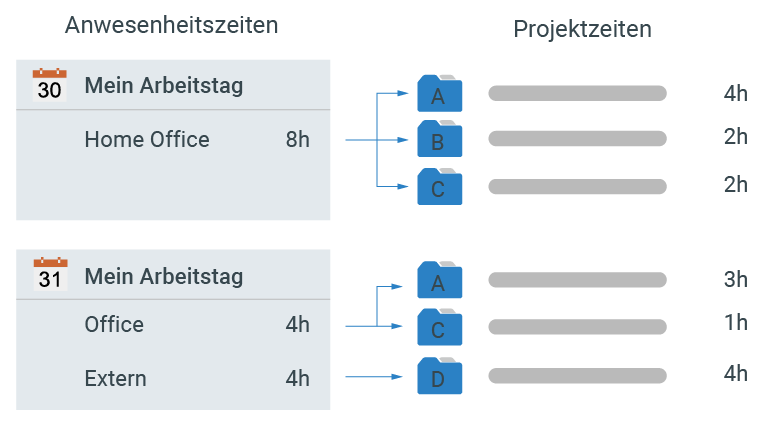
A distribution as shown in the figure above means that seven hours of the recorded working time are billed within the scope of customer project A, two hours for project B etc.
Flexible time recording systems such as projectfacts offer convenient options for setting which services are billable and which are not. The template can already specify whether a service is, for example, always chargeable or always free of charge.
Special billing forms can also be mapped with this, e.g. proportional billing of travel time or a service billing timed in half-hour intervals. For this purpose, a distinction is made between internal and external time. This distinction is advantageous in many use cases:
- 1: A support employee spends 25 minutes (internal time) looking after a customer. The service contract with the customer provides for half-hourly billing, so 30 minutes (external time) are billed.
- 2: Due to a technical problem, completing a work package takes four instead of two hours. For project planning, an internal time of four hours can be entered, but as a goodwill gesture only two hours are charged externally.
The billing date in turn depends on the agreed payment terms and can take place at fixed points in time, according to project progress or a fixed payment plan.
Mixed forms of these variants can also be set up in projectfacts. If working hours are to be billed directly to the customer, the time recording system must check which billing mode is applied and which times are to appear on the next invoice. The system must also know which services can be billed to the customer at which rate and which cannot.
In some cases, project times must also go through an approval process before invoicing. Such a process can run purely internally or together with the customer. For this purpose, time recording systems offer the option of creating timesheets or activity records. These include all booked project times that are to be billed and can be reviewed and countersigned by the customer.
Benefits of time recording for project controlling
From the systematic recording of project times, projectfacts also offers extensive options for project controlling:
- Track project progress in real time.
- Calculate labour costs and contribution margins exactly.
- Carry out target/actual comparisons for your project key figures.
- Manage your employee utilisation dynamically.
Checklist for Level 3 of time recording: Customer billing
- Working hours must be bookable to customer projects.
- Project times must be assignable to a specific order.
- Fixed and effort-dependent items must be billable.
- Billable services must be selectable and configurable.
- The system must support different billing modes.
- The system must distinguish between internal and external times.
- Timesheets must be creatable and reviewable.
Conclusion
Time recording is a wide-ranging topic. Companies are therefore well advised to first think about what goals they want to achieve by introducing time recording, because different requirements for the underlying system arise depending on the objectives.
This article gives you a first insight into the topic. If you are interested in introducing time recording, we recommend a free and non-binding consultation. In this we go into detail about your goals and requirements.
Further information on the projectfacts software is available directly on our homepage on the subject of time recording. There we give you an overview of many further features and options that projectfacts offers you for the digitalisation of your company.