
Automated CRM Campaigns
With automated CRM campaigns, you develop leads even more effectively. Plan sales activities, send information material or follow up in a targeted manner.
The ideal complement for sales and customer care
Companies are frequently reached by a large number of enquiries every week. Processing these enquiries as effectively as possible is a major challenge. projectfacts has been helping companies with this for some time via an integrated ticket system. With this, enquiries can be channelled, assigned to a suitable processor and completed on time.
Despite all the workload relief, the ticket system always depends on an employee to take care of the individual tickets. With projectfacts 2022, in addition to the existing campaign management, we offer companies the ability to run automated CRM campaigns. This allows sales activities to be planned and emails to be sent automatically. Below, we show you how sales and support can benefit from this.
Developing leads automatically
Are you receiving many enquiries from potential customers every day? Sales representatives cannot always respond immediately. Automated campaigns help you in various ways. For example, you can use them to remind sales representatives or send information material. With automated CRM campaigns, you ensure that you never lose sight of any lead and that all prospects are quickly and reliably supplied with the information they need – even at the weekend or when the responsible employee is sick or on holiday.
Don’t forget to follow up
Would you like to contact new prospects at regular intervals? Then use CRM campaigns to automatically create “follow-up” tasks. They remind sales representatives to contact a new lead. You determine the timing and frequency entirely flexibly. Once the sales representative has reached the prospect, they can close the process, including a timestamp. Failed contact attempts can also be documented. If a lead has lost interest or has already placed an order, simply remove them from the automated campaign again.
Supplying leads with targeted content
Would you like to provide your prospects with material in advance to inform themselves? This too is no problem with automated CRM campaigns. Simply create a standard email and attach the information material as a PDF file. The system sends the email automatically within a time window that you can freely choose – e.g. the next day between 2 and 4 pm. If desired, you can additionally set up a precondition, e.g. that the prospect has already received a quotation or a price list. This also allows several campaign processes to be linked together. In this way, you continuously supply prospects over several weeks with targeted content and increase your sales opportunities.
Managing customers effectively
Automated CRM campaigns are not only suitable for acquiring new customers. The tool can also be used optimally for managing existing customers. You can use it, for example, to conduct regular satisfaction surveys or to manage recurring customer promotions.
Asking customers about their satisfaction
Customer satisfaction is a very important asset for every company, as only satisfied customers are loyal and recommend your company to others. It is therefore all the more important to know how satisfied your customers are. With automated CRM campaigns, you can systematically conduct surveys for this purpose. Simply set up a standard email and link your survey form. Via automatic runs, you can repeat the survey at regular intervals and thus always have an up-to-date picture of your customer satisfaction.
Managing customer promotions
Do you frequently run special promotions for your existing customers, e.g. workshops or webinars? Then automated CRM campaigns can help you. Simply create the desired information emails and CRM processes once and set the time intervals. For every new promotion, you can fall back on these. This saves you administrative work and allows you to follow up in a targeted manner after the promotions – for example to ask about satisfaction or gather feedback.
Setting up automated campaigns
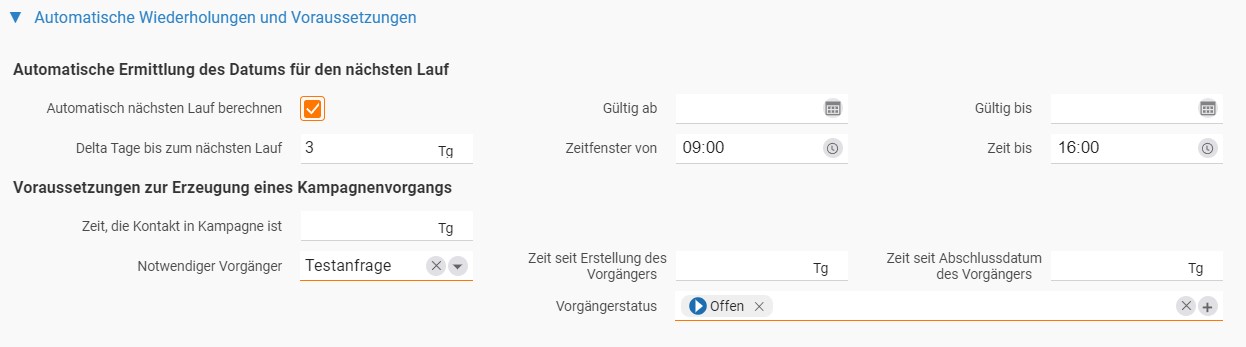
Automated CRM campaigns can be set up for every new campaign process. To do this, create a new campaign and add a process. In the dialog you will find the section “Automatic repetitions and prerequisites”. In it you can make all the settings for your automated campaigns.
Defining automatic runs
In the upper section you define automatic runs for the current campaign process; to do this, activate the checkbox “Automatically calculate next run”. Directly below this, specify in how many days the next run should be executed. After this time has elapsed, the associated CRM processes are automatically created for all contacts assigned to the campaign. If it is an email, for example, it will be sent to all contacts. CRM processes such as a “follow-up” task are created for all contacts.
To the right of this, you define in which time window automatic runs should be executed. You can also specify whether runs should only take place within a certain time, e.g. during normal business hours.
Setting prerequisites and rules
In the “Prerequisites for creating a campaign process” section, you define additional conditions that must be met for an automatic run. You can specify, for example, that a contact has been assigned to the campaign for at least X days. Or you define a necessary predecessor so that the next campaign process is carried out. Set which process must have already taken place. You can also specify how much time must have passed since the creation or completion of the predecessor, or what status the predecessor must be in for the next campaign process to be created.
Testing automated CRM campaigns
Would you like to find out more about automated CRM campaigns in projectfacts or test the feature in your company? Then contact our consulting team. We will be happy to help you.
If you are not yet using projectfacts but would like to get to know it, you can register at any time for a free and non-binding trial account.