
Campaign management software and tool
Centralise your campaign management in the projectfacts software: newsletters, mail merges and telephone campaigns from a single tool. Test now!
Enquire nowClear tool for your campaign management
With the projectfacts campaign management tool, we help you to digitise and optimise your sales processes. Whether you want to use newsletters, mail merges or telephone campaigns, projectfacts ensures that you always address your customers with the right topics at the right time.
Plan a new customer campaign, send event invitations or Christmas cards. With a campaign management tool, you can keep track of everything. All assigned campaigns are stored for each contact. With the help of the integrated CRM module in projectfacts, you always have the campaign management tool at your fingertips: the perfect basis for successful marketing.
What is campaign management?
Campaign management refers to the planning, implementation and control of marketing and sales campaigns for a defined group of contacts, for example new customer campaigns, newsletters, mail merges or telephone campaigns.
Campaign management software bundles these campaigns centrally with the CRM database: recipients, processes, reminders and results all come together in one system. This turns individual actions into a continuous campaign management system that your team controls from campaign planning through to evaluation, without any additional programs.
Campaign management software: the most important functions at a glance
| In projectfacts | |
|---|---|
| Mail merges | Create and send directly as a PDF, without any Excel formatting or Word linking. |
| Newsletters | Send email marketing directly from projectfacts and document it as a process with the contact. |
| Resubmissions | Work through telephone lists in a structured way, prioritise contacts and document contact attempts. |
| CRM integration | Select recipients directly from the integrated CRM database; email address and telephone number are already stored. |
Advantages of the campaign management tool
Plan campaigns
With projectfacts, you can plan campaigns precisely in advance, schedule individual processes and assign responsibilities. This ensures that your campaigns are carried out cleanly and successfully.
Select recipients
Simply select all the addressees of your campaign from the integrated CRM database. This means that the email address and telephone number are already stored and can be used automatically.
Manage campaigns
Newsletters, mail merges and telephone campaigns can be carried out directly from the campaign management tool. This saves you duplicating work and switching between applications.
Successfully managing marketing and sales campaigns
The projectfacts campaign management tool is always your tool of choice when you want to carry out campaigns for a group of customers. Depending on the focus, you create campaigns and assign the appropriate contacts. To do this, simply select the desired customers from the CRM database and then define the desired action.
In the campaign management tool, you manage and control all your CRM campaigns. You don't need any additional programs, saving you a lot of time, money and effort. Afterwards, you can track which customers or prospects you have successfully reached.
- Plan, implement and control campaigns in one software
- Simple addition/removal of CRM contacts
- Integrated functions for newsletters and mail merges
MANAGING campaigns
Plan processes and select contacts
When you plan a campaign, it usually consists of several steps. For this reason, you can create several CRM processes with the campaign management tool.
With the help of the campaign management tool in projectfacts, you know exactly which contacts have already received a letter or email. Resubmissions for the key account manager are then stored with the contacts. This automatically increases your chances of success.
- Choose from different contact types
- Provide your campaign processes with a start and end date
- Combine different processes within one campaign: e.g. mail merge and follow-up by phone
Reminders and resubmissions
Marketing and sales campaigns often extend over a longer period of time. You can use reminders in the form of notifications and resubmissions to ensure that your team always has an overview.
This means that no information or processes are forgotten. Automatic reminders keep your sales team on top of things, without them having to do anything themselves. This is how automation works in campaign management.
Notifications
Notifications are a helpful tool in projectfacts to set a reminder for yourself or other people in the company. You can flexibly set who should be reminded of what and when. The system takes care of the rest. This ensures that no task within your campaign is forgotten.
Resubmissions
Resubmissions are an excellent tool for structuring sales work. Campaigns often require the systematic processing of contacts, e.g. by telephone. With resubmissions, you can work through telephone lists in a structured way, prioritise contacts and document contact attempts.
Automated CRM campaigns
A ticket system and resubmissions always depend on an employee taking care of things. With automated CRM campaigns, you go one step further: sales activities are planned and emails are sent automatically, even at the weekend or when the responsible employee is off sick or away. This way you never lose sight of a lead and supply all prospects quickly and reliably with the right information. Developing leads automatically is part of our lead management.
Automated campaigns are suitable not only for acquiring new customers, but also for looking after existing customers, for example for regular satisfaction surveys or recurring customer actions such as workshops and webinars.
Develop leads automatically
Use automatic follow-up items that remind sales staff to contact a lead at the agreed time. You determine the timing and rhythm flexibly, and completed and failed attempts are documented including a timestamp. You send targeted information material as a PDF automatically within a freely chosen time window and, if required, chain several campaign processes together via preconditions.
Look after existing customers systematically
Run satisfaction surveys via automatic runs by repeating a standard email with a linked survey form at regular intervals. For recurring customer actions, you set up information emails and CRM processes once and draw on them for every new action, including targeted follow-up afterwards.
AUTOMATING
Set up automatic runs and preconditions
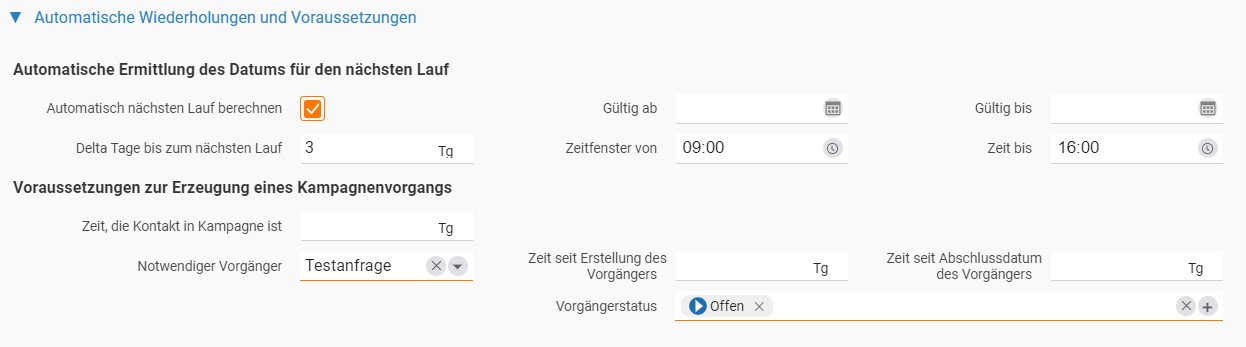
You set up automated CRM campaigns with each new campaign process in the Automatic repetitions and preconditions section. Activate Automatically calculate next run and define in how many days the next run is carried out. The associated CRM processes, such as an email or a follow-up item, are then created automatically for all assigned contacts.
You control the times at which the runs take place via a time window, for example only during business hours. In the Preconditions for creating a campaign process area, you define additional conditions, such as a minimum membership of the campaign or a required predecessor in a specific status.
- Have automatic runs calculated in the rhythm you want
- Limit execution to fixed time windows
- Define preconditions and predecessor rules for each campaign process
“After a good year with projectfacts, our conclusion is: we would do it again. I would particularly like to praise the very dedicated support and the fact that projectfacts is being substantially further developed.”
 – Fundus
Create mail merges online
The mail merge is still a widely used campaign management tool. It allows you to quickly reach a large number of contacts with relevant information.
This would be even faster and more convenient if you could dispense with the time-consuming Excel formatting and Word linking. That's why the campaign management tool in projectfacts offers a direct mail merge function in addition to the classic Excel export.
Mail merge letters are already created as PDFs in projectfacts and only need to be printed out by you. This gives you more time for your actual sales work.
- Create and send mail merges directly in the campaign management software
- Simple addition of new and existing CRM contacts

Email marketing: sending newsletters
With relevant email marketing, you can strike a chord with your customers. Select the customers and create your newsletter or other marketing emails in projectfacts. Your emails are sent directly from projectfacts and stored as a process with the contact. This means you can always see which contact has received which emails from you.
- Create and send newsletters directly in the campaign management tool
- Keep track of who has received your email and who has not
A system for your campaign management and much more
As an integrated system, projectfacts not only helps you with your marketing and sales campaigns. If you wish, you can also digitally map subsequent processes with projectfacts and manage them easily online:
- Capture leads and manage sales opportunities
- Create and send offers
- Monitor and analyse sales success
Convince yourself of the many other applications of the projectfacts CRM software.
Test your new campaign management tool: quickly and easily with projectfacts
With the campaign management tool from projectfacts, you can manage all your customers' campaigns at a glance. And in compliance with data protection regulations. See for yourself and test projectfacts!
Enquire nowCampaign management at a glance
Campaign management in one tool
New customer campaigns, newsletters, mail merges or event invitations
Digitisation
Automate your marketing campaigns with software
Integrated email marketing functions
Supports customer acquisition and retention
Good results from your campaigns
Quick and easy
Still have questions? We have the right answer!
Give us a call, send us an email or take a look at our FAQ section! We will be happy to answer your questions!