
8 Tools for successful project monitoring
Will my project be finished on time? Is the budget sufficient? We present 8 tools and KPIs that will make your project a success.
Why is project monitoring important?
Project monitoring, or project controlling, is the continuous monitoring of your projects. Even the best projects never run exactly according to plan. That is why it is important to permanently compare the actual status with the target status. Only then can you detect deviations in time and take corrective action.
What do I monitor in project monitoring?
A saying by Peter Drucker states: “What gets measured gets done.” This statement may be simple, but it hits the nail on the head. In project management it is particularly important to follow this rule, as it highlights three key points:
Set concrete targets
Central to project monitoring is first of all being clear about what goals you want to achieve with the project. Record these goals concretely. Targets such as “swift completion” or “a satisfied customer” are of little help. It is better to formulate the goal as specifically as possible, e.g. “Completion no later than …”
Collect the right KPIs
To determine whether you are achieving your project goals, you need a reference point that tells you the current state of affairs. This KPI should be easy to collect and give you either a direct target/actual comparison or an estimate for the future.
Prioritise your requirements
Just because you can measure something does not automatically mean that you should. With too many KPIs you create unnecessary bureaucracy and lose track of things. Align yourself with your project goals and only measure important requirements.
Which tools and KPIs should I use for project monitoring?
Most project goals lie within the “magic triangle”. This refers to three variables that typically define the success of a project. Specifically these are:
- Time: Can I complete the project on time? I.e. within the timeframe I have planned for the project.
- Costs: Are the costs of the project within the framework I have budgeted for it?
- Performance: Does the result of the project meet the requirements I have set for the project in terms of quality and scope?
Does your project monitoring also revolve around these questions? Then the following 5 tools and KPIs will help you measure your project success.
1. Progress: How much is still to be done?
Project progress is a percentage that indicates what proportion of the work you have already completed in a project. It is calculated based on the information provided by your project team. Completed tasks have a progress of 100%, work packages not yet started a progress of 0%. A progress can also be specified for activities currently being worked on, e.g. 50%.
Based on the progress of individual work packages, you can derive the progress of your sub-projects and the overall project. To do this, simply add up the progress of all work packages within each sub-project and divide by the number of work packages.
Example: A (sub-)project consists of five work packages, three of which are already completed, the fourth is halfway done and work package five has not yet been started.
The project progress is currently (100% + 100% + 100% + 50% + 0%)/5 = 70%.
If your project in turn consists of several sub-projects, you can analogously add up the progress of the sub-projects and divide by the number of sub-projects. To be able to draw meaningful conclusions, work projects and sub-projects should each be approximately the same size, as the method treats all work packages equally and does not distinguish between small and large tasks.
A spreadsheet programme like Excel will help you with the calculation. Even more convenient is a project management software like projectfacts. In it, employees can directly enter their current progress and the system automatically performs the calculation for you.
Project progress is particularly meaningful when you relate it to another KPI, e.g. the time already elapsed or the budget consumed. For this purpose, the earned value (EV) is used:
Earned value (EV) = Project progress * Project budget
2. Status: Where are the bottlenecks?
Progress and status give you an initial overview of how your project is going. Both KPIs are as simple as they are meaningful. Although they are related to each other, they mean two different things. While progress is a percentage, the status is essentially a keyword that indicates the current state of a task, e.g. “open”, “on hold” or “completed”.
The status thus provides valuable additional information about why a task has not yet been completed. In software tools for project monitoring, statuses can generally be freely selected and combined into workflows. Employees can view the current status of a task (e.g. “open”) and move it to a predefined next state (e.g. “in progress”).
Example of a status workflow:
Open > In progress > For approval > Completed
Statuses can additionally be given a colour. This sets up a kind of traffic light system with which you can monitor the work. Irregularities such as missing material or a pending approval then draw attention to themselves through a signal colour.
Such a traffic light system can be implemented with table tools like Excel. However, a specialised software solution like projectfacts is simpler and easier to maintain here too. In it, you define project statuses freely according to your wishes and can filter specifically for the statuses relevant to you in large projects.
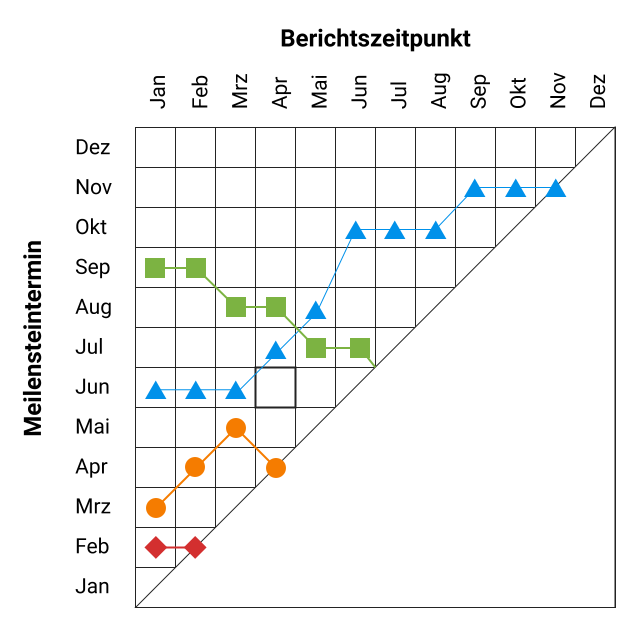
3. Milestone trend analysis: Can we meet deadline XY?
Milestones are particularly important for project success. They mark events that are important for the company or prerequisites for the further course of the project. They often have far-reaching consequences for your own company and possibly also for other project partners. That is why the question of whether a particular milestone date is likely to be met is an obvious one.
In the milestone trend analysis (MTA), you create a grid in which the milestone dates are plotted on the vertical axis and the analysis points in time on the horizontal axis. On the far left you mark the dates by which the milestones are due to be reached according to your plan. For each new analysis point in time, you re-estimate based on the current project progress when the milestones are expected to be reached.
This produces a trend line for each milestone. If the line remains at the same level throughout, the project is progressing as planned. If the line rises, it means that your milestones are being pushed further and further into the future. The project is therefore behind schedule. If the dates alternate between going up and down, there is no systematic delay yet, but it is also uncertain whether the deadline can be met.
4. Schedule variance: Will the project be finished on time?
Whether a project will be completed on time is probably one of the most frequently asked questions in project management. Many large projects show that even professionals find this question difficult. To prevent your projects from suffering the same fate, we present two KPIs below with which you can quickly identify and even anticipate schedule deviations.
One method of identifying schedule delays draws on budget planning. Here, the current earned value (EV) is compared with the planned costs (PC) that were budgeted for the work already completed. The schedule variance (SV) is calculated as follows:
Schedule variance (SV) = Earned value (EV) – Planned costs (PC)
< 0: The project is behind schedule.
> 0: The project is ahead of schedule.
If the planned costs are greater than the earned value, this indicates that the project is behind schedule. In the opposite case, the project is even ahead of schedule.
5. Schedule performance index: How much more time do we need for the project?
A KPI related to schedule variance is the schedule performance index (SPI). It draws on the same values but is calculated slightly differently to schedule variance.
Schedule performance index (SPI) = Earned value (EV) / Planned costs (PC)
< 1: The project will probably take (100/SPI)-100 % longer than planned.
> 1: The project will probably only require (100/SPI)-100 % of the planned time.
What is special about the schedule performance index is that it gives you an indication of how much your project is being delayed. If you obtain an SPI of 0.8, for example, this means an expected delay of (100/0.8)-100 % = 25%. You should therefore plan for a quarter more time for your project than originally assumed. Even easier than manual calculation, of course with the schedule performance index too, is letting a project monitoring software do the calculation for you.
6. Cost variance: Are we within budget?
Some KPIs also help you evaluate your project in terms of budget. The simplest form here is also a target/actual comparison. You obtain the cost variance (CV) by subtracting the actual costs (AC) from the earned value.
Cost variance (CV) = Earned value (EV) – Actual costs (AC)
< 0: The project is above budget.
> 0: The project is within budget.
A negative result means the actual costs are greater than the current earned value. The project is therefore above budget. A positive result shows that costs are within the set framework.
7. Cost performance index: What additional costs can we expect for the project?
Similarly to the schedule performance index, you can use the earned value and actual costs to estimate whether the budget is sufficient overall for the project. If you divide both values by each other, you get the cost performance index (CPI).
Cost performance index (CPI) = Earned value (EV) / Actual costs (AC)
< 1: The budget will probably be exceeded by (100/CPI)-100 %.
> 1: The budget will probably only be used to (100/CPI)-100 %.
If you have calculated a cost performance index of 0.75, for example, the budget is unlikely to be maintained. If costs continue to develop as they have been, additional costs of (100/0.75)-100 % = 33% will arise. The project will therefore cost a third more at its current trajectory.
8. Contribution margin: Is the project worthwhile for us?
The contribution margin is an absolutely central business management figure. Especially in projects, however, it is often treated as an afterthought, because recording all revenues and costs is time-consuming – at least if you try to do it with pen and paper (or Excel). Project monitoring software like projectfacts takes a large part of the work off your hands.
Labour costs: The key factor for labour costs is the time your team invests in a project. With the projectfacts project time recording, all your project members can record working hours for the tasks they have worked on. For the calculation, the software automatically draws on the appropriate internal hourly rate. Surcharges for night and weekend work are also automatically taken into account.
Material costs: These generally refer to costs from third-party suppliers, often materials, but possibly also for personnel or expertise. The associated invoices can be recorded digitally in projectfacts by photographing them or dragging and dropping them into the system.
Project revenues: Project revenues are usually the easiest to determine, as they are generally based on the customer’s order value. In projectfacts, the order is directly linked to the project.
Costs and revenues are automatically summarised in projectfacts and the contribution margin is calculated from them. From this you can see whether your project has been economically worthwhile. In addition, you also receive a large number of other pieces of information and opportunities for analysis, for example …
- Which work packages incur particularly high costs?
- Which project tasks is your team most heavily occupied with?
- In which project phase do the greatest target/actual deviations occur?
- And much more.
Systematic solution for your project monitoring
With our tools you keep an eye on your projects and ensure that your project becomes a success. Especially when you are managing several projects in parallel, the investment in a professional software solution is worthwhile. projectfacts offers you everything you need for multi-project management.
Test the software free of charge for 14 days and convince yourself of the advantages of our project monitoring software.