
New Reports in Sales Controlling
Discover new reporting options in the sales controlling software. ✓ Sales opportunities ✓ Sales funnel ✓ Activity analysis
Measuring sales success reliably
Many companies have a more or less reliable gut feeling about how well their sales team is performing. Of course, success can be quickly read from incoming orders and revenue development. But where does it come from? Or what is the reason when things are not going so well? An objective analysis of sales not infrequently has one or two surprises in store.
Systematic sales controlling allows you to take a much closer look at what makes your sales successful (or not). You identify levers with which you can optimise processes, or find out which customer groups and sales representatives are most valuable for your business.
On closer inspection, there are many questions that are interesting for business owners and sales management and that you have certainly already asked yourself:
- What has become of prospect XY who seemed so promising last month?
- At which stage of our sales process do we lose the most prospects, and why?
- What makes certain sales representatives so successful?
- How well are our company’s key accounts being managed?
These and similar questions can be answered with suitable software such as projectfacts. With the help of the new tools and features for your sales management from version 6.9 and the extended analysis options from version 6.10, you are perfectly equipped to get the most out of your sales.
How have my leads developed?
Particularly interesting for sales controlling is the question of how leads from the previous month have developed.
- How many leads were qualified?
- At which sales stage are the leads currently?
- How much revenue is expected to be generated?
You can answer these questions with the “Sales Opportunity Analysis” report. Here, all active sales opportunities are captured and consolidated. The overview shows you at a glance how many sales opportunities have been created and what their current value is.
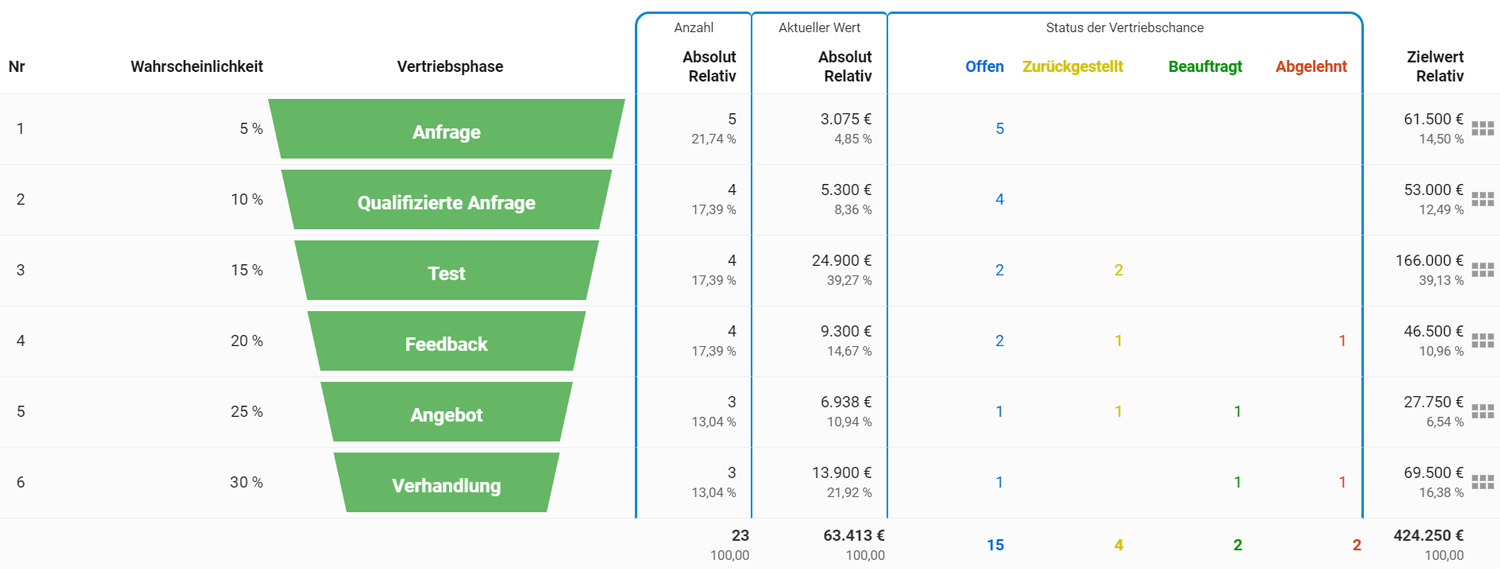
This allows you to easily make comparisons over time and compare the number of leads with, for example, previous months in order to identify trends. The current value shows you the expected revenue that can likely be generated with the existing leads.
The current value can be calculated individually, for example as the sum of one-time and recurring income. It is additionally multiplied by the purchase probability of the current sales stage. This gives you a realistic assessment of your revenue potential. Further information on KPIs that you can incorporate into the calculation can be found in our article on sales management.
In addition, a breakdown is provided of which sales stage the leads are in and what status they currently have. This offers you various reporting options:
Track in real time how your sales opportunities move through the sales funnel. You can immediately see which leads have already been qualified (e.g. through telephone contact) or have already received a quotation. You enjoy maximum flexibility here, as you define the stages of your sales funnel yourself.
Where are the weaknesses in the sales process?
The sales opportunity analysis report is a powerful sales controlling instrument. A look at the development of sales opportunities reveals potential weaknesses in the sales process.
Based on the relative proportion of prospects per stage, you gain an overview of the conversion rates in sales. It tells you what percentage of prospects move on to a subsequent stage or leave the sales process at that point.
This allows you to see at a glance whether a particularly large number of prospects are being lost at a specific sales stage. You immediately have a suitable lever to optimise sales activity at that point.
Which activities were carried out with key accounts?
Key accounts play a special role in sales controlling, as they continuously generate new revenue potential. It is therefore all the more important to keep an eye on ensuring that key accounts are optimally managed.
This applies both to the customer organisation and to the decision-maker within the customer company who is responsible for placing orders. Both can be identified and analysed in projectfacts.
Are you interested in finding out what has happened with such a specific contact? No problem, thanks to the activity analysis. Once selected, the software shows you all tickets, appointments, documents, etc. assigned to the contact. You can jump directly into linked elements if desired, giving you a complete overview of all activities in connection with the contact.
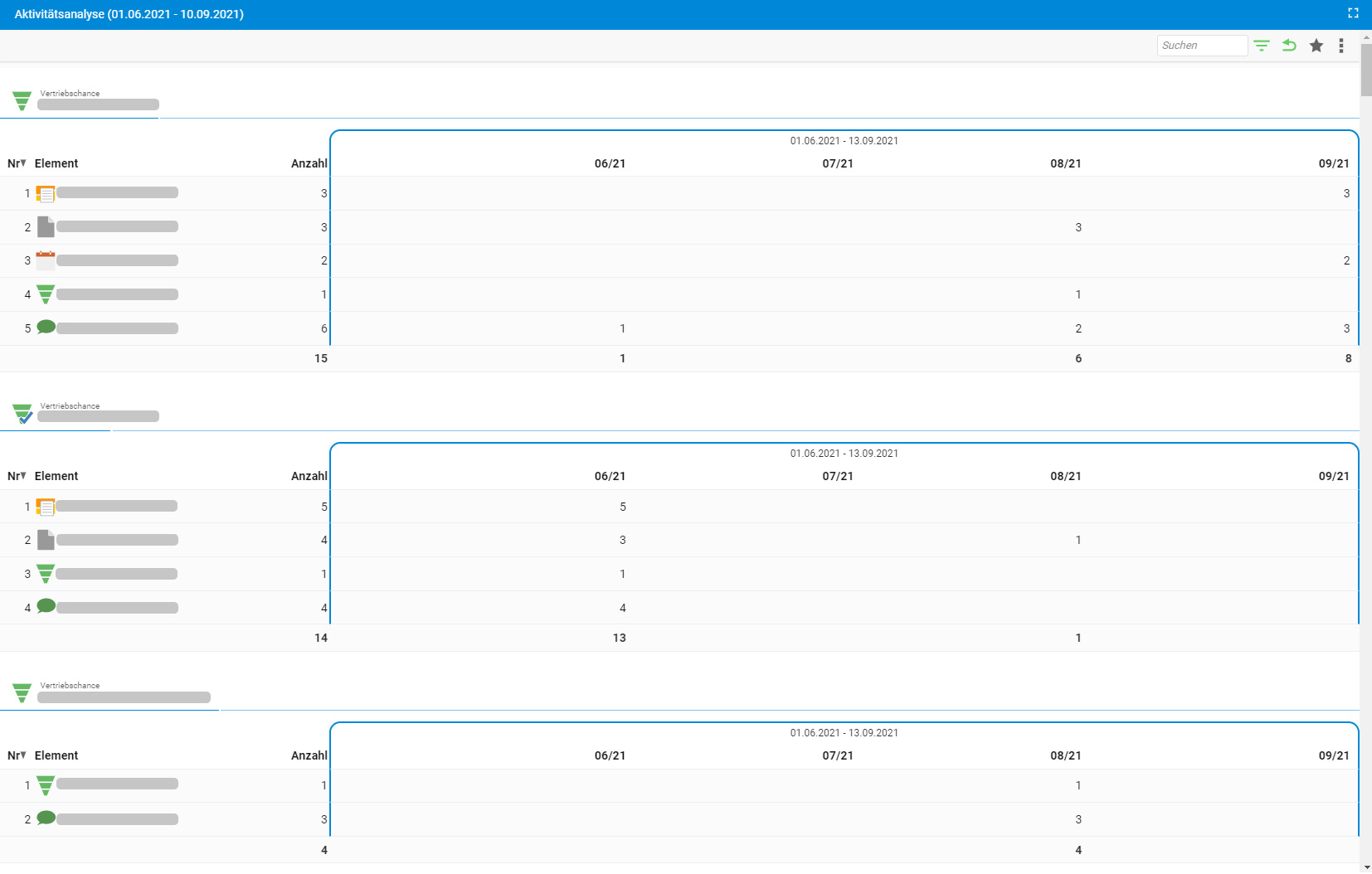
The activity analysis provides you with a complete overview of activities related to a specific element in projectfacts. It is therefore also suitable for a wide range of further analyses:
- Which activities were undertaken in connection with a specific sales opportunity?
- What was a specific sales representative working on last week?
- Which tickets are associated with a specific key account?
- and much more.
Questions about the software for your sales controlling?
If you would like further information about the sales controlling features in projectfacts, please contact our consulting team. They will be happy to assist you with the setup.
Not yet using projectfacts? Try the software for your sales controlling free of charge and without obligation for 14 days.