
Your sales management software for sales control
Keep track of your sales opportunities and manage new enquiries. Sales control in one place. Test now!
Enquire nowIncrease efficiency with sales management software
Sales management software brings the control of your sales together in one system: it captures sales opportunities, maps out the sales funnel, assigns a key account manager to each customer and delivers the key figures for your sales control. This lets you plan, manage and monitor all of your sales activities in one place.
With our sales management software, you take your sales to a new level. Automations and reports help you to get the best out of your processes and employees. With projectfacts, you strengthen not only your customer acquisition in inside and direct sales, but also your support.
What is sales control?
Sales control is the ongoing planning, steering and monitoring of all sales activities on the basis of key figures. It answers three questions: which sales opportunities are open, what stage are they at, and what revenue can realistically be expected from them.
There are two levels. The strategic level sets targets, target groups and sales channels for a longer period. The operational level runs the day-to-day business: it distributes sales opportunities among staff, makes sure follow-up happens on time and steps in as soon as the figures deviate from expectations. Suitable software provides the data basis for both, because every activity with the customer stays documented.
Sales control differs from sales planning in its timing: planning sets the targets in advance, control accompanies their ongoing implementation.
What sales management software covers
| Function in projectfacts | |
|---|---|
| Sales opportunities | Capture leads instantly and steer them centrally as a control centre |
| Sales funnel | Sales phase and closing probability for each opportunity at a glance |
| Key account | Fixed responsibility per customer across the entire sales and support workflow |
| Sales controlling | Spot revenue targets, order peaks and looming revenue gaps early |
Instruments of sales control
Sales control needs tools that genuinely let you steer your sales. These sales instruments are available in projectfacts and mesh with one another, because they are attached to the same contacts and documents:
- Sales opportunity: the control centre for each prospect, with contact, target value, current value and a timeline of all activities
- Sales funnel: freely definable stages with a probability of closing, and as many funnels as you like for different sales channels
- Traffic light system: flags when a sales opportunity or a key account has gone too long without action
- Resubmissions: scheduled follow-up, so that contact attempts do not depend on anyone's memory
- Key account management: fixed responsibility per customer across the entire sales and support workflow
- Campaigns: calls and mailings as plannable processes, with recipients from contact management
- Reports and analyses: analysis of sales opportunities and activity analysis as a basis for decisions
Combining sales control instruments effectively
Taken individually, each of these control instruments is familiar. The difference comes from the shared data basis: because sales opportunity, quotation, order and later project are all attached to the same customer, the figures for sales control do not have to be pieced together from several systems. If you also want to set targets and forecasts, you will find the right tools in sales planning.
Advantages of the sales management tool
Sales opportunities
To manage sales effectively, you need a complete overview of your prospects. Sales opportunities help you to capture potential leads immediately. They are also the control centre for your sales staff. All sales activities can be planned, managed and monitored from there.
Sales funnel
The sales funnel is a very helpful tool. It shows you at a glance where your prospects currently are in the sales process. Is it a lead that has just been qualified? Or is a purchase about to be concluded? With projectfacts, you always keep an overview.
Key account management
Key account management is a central sales tool that runs through the entire sales and support workflow. Assign a key account manager to each sales opportunity to look after the prospect and later customer. When a customer calls, your staff see immediately who is responsible and can respond straight away.
"Fantastic. I can see what the sales department has discussed with the customer, which I have never seen before." – tetronik Kommunikationstechnik

Sales opportunities – recognising and exploiting opportunities
In English, this is often referred to as an "opportunity". It means sales potential, albeit perhaps still very vague. With projectfacts, you can capture sales opportunities as soon as they arise, whether through an enquiry from a prospect or a promising trade fair contact. The capturing, qualifying and following up that comes before this is brought together in our lead management.
Your sales control centre
As soon as an employee creates a sales opportunity, it serves as the control centre for all further actions. The contact is linked directly so that you can get in touch immediately: by email or telephone. Targeted follow-up can also be set up using resubmissions. Your employees are automatically reminded to follow up on contacts after a set time. This also increases your sales chances.
Automatic analysis & documentation
Individual sales funnels show you which phase the prospect is currently in and how likely a purchase is. The target value and the current value of the sales opportunity can also be viewed and changed. Using the timeline, you can trace which activities have already been carried out in connection with the prospect and, for example, whether an offer has already been created.
What is a sales funnel?
The sales funnel is a tool for steering and monitoring a company's selling process. It splits that process into stages, from selecting the target group through to the close, and shows at every stage where a sales opportunity currently stands.
The name comes from the shape: as in a funnel, the number of open cases narrows as the process runs. Give each stage a probability of closing and you can also determine the monetary value of every stage.
The benefit differs by role: management sees the overall status of every sales process. Key account managers and sales staff see the opportunities they are working on and the next steps, for instance offer tracking. And controlling sees at which stage conversations tend to break off, and where the process therefore needs reworking.
Sales funnel – optimise processes
Optimise your sales and increase the number of contracts you conclude. Recognise at an early stage whether the sales targets you have set are being achieved and step in more quickly when there are deviations. Gain a direct insight into which sales opportunity is close to being closed and which still requires more effort.
Create a sales funnel
In projectfacts, you can create as many sales funnels as you need. Define many properties of the funnel flexibly and to your own liking:
- Name and purpose of the sales funnel
- Number and naming of the individual sales phases
- Probability of a purchase per phase
- Individual colour, icons and description per sales phase
Use sales funnels
For each individual sales opportunity, specify which sales funnel it should follow. This determines the current phase and the next steps in the sales process. Your employees can prioritise sales opportunities individually and have all currently running opportunities clearly arranged on one dashboard.
With sales funnels, sales managers get a complete overview of the sales situation in your company at a glance. Recognise promising offers, possible order peaks in the future and looming revenue gaps.
Using sales tools for optimisation
The sales funnel reveals potential for improvement in your sales process. You can see in which sales phase a particularly high number of drop-offs occur and can intervene directly.
Possible improvements can also be identified quickly at employee level. This way, you can use the sales tools in the software effectively for training purposes and quickly get the most out of new sales employees.
What a sales stage is worth
As soon as every stage carries a probability of closing, the funnel turns into a revenue forecast. An example for software including setup and consulting with a sales value of 10,000 euros:
Stage, probability, expected value
- Selection · 0 % · 0 €
- First contact · 5 % · 500 €
- Presentation · 10 % · 1,000 €
- Quotation · 25 % · 2,500 €
- Decision · 100 % · 10,000 €
What that lets you steer
Summed across every open opportunity this produces a weighted expectation rather than a wish list. Both the stage names and the percentages are yours to set in the configuration, to match your own sales process. Because the opportunity is linked to the contact, the later project and every document, the context stays intact.
Key figures for steering your sales
You can only steer what you measure, and that means figures that come about without anyone having to compile them. In projectfacts they arise as a by-product of daily work and are ready for you in reports:
- Number and value of open sales opportunities: how many opportunities have been created and what value they currently carry
- Distribution across the stages: which sales stage the prospects are currently at and what status they have
- Share per stage: this tells you what percentage of prospects moves on to the next stage and what percentage leaves the process at this point
- Expected revenue: current value multiplied by the purchase probability of the stage, summed across all open opportunities
- Activity per customer and employee: which tickets, appointments and documents belong to a contact, an opportunity or a key account
What they tell you
If drop-offs pile up at a particular stage, the problem usually lies in the process rather than with individual employees. If expected revenue falls short of the target, you can see early enough whether too few opportunities are entering the top of the funnel or whether they are failing to close at the bottom. Both are interventions worth making while the quarter is still running.
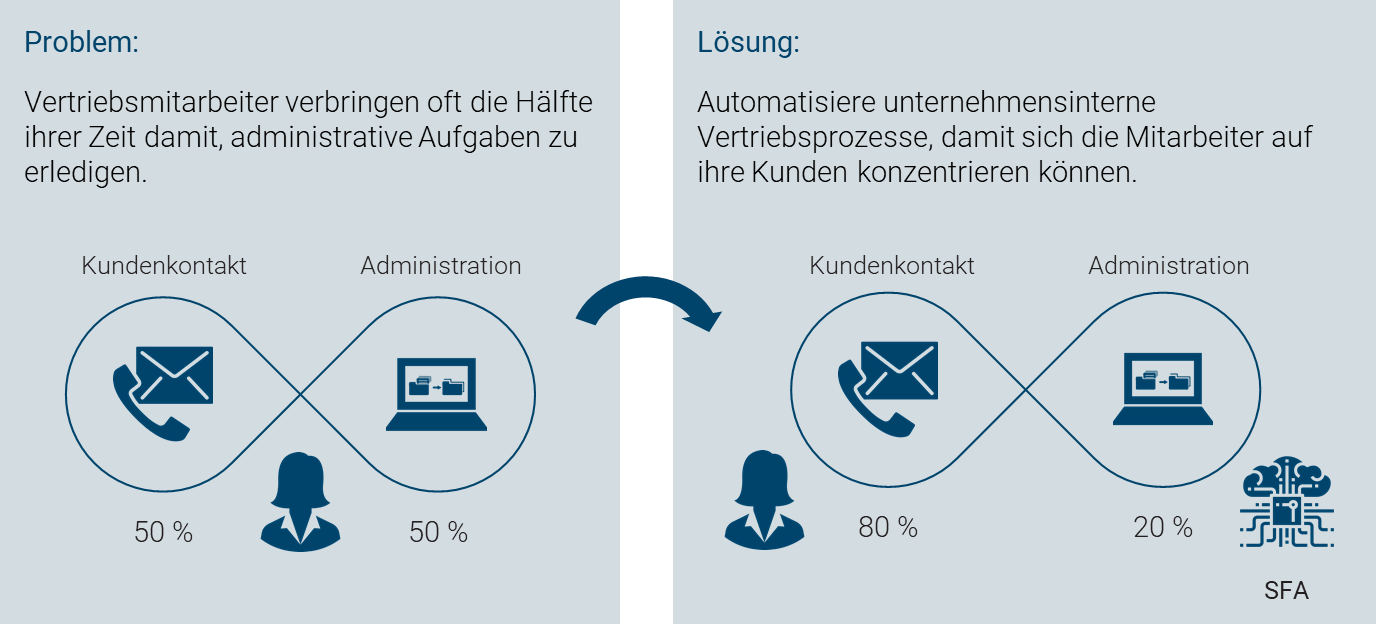
Sales force automation: hand over the routine, look after customers
Sales staff often spend a considerable share of their working time on internal coordination rather than on customers. In key account management that is particularly unfortunate, because key account managers are hired for looking after clients in the first place.
Internal administration mostly consists of routine sequences and small standard tasks. Individually they are neither hard nor long, yet together they add up. This is where sales force automation, also called sales automation or SFA, comes in: automating sales processes so that staff need less time for administration and can concentrate on looking after customers. The gain lies above all in efficiency, because the share of revenue relevant work in total working time goes up.
Where projectfacts automates
- Contact management: everything about a customer in one place instead of spread across systems
- Sales opportunities: stages, probabilities and values come out of the funnel
- Sales activities: follow ups, documents and mail templates straight from the case
- Analysis and reporting: status, quotation and order volume prepared per team
A traffic light for opportunities and key accounts
So that no lead is left lying, a traffic light system can be defined that warns as soon as a new action is due. It supports following up with prospects on a regular basis.
The same exists for key accounts: it shows when an existing customer needs attention again, so that friction is noticed early. A short phone call often secures the revenue of the years to come.
Key Account Manager – effective customer support
Key account management is a central sales tool in the software and runs through the entire sales and support workflow.
Define a key account manager
A key account manager can be assigned as early as when a sales opportunity is created. From then on, they are responsible for looking after the prospect (and hopefully later the customer). You can view and contact the key account manager directly in the organisation and for all of the customer's activities and documents.
Manage activities
When a customer calls, the assigned key account manager for the customer is displayed. This ensures that they are informed about all of the customer's processes and can respond directly. Quotations, orders and invoices can be generated directly in the software and taken over by the key account manager.
Everything in view
A central contact management system is available to your sales staff, displaying all of your customer's important contact information. Call logs, enquiries or offers already made are directly visible. This allows you to support customers smoothly at all times.
Automated campaigns as a further sales tool
Plan campaigns effectively with projectfacts. You can create different processes with which to execute your campaign optimally. Thanks to the integrated CRM tool, you have all the important information at a glance when adding contacts.
Calls that you need to make for the campaign are automatically shown to you in resubmissions. Mailing campaigns are prepared in a few clicks and can be sent out automatically to all added contacts.
Digitise your sales management and request your projectfacts test account
Store sales opportunities in an organised way, process them easily and keep an overview. See for yourself and test projectfacts!
Enquire nowSales management at a glance
All in one software
Online set of sales tools
Optimise sales
Recognise potential for improvement
Helpful sales tools
Sales opportunities & funnels, key accounts, etc.
Still have questions? We have the right answer!
Give us a call, send us an email or take a look at our FAQ section! We will be happy to answer your questions!