
projectfacts 6.5 – Reach Your Goals with the Right Plan
The highlights of the new projectfacts Version 6.5 are online! ✓ Capacity management ✓ Target values ✓ Individual UI ✓ and more
2020 has so far shown that not everything can be planned. Even tax levels are unpredictable. Nevertheless, good planning remains the best way to achieve set goals. projectfacts 6.5 will therefore bring you various new features from 25 June 2020, with planning and targets at the centre.
Our Highlights
Capacity Management
The capacity planning of projectfacts has been comprehensively revised to support you even better in achieving your company goals. Find out here how to proceed methodically to get the best out of your resources.
Target Values
For many activities, it is difficult to make progress visible. With the new target value in pf 6.5, you give your employees the opportunity to evaluate their own performance more easily.
More information and instructions on how to activate the target value in the system and assign it to your employees can be found here.
Customise Your Interface Even More Individually
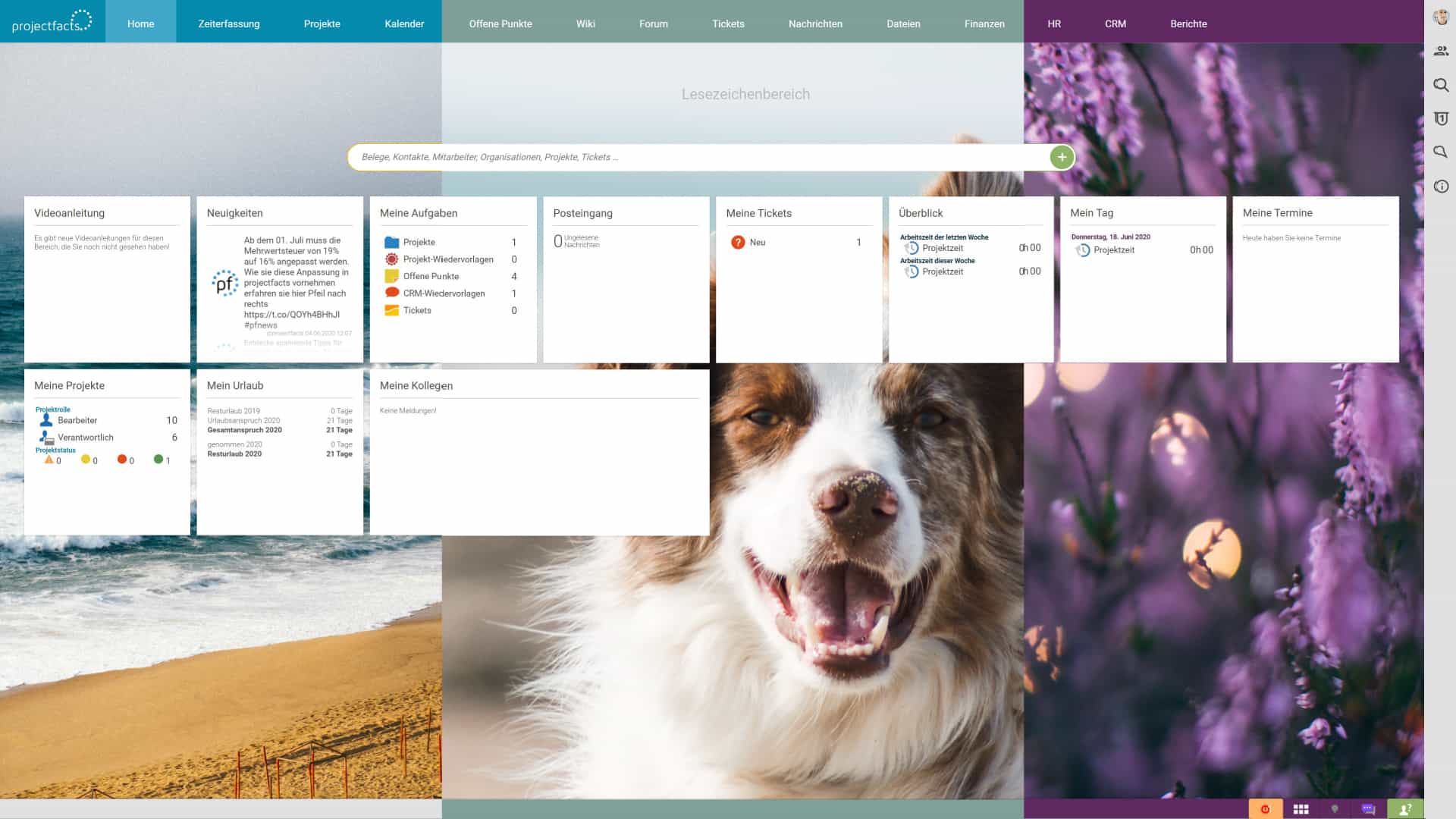
Your holiday was cancelled, you would love to have your loved ones nearby, or you simply want a little nature at your workplace? With the new version of projectfacts, you can now set your favourite image as your background.
Upload your favourite image under your “Personal settings”, restart your projectfacts session, and you will have your very own personalised projectfacts interface.
Changelog projectfacts 6.5
Highlights
- Extension of capacity planning
- Employees can be assigned target values that are calculated from their generated revenues
- Customer-specific autoreplies can now be stored
- Failed logins are displayed in the user account
- The activity record can now be split by area/category
- Paying out working hours on Sundays and public holidays with the monthly closing is now configurable
- Short-time work can now be selected for employees
- Project lists now have active columns for project times, broken down by areas, categories, and editors, including corresponding filters
- Setting up an individual background image for the user interface
- In documents, minimum/maximum quantities of an article can be entered and displayed on the PDF
- The functionality of the “My tasks” tile has been extended
Improvements
- Participants can be added to existing appointments more conveniently
- HTML activated for the automatically generated ticket subject when the email is relatively short
- The “Time recording” module now also has a module search, with which you can also search for booked times and holidays
- Contact search also searches the email address
- Projects in draft no longer send team notifications. Instead, the entire team receives a notification when the project is validated
- Board items can no longer be accidentally deleted with “No entry”
- SLA email notifications now contain a link to the affected ticket
- When displaying a ticket, the autoreply is no longer pre-selected
- Ticket escalations now provide more information
- Images in emails are now adjusted to the screen size when displayed
- Various improvements to the print view of lists
- It is now displayed who performed a check-in/check-out
- Team calendar navigation now also available with quarters
- A CRM transaction created in a ticket is directly linked to the sales opportunity
- Splitting project times by document item now with more information about the item and document
- When splitting an activity record by invoice items, sorting is by invoice item
Bug Fixes
- File filter “Search subdirectory” behaves better again
- If an attendance time that is in the past is edited in the working day, a check-out on the current day is no longer performed
- It is now possible again to view colleagues’ working days and navigate through the days
- Certain recurrence rules could cause Thunderbird/Lightning to crash
- Date from/to filters work again in the project analysis report
- Messages with HTML can be printed again
- “Empty” email addresses can no longer be added as ticket recipients
- The display of contract times in the time matrix has been adjusted
- Input fields with a displayed unit are again displayed correctly in Firefox
- Date settings in “Personal settings” are applied again
- Due date in tickets works again
- The sum for project times in the time matrix works again
- No more duplicate entries when checking in
- Default ticket categories are now again applied when creating/changing the channel of tickets
- Ticket categories are no longer lost when mail arrives
- If an organisation is deleted, the associated contact is also deleted, provided no transactions exist
- When the working time is edited, the break is now always factored in
- Browsing in the team view at month or year level no longer reduces the displayed period
- Rotating the print view works again (in most views)
- No autoreplies are sent to invalid email addresses
- File names with special characters are possible
- There is no longer a problem when downloading files with special characters
- The subject from mail templates is now applied again
- Bug fixes for future revenues
- Ticket channel: incoming tickets now correctly trigger alarms again