
Sales Force Automation
What does Sales Force Automation mean? What advantages does it offer? How can we benefit from Sales Force Automation with projectfacts?
What is Sales Force Automation?
Sales employees often spend half of their working time handling internal coordination tasks. As a result, they can only devote 50 percent of their time to their actual primary task: looking after customers.
This ratio is particularly unfavourable in key account management, because key account managers are hired primarily for customer care. As the interface between the company and key accounts, they occupy an important intermediary position in CRM and should therefore always have their finger on the pulse of their customers.
It is striking that internal administration frequently consists of routine procedures and small-scale standard tasks. They are not difficult and individually don’t take long, but in total they add up to a mountain of work. Every little bit counts, as the saying goes.
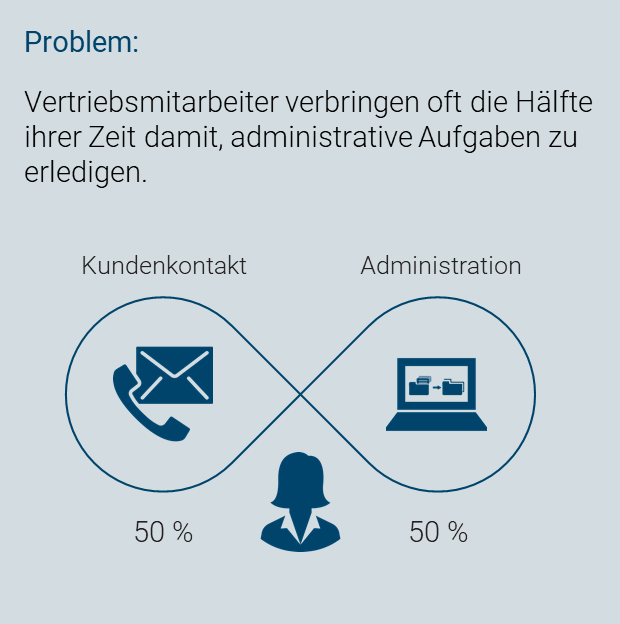
Figure 1: A common problem in sales
Now imagine a software that takes over exactly these tedious tasks for sales employees and key account managers. This is where Sales Force Automation (also Sales Automation or SFA) comes in. The core idea is as follows:
Sales Force Automation (SFA) refers to the automation of sales processes so that employees spend less time on administrative tasks and can instead focus on customer care.
Used correctly, Sales Force Automation can help you relieve your employees and prioritize their tasks better. Key account managers can consequently focus on what is most profitable for your company: looking after customers.
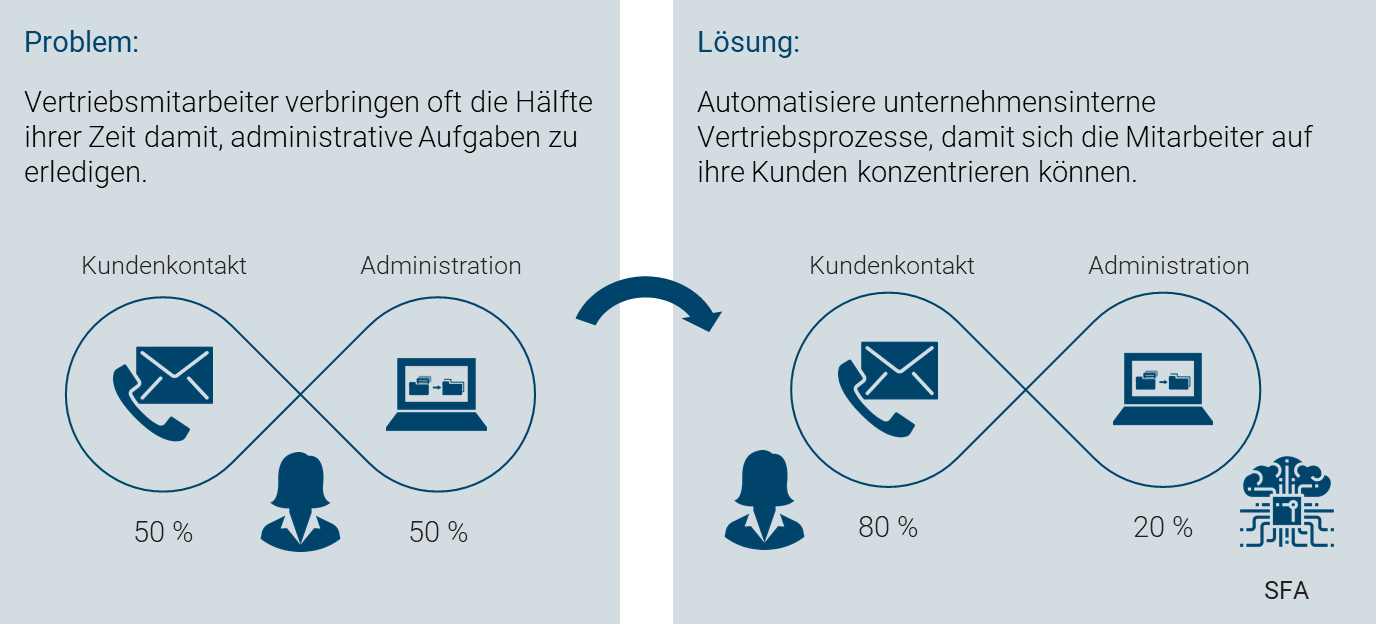
Figure 2: Sales Force Automation as a solution approach
What advantages does Sales Force Automation offer companies?
Surveys from the USA show: efficiency gains are the most frequently cited reason for companies to introduce Sales Force Automation. By outsourcing support tasks to intelligent software, the share of revenue-relevant activities in the total working time increases.
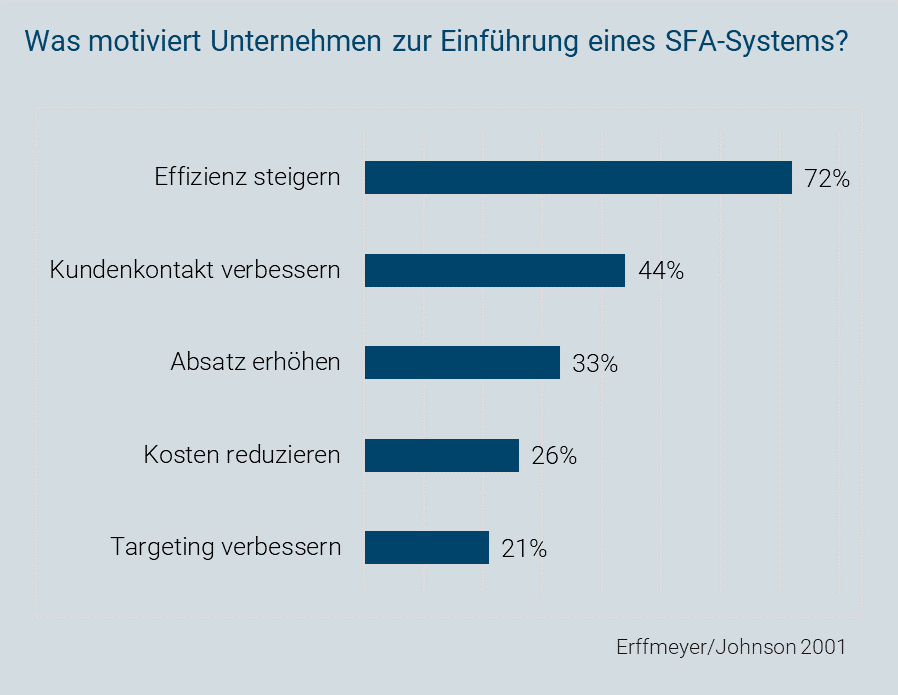
Figure 3: Motivation for introducing an SFA system
For 44 percent of the companies surveyed, improved customer contact plays the decisive role in the decision to introduce it. Costs can also be reduced through Sales Force Automation. Comparing, for example, the hourly rate of a key account manager with the costs a software incurs when completing the same tasks makes the savings clear.
Of course, speed is not everything. The quality of sales activities ultimately determines the success or failure of sales efforts. Therefore, a software solution for Sales Force Automation must offer genuine added value for its users.
This added value manifests itself in CRM on various levels:
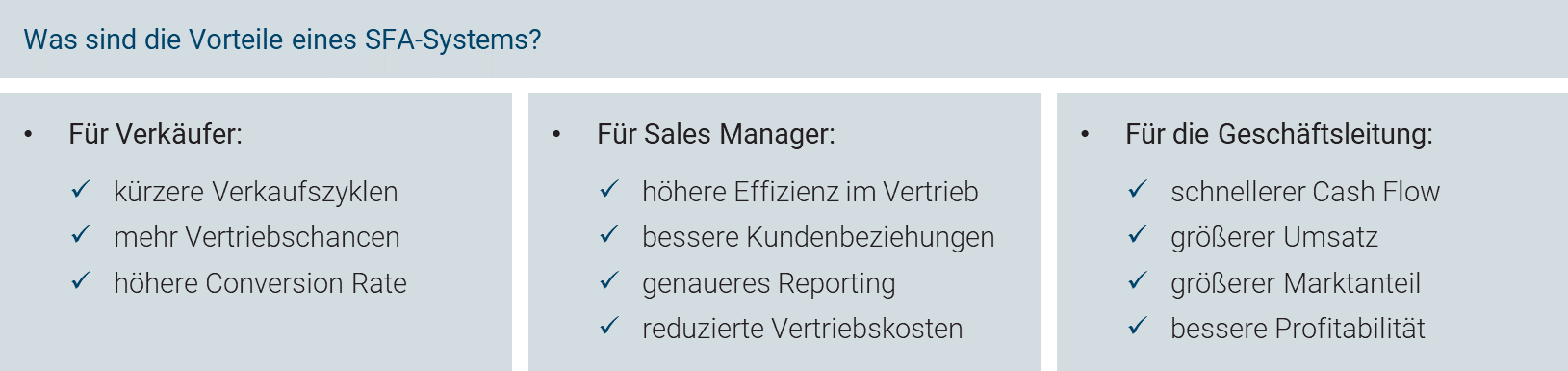
Figure 4: Advantages of an SFA system
Sales representatives benefit, for example, from shorter sales cycles, because many time-consuming routine tasks are eliminated through automation. The time saved can in turn be invested more effectively in developing their sales opportunities.
Sales managers welcome generally higher efficiency in sales and closer contact with customers. Through the automatic documentation of sales activities and their results, precise reports can be generated at any time.
Management records faster cash flow, greater market success and higher profitability thanks to the higher degree of automation.
Scientific studies do in fact confirm that Sales Force Automation can achieve measurable improvements in various CRM KPIs (cf. e.g. Moutot/Bascul 2008):
-
Number of telephone sales conversations
-
Number of quotes created
-
Quote success rate
How can we benefit from Sales Force Automation with projectfacts?
As a projectfacts user, you are in an excellent starting position to benefit from the many advantages of Sales Force Automation. Below we show you some examples that you can implement immediately (provided you are not already making extensive use of them).
The following process steps are frequently gone through in sales. Many tasks within them are recurring and do not directly help you generate revenue. Nevertheless, they are important for maintaining an overview, nurturing contacts and managing sales activities.
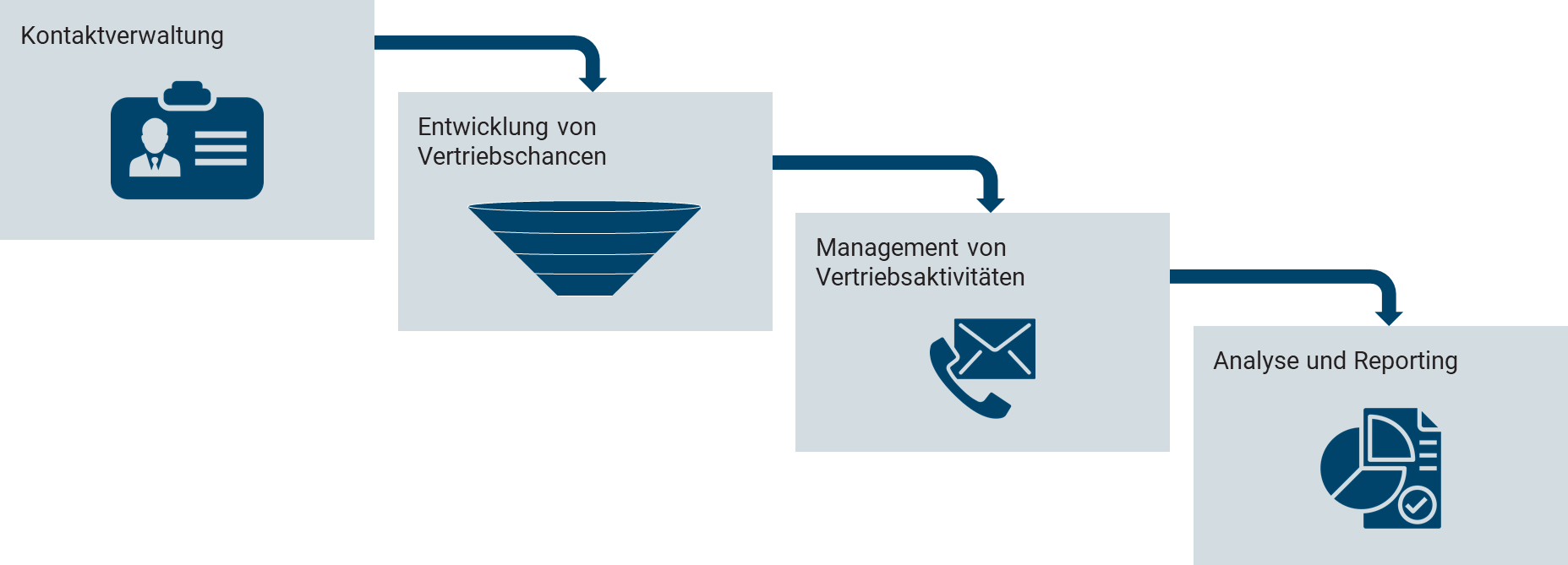
Figure 5: Typical process steps in sales
For reasons of space, we can only present a selection of features here. In addition, the projectfacts software solution offers you many further ways to support and automate your sales. Feel free to contact us, we will find a suitable solution for you.
Contact management
With the contact manager you always maintain a clear overview of your key accounts. All information about your contacts is automatically collected and displayed clearly on a virtual business card. Unlike a conventional business card, however, projectfacts offers a multitude of further ways to manage your contacts:
- Identify connections between contacts and jump to the parent organization.
- Contact your account directly – by email, phone or letter.
- Store preferred contact methods and salutations.
- View all quotes, orders, invoices etc. linked to the contact.
- Create new sales opportunities or documents.
- …
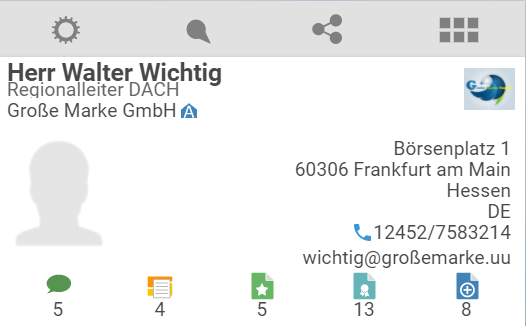
Figure 6: Contact management in projectfacts
Developing sales opportunities
Your customers go through a typical process from initial contact to the contract. This is called a Sales Funnel or sales pipeline. In projectfacts you have the option to individually configure several of these funnels depending on the type of offer.
For your employees, sales opportunities are an excellent tool for structuring sales activities. In a sales opportunity, all activities are bundled and documented. All quotes created during the sales process can be viewed and reused. Multiple parallel sales opportunities can also be created per contact. This gives you a maximum of clarity with a minimum of effort.
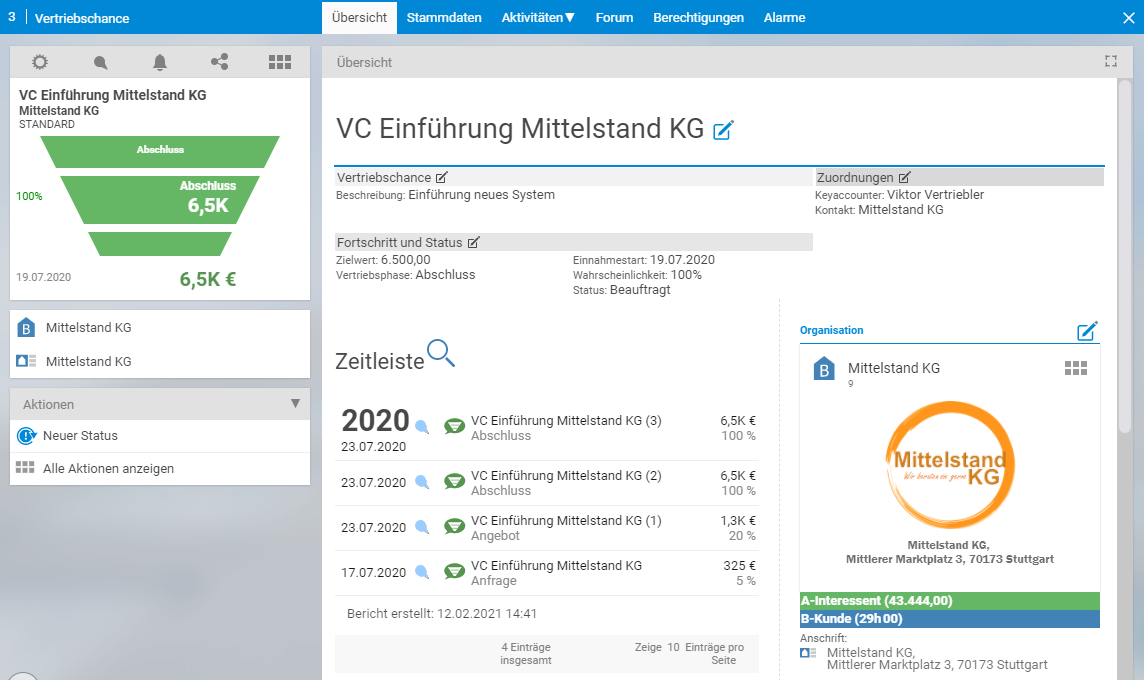
Figure 7: Sales opportunities in projectfacts
Managing sales activities
Day-to-day sales life is stressful. Good organization is half the battle when it comes to getting things done. projectfacts makes your life as easy as possible by supporting you in planning activities and reminding you when needed.
With campaigns you can effortlessly carry out sales activities for a defined group of contacts. Tasks can be distributed to employees and progress in completing them is recorded and displayed. If you ever lose track of something, projectfacts automatically reminds you with follow-up reminders. This way all tasks are completed promptly and reliably – without endless email chains or ad-hoc meetings.
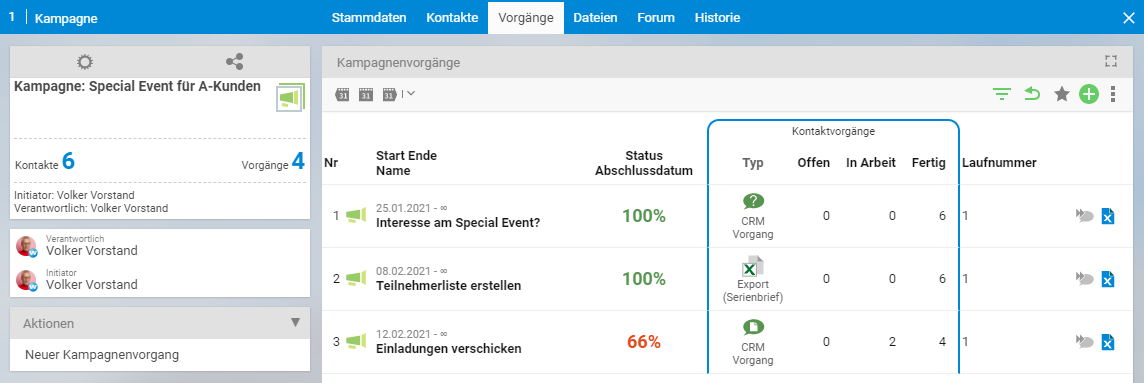
Figure 8: Campaigns in projectfacts
Analysis and reporting
Via the reporting function in projectfacts you can compile and export a large number of individual reports yourself. The graphical display format can also be adjusted with a single click. Through the analysis of sales opportunities you can, for example, quickly get an overview of your order situation. You can see recently commissioned projects and those currently in the pipeline. This way you always have a clear picture of where your customers are in the process. You can identify potential revenue bottlenecks or order peaks in advance and react in good time.
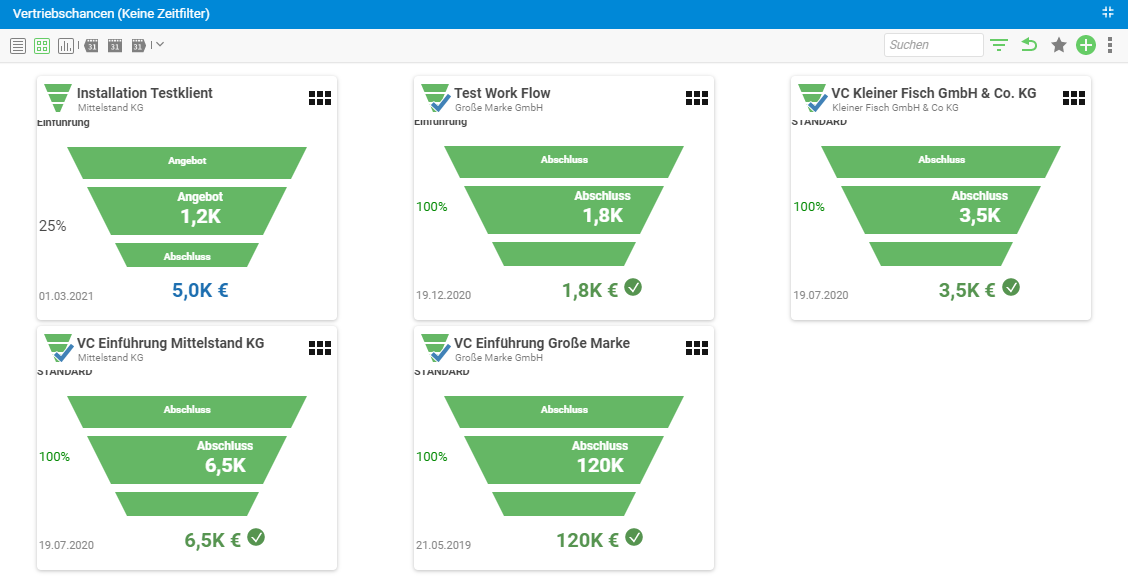
Figure 9: CRM reporting in projectfacts
Via the customer analysis you can see which customers are currently generating the greatest employee workload. You can then compare the booked project times with the ranking of your customers (A, B, C customers) and the associated contribution margins. This makes it easy to identify unprofitable projects at a glance.
Further tips and tricks on Sales Force Automation with projectfacts
In addition to the main functions already presented, projectfacts offers a range of additional ways to increase the efficiency of your sales work:
Automatic creation of documents (quote, order, invoice etc.)
In the course of the sales process, a whole range of documents is generated. Many small and medium-sized companies create these documents manually. This costs a lot of time and is error-prone. With projectfacts you can simplify the creation of quotes, orders, invoices and other documents. If, for example, a standard quote needs to be created, this can be generated with a single click. Quote items, quantities and prices can be adjusted just as easily. Addresses, text modules, layout and formatting are automatically applied.
Email templates, text modules and automatic email replies
Define any standard email templates you like. This prepares you perfectly for the most varied enquiries and means you no longer need to waste unnecessary time formulating the same content over and over again. Individual text modules can also be freely combined with one another. Through automatic email replies, the process can even be fully automated. Your customers receive immediate feedback and you no longer need to worry about a thing.
Telephone interface with speed dial and caller identification
By storing contacts uniformly in the system, you will never again be searching for the right email or a business card. Instead, you can call the desired contact with a simple mouse click. Conversely, when the contact calls you, the phone number is automatically recognized. You know exactly who it is even before the other person introduces themselves by name. In addition, all recent interactions with the contact are visible. You also receive additional information, e.g. whether it is an A, B or C customer.
Dynamic Word templates with cover letter and address block generation
If you already have Word templates for certain document types, these can be integrated into projectfacts. Address data can be automatically transferred into the template. Individual cover letters can also be generated dynamically and appear in your corporate design. Manual copying or layouting becomes a thing of the past. Quotes can, for example, be extended with personalized attachments that integrate seamlessly into the overall document.
projectfacts offers you a wide range of ways to automate and make your sales processes more efficient. In this article we have given you a small insight into these possibilities. Feel free to contact us directly if you have further questions or suggestions.
Your projectfacts team
Icons © Smashicons. Freepik, Gregor Cresnar, phatplus, catkuro – www.flaticon.com (2021)