
Ticket administration: track tickets, keep status and overview in view
With online ticket administration, you track every customer request from receipt to completion. The status, duration and processor of every ticket at a glance.
Enquire nowWhat is ticket administration?
Ticket administration brings all customer requests together as traceable tickets and keeps their status, their duration and their processor visible at all times. The focus is on tracking and overview: you follow every ticket from the first request through to completion, instead of losing sight of individual cases in email inboxes.
This makes ticket administration the monitoring and control layer above your support: the ticket system records requests digitally, ticket management organises how they are processed, and ticket administration ensures that the status, progress and key figures of all tickets stay transparent.
Good ticket administration shows you everything at a glance
Good ticket administration software makes the state of your support visible at all times, without you having to ask. This is how you recognise it:
- Ticket status of every case at a glance: open, in progress, with the customer for review or completed
- Ticket overview across all channels, with duration, markers and customer information
- Ticket tracking from the first request through to completion, documented without gaps
- Filters and individual views, so that every employee keeps their own ticket overview
- Ticket analysis with key figures such as processing time and ticket volume per customer
- Hosting and development in Germany, GDPR-compliant
Manage tickets online: quick, easy and intuitive
By using ticket administration for your internal and external communication, you take your support to a new level. Your customer service becomes not only faster, but also more convenient and more precise. With online ticket administration, everyone in your team knows what to do and when, and no request is forgotten.
Manage tickets online
In the ticket preview, you have all the important information about a ticket at a glance: status, contact, processor and when it was received. This gives you an ideal overview and lets you work efficiently.
View ticket processes
The unique ticket ID automatically collects all processes relating to a ticket. This lets you seamlessly track both the communication with the customer and internal coordination.
Working with tickets
Ticket channels ensure that incoming requests end up in the right place. With the right ticket workflow, you also clearly define the process. This way, your team always knows what needs to be done.
Online ticket administration makes work easier for your support
When every member of the support team knows exactly which tasks have which priority, you can assist your customers quickly and competently. By using projectfacts ticket administration, you can ensure exactly that, and relieve your employees at the same time.
All requests in the ticket overview
The ticket overview shows you the tickets across the different channels. You also see the duration of the ticket, its status, markers and customer information. Thanks to filters and individual configurations, you can build the overview in the software in the way that helps most in your daily work. This is a real relief for your support team, because it lets them concentrate on what matters most: your customers.
- Where is action currently needed?
- Which requests have been with us for a long time?
- How many tickets are currently being processed?
- What is the status of the tickets I have created?
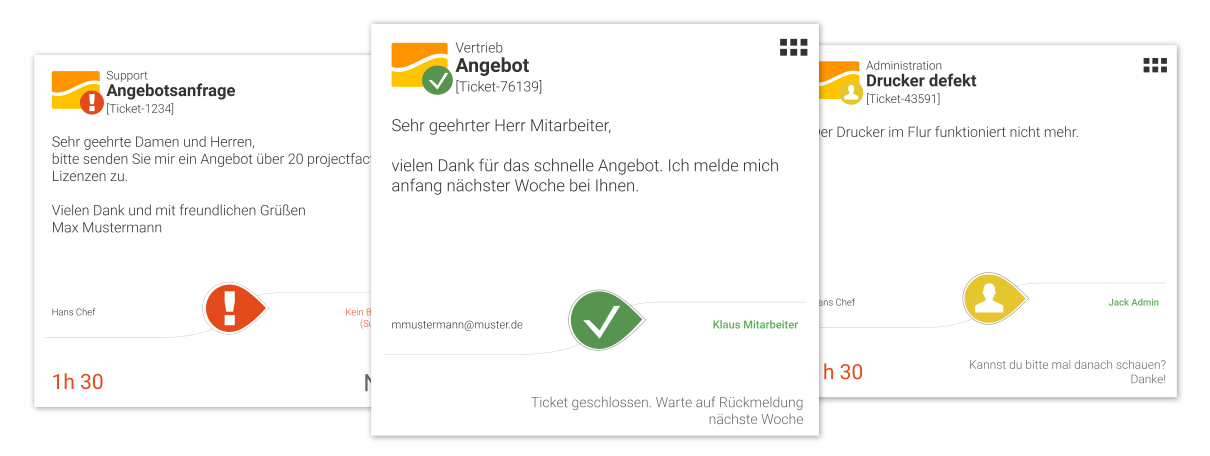
Simple ticket administration with projectfacts
Are you looking for a simple software solution to manage incoming requests? Then try our ticket administration. It combines all the functions you need for your support.
Enquire nowTicket tracking: all information about a ticket at a glance
Only those who know the entire history of a request can provide helpful support. Within a ticket, you therefore always see a complete process overview. Every change within the ticket is documented in this way, so that you can track the progress at any time and retrace everything.
Work effectively with tickets
You can move the ticket to different channels, assign it to teams or individual employees and communicate within the ticket, both internally and externally with the customer. Via the customer portal, you can integrate your customers directly into the ticket system. This saves you frequent enquiries about the status of tickets. Instead, your customers can see the current progress live at any time.
Intelligent networking
The special thing about the projectfacts ticket system: thanks to intelligent links, you not only see the ticket with all its processes. At the touch of a button, you can also view all information about the project and the customer, as well as service information such as service level agreements (SLAs).
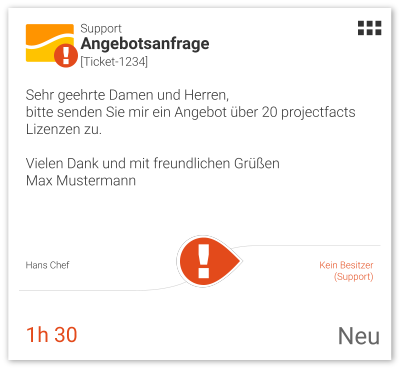
Edit and check tickets
Ticket administration with projectfacts is intuitive, clear and adapts to your needs. Decide for yourself which channels you want to use and which statuses you want to assign. This way, projectfacts adapts to your processes, not the other way around.
Templates & text modules
Many convenient features simplify working with tickets. Thanks to a modern text editor, ready-made text modules, automatic responses and drag & drop, processing tickets in the software is child's play.
Processors & responsible persons
Tickets are dynamic tasks. This means responsibilities can change quickly or new problems can arise. Your ticket administration software shows you live who is currently working on what.
Ticket status
The ticket status shows you at a glance where your team stands. In the overview, you can see the status of your ticket at any time and know whether the ticket is currently with the customer for review or whether one of your team members needs to take action.
Manage online tickets at team and employee level
You can assign the tasks resulting from a ticket to individual employees or entire teams. Thanks to a sophisticated rights system, you can individually manage which information your employees are allowed to view and which they are not.
Ticket channels
You can bundle tickets in channels that are managed by different employees. For example, you can give teams access to certain channels only, while team leaders can see all tickets. The assignment to channels also determines who is explicitly informed about a new ticket and who can only view it within the channels.
Ticket processor
Distribute tasks across different ticket processors, for example according to qualification. This ensures competent support, to the satisfaction of your customers. You can assign the tickets yourself, or the ticket system in projectfacts does it for you. If desired, the customer can decide from the outset who should receive which ticket.
Each user has an individual overview in the ticket administration software and can view their personal requests in order to structure their tasks. This lets you organise your day-to-day work and that of your employees.
- Tickets can be assigned to people or teams quickly and easily
- Ticket channels with individual reading and editing rights
- Comprehensive rights system to cover your requirements
- Optional automatic ticket distribution, or according to customer preference
The solution for your online ticket administration
Manage your customer requests in an online system instead of in overflowing mailboxes. This way you keep an overview and can organise your team's work effectively.
Enquire nowAnalyse tickets, optimise support
Do you want to optimise the quality of your support? Then evaluate your tickets in the projectfacts ticket analysis.
Using selected key figures, the ticket analysis reveals a variety of details about your ticket administration: how long did it take to process a ticket? Which customer opens the most tickets on which topic?
The ticket analysis answers these and many other questions. This gives you important pointers as to which areas of your support could be even better.
- Ticket analysis gives you well-founded insight into support performance
- Important key figures about your support at a glance
Ticket administration at a glance
Quick and easy
Manage your tickets online: all processes at a glance
Administration types
Comprehensive ticket administration options: status, channels and much more
Information overview
All relevant customer information viewable via the ticket
Ticket processor
Tickets can be assigned to people or teams quickly and easily
Ticket overview
Individual ticket overview per employee, with status and duration
Ticket analysis
Sophisticated ticket analysis offers you individual evaluations
Still have questions? We have the right answer!
Give us a call, send us an email or take a look at our FAQ section! We will be happy to answer your questions!