
Ticket system and project management in one system.
Manage tickets for your projects and convert extensive tickets into your own projects.
Enquire nowThe best of both worlds: Ticket project management
Ticket system and project management are directly connected in projectfacts: every incoming ticket can be assigned to a project structure or converted into its own project with a single click, so that request, task and billing remain in one system.
It is in the nature of things that some tickets require more work, others less. With the projectfacts online ticket system for project management, you are equipped for both cases. Smaller tickets can be processed quickly and efficiently using agile methods.
Sometimes, however, a small ticket can turn into a major task or an entire project. For larger requests, the entire project management in combination with the ticket system in the software is therefore available to you. This means you are always prepared for any situation and can structure even more complex tickets into clear packages. This way, you use a project management software with a ticket system that unites both worlds under a single interface.
Manage tickets
projectfacts is a fully-fledged ticket system. Manage incoming requests easily online. Use ticket channels and individual statuses to structure your work with tickets.
Convert tickets into projects
A ticket requires more work? No problem. Simply turn it into a project. The complete projectfacts project management is at your disposal.
Record times for tickets
Would you like to record project times for a ticket? It's easy with projectfacts. Simply assign working time. You can then bill the recorded times directly to the customer.

Create tickets as new projects
projectfacts bundles all important company processes in one online software, so project management and ticket system also flow seamlessly into one another. Simply create a work package or project from a ticket, without any duplication of effort. This helps you to structure tasks and plan the required resources.
You plan each project as a system of linked tickets, times and tasks, instead of processing requests in isolation.
- Turn more complex tickets into your own customer project
- Structure larger requests as work packages in a ticket project
- All relevant information can be found both in the ticket and in the project
Manage tickets for existing projects
Of course, you can use projectfacts not only to convert tickets into projects, but also to manage incoming tickets for existing projects. Set up your own channels and workflows if you wish.
The networked system allows you to link any tickets to your projects in projectfacts. In this way, you can use tickets for your project documentation. However, you can also create new sub-projects or work packages for a ticket. This allows you to integrate suggestions for improvement into your ongoing projects, for example.
The interface for your ticket system and project management
Manage tickets for your customer projects or convert tickets into new projects. With projectfacts you create the ideal link between the two worlds. Try it out now.
Enquire now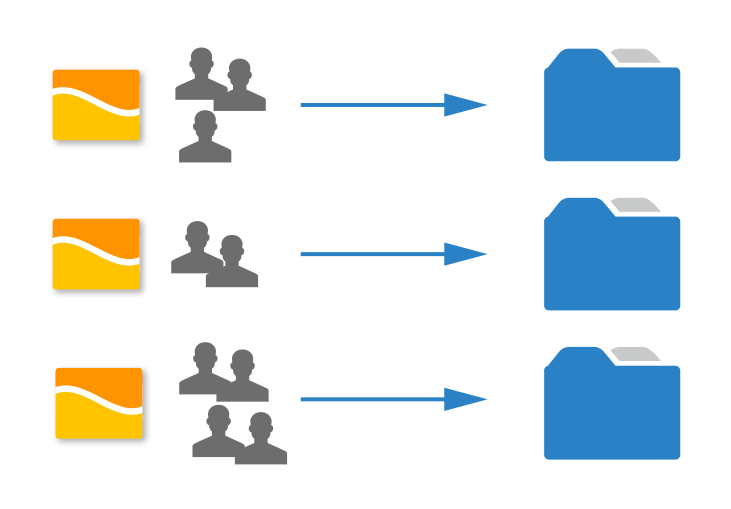
Convert requests into projects: Ticket project management
It is a frequent topic in the IT world: a customer reports an error or has more extensive change requests in a software. A ticket system is an ideal solution for this. However, conventional solutions usually fall short when it comes to more extensive development work.
Such work should be considered separately and planned and managed in the overall context. For example, is the work on the ticket planned as an independent project or is it included in the course of a new update?
projectfacts helps you to manage such projects. By simply converting a ticket into a project, all project management functions are available to you: you can plan resources and budgets and create schedules. You decide whether the ticket is assigned to an existing project or whether it becomes an independent project.
- Assign tickets to existing projects or create new ones
- Plan the project structure, resources and budget

Manage ticket processing online as a project
Tickets and ticket projects can be used independently. This means that both functionalities are available to you for one task. Even if you convert a ticket into a project, the original ticket is retained for customer communication.
What initially works completely independently is very helpful in combination. Linking tickets with projects makes your project management and customer communication faster and more efficient.
Plan ticket projects
Create a work breakdown structure or work agile with a Scrum or Kanban board. Resources, responsibilities and budgets can be planned just as easily. With the projectfacts ticket system for project management, you enjoy complete freedom and can organise your work entirely according to your requirements. Subsequent project management is also easy.
Record ticket times
All tickets can also be used for time recording. This means you can always record exactly which employee has invested how much working time in a ticket. Not just an advantage for analysis, but a real help for your billing. Thanks to the integrated time recording, you can create activity reports in no time at all and always bill correctly, without any additional effort.
Everything important at your fingertips
With the projectfacts ticket system, you can find all your data in one central location. You can access it online from anywhere. However, the intuitive operation also runs through all areas within the software. Intelligent links allow you to jump from the ticket to the project or customer or vice versa with a single click. This saves you sticky notes or tedious searching.
projectfacts combines customer projects and support tickets
See the benefits of an integrated solution for customer inquiries and projects for yourself. Benefit from intuitive workflows for ticket and project processing.
Enquire nowTicket project management at a glance
Link tickets
Integrate tickets into existing projects or create new ticket projects
Plan with tickets
Plan resources, budgets, times, responsibilities and much more.
Book times
Record and book your employees' working hours on ticket projects
Workflow
Benefit from fast and intuitive navigation between ticket, project and customer

Still have questions? We have the right answer!
Give us a call, send us an e-mail or take a look at our FAQ section! We will be happy to answer your questions!