
Lead management software for your sales team
Capture, qualify and follow up on leads automatically, all in one place.
Enquire nowWhat is lead management software?
Lead management software is a tool that covers the entire life cycle of a lead: from capturing it, through qualifying and automated follow up, to scoring it and handing it over to sales. It replaces Excel lists and scattered notes with a traceable process in which every prospect has a phase, an owner and a next step.
projectfacts is such a lead management software. It brings new enquiries together as sales opportunities, guides them through the sales funnel and makes sure, through a traffic light system and follow ups, that no lead is lost. How lead management works step by step is set out in the five phases of the lead management process.
Unlike specialised standalone tools, projectfacts links your leads directly to contacts, quotations and invoicing. A qualified lead does not end up in a separate system but moves straight into quotation and order. Development and hosting take place in Germany and comply with the GDPR.
"With projectfacts, we have found a solution that reliably supports us in the consulting business across the entire value chain and all processes and significantly increases efficiency."

What lead management software has to deliver
Capture leads
Record potential leads the moment they appear, whether from an enquiry or a promising contact at a trade fair. As a sales opportunity they become the control centre for everything that follows.
Follow up on leads
projectfacts lets you follow up on contacts systematically. A definable traffic light system and automatic follow ups remind your team to get back in touch, so no potential lead slips through.
Score leads
The ABC analysis shows you in real time which leads and customers are the most valuable. The sales funnel gives you the stage and the probability of closing per lead, so you can set the right priorities.
The lead management process in five phases
Lead management is not a single task but a sequence with a fixed order. In projectfacts every phase leaves a trace on the prospect's record, so you can see at any time where they stand and who acts next.
Phase 1, Capture: The prospect is created as a sales opportunity, whether they come from an enquiry, a trade fair or a phone call. From the very first minute the lead has a record instead of a note on a scrap of paper.
Phase 2, Qualify: The lead is given a stage in the sales funnel. Because you name the stages yourself, you can also map the threshold at which a merely interested contact (marketing qualified lead) becomes a sales ready lead (sales qualified lead). How to build funnels is shown in sales management.
Phase 3, Develop: Prospects who are not yet ready to buy move into lead nurturing. Automated campaigns send out information material and remind you to follow up until the lead is ready. The mechanics behind this are described in campaign management.
Phase 4, Score: Lead scoring is handled by the ABC analysis. It ranks leads by their value so that scarce sales time goes where there is most to gain. You define the yardstick yourself, more on this in customer management.
Phase 5, Hand over: The qualified lead turns into a quotation and an order in the same system. The lead does not change tools but runs straight on into order processing.

Capturing leads
The sales opportunity
To manage your leads effectively you need a complete view of your prospects. Sales opportunities let you record potential leads the moment they appear, whether from an enquiry or a promising contact at a trade fair.
As soon as an employee creates a sales opportunity, it acts as the control centre for everything that follows. The contact is linked directly, so you can get in touch immediately by e-mail or phone. Targeted chasing can be set up through follow ups. How sales opportunities are steered in detail is covered by our sales management.
- Record potential leads immediately as a sales opportunity
- Contact linked directly: respond by e-mail or phone
- Control centre for every further sales activity
Qualifying leads
The sales funnel
Not every lead is equally far along. The sales funnel shows you at a glance where your prospects currently sit in the sales process. Is this a lead that has only just been qualified, or is a close imminent? Either way, projectfacts keeps you in the picture.
In projectfacts you can create as many sales funnels as you need. Individual funnels show you which stage a prospect has reached and how likely a close is. That way you see which lead is nearly there and which one still needs work.
- Sales stage and probability of closing per lead at a glance
- Create as many sales funnels as you need
- Spot drop offs and step in directly
Start your lead management with projectfacts
Capture leads in an organised way, qualify them in the sales funnel and keep the overview. See for yourself and try projectfacts!
Enquire now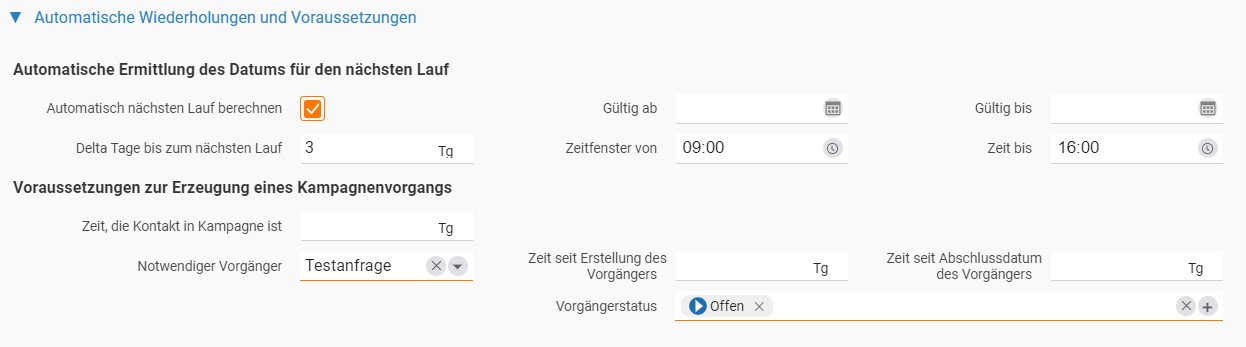
Developing leads automatically
Lead nurturing
Automated CRM campaigns develop your leads further on their own. Sales activities are scheduled and e-mails sent automatically, at the weekend as well, or when the responsible employee is ill or on holiday. That way no lead drops out of sight and every prospect is supplied with the right information quickly and reliably.
Use automatic follow up items that remind sales staff to contact a lead at the agreed time. You set the timing and the rhythm freely, and completed as well as failed attempts are documented with a timestamp. Targeted information material can be sent as a PDF automatically within a time window you choose.
- Automatic follow up items in the rhythm you want
- Send information material as a PDF on a schedule
- Chain several campaign steps through preconditions
No lead gets lost
Follow ups and reminders
So that your team keeps track while chasing leads, you set reminders in the form of notifications and follow ups. Nothing is forgotten that way, and your sales team keeps the overview without having to do anything themselves.
Follow ups are an excellent instrument for structuring sales work. They let you work through call lists in an orderly way, prioritise contacts and document attempts to get in touch. A definable traffic light system additionally warns you when a sales opportunity needs a new action, so no lead slips through.
- Notifications remind you automatically about open items
- Work through call lists in order and document attempts
- Traffic light warns when a lead needs a new action
Prioritising leads
Lead scoring with the ABC analysis
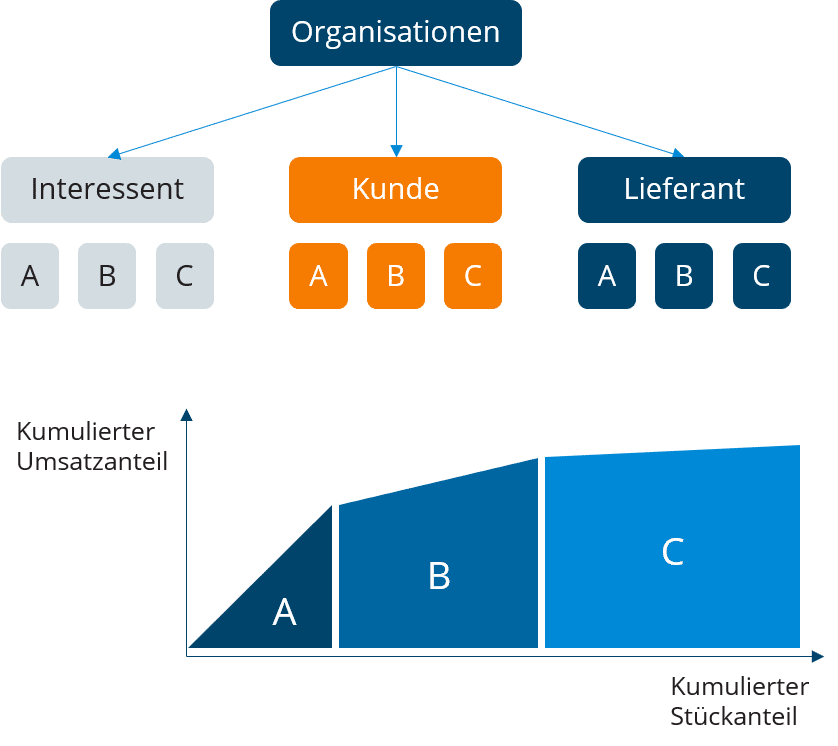
Not every lead deserves the same attention. In projectfacts, lead scoring is handled by the ABC analysis: it lets you set priorities and address your contacts deliberately. Our software calculates the ABC analysis automatically and gives you a clear listing of your contacts in real time, so you always know which leads and customers are the most valuable to you.
You define the criteria the analysis is built on. Instead of actual revenue you can look at potential revenue opportunities, which is particularly helpful with new leads. How the customer file and the ABC analysis work together is covered by our customer management.
- Identify valuable leads and customers at a glance
- Choose the measure freely: actual revenue or revenue potential
- ABC category visible everywhere in the software
What to look for in lead management software
The products on the market differ less in their range of functions than in how far they carry the lead. These six questions quickly separate the candidates:
Reach: Does the qualified lead become a quotation, an order and an invoice in the same tool, or does its trail end at the system boundary? The earlier the handover breaks, the more has to be retyped later.
Adaptability: A lead management system should follow your sales process, not the other way round. Check whether the number and names of the stages can be set freely.
Reminders: Without automatic follow ups and a visible warning for items left lying around, the process ends up relying on your employees' memory after all.
Scoring criteria: Lead scoring based purely on past revenue puts new prospects who have not bought anything yet at a disadvantage. Ask which criteria are available to choose from.
Nurturing: Find out whether campaigns and mail merges run in the same system or whether a second tool with a second address list becomes necessary.
Data storage: Leads are personal data. Ask where the servers are located and whether any processing takes place outside the EU, because third country transfers are the most laborious part of GDPR documentation.
What the lead management software covers
| In projectfacts | |
|---|---|
| Lead capture | Record leads immediately and steer them centrally as a sales opportunity. |
| Sales funnel | Sales stage and probability of closing per lead at a glance. |
| Lead qualification | Funnel stages you can name freely, which also let you map the threshold to a sales ready lead. |
| Lead scoring | ABC analysis in real time, based on either actual revenue or revenue potential. |
| Traffic light and follow ups | A definable traffic light system and automatic follow ups make sure no lead slips through. |
| Lead nurturing | Automatic follow up items and scheduled information material develop leads on their own. |
| Data storage | Developed in Germany, hosted variants run in an ISO 27001 certified data centre in Frankfurt am Main, GDPR compliant. |
| Handover to quotation and order | Create a quotation and an order straight from the qualified lead and move seamlessly into order processing. |
Manage your leads with projectfacts
From the first enquiry to the handover to sales: with projectfacts you have the right basis for capturing, qualifying and following up on your leads reliably. Get started right away!
Enquire nowMore functions around your lead management
- Special contacts per company
- Daily caller lists
- Automatic handling of unreached calls
- Follow ups and reminders
- Individual sales funnels
- Traffic light on sales opportunities
- Key account management
- Tracking of networking and acquisition
- Automated CRM campaigns
- Mail merge and newsletter
- Excel interface and vCard
- Integration of social networks
You can view a complete overview of all functions here:
Who is lead management software right for?
A good fit if you want to bring your leads together in one system, from capture through qualification to the handover to sales, and connect them to contacts, quotations and invoicing rather than maintaining several standalone tools. If German hosting and GDPR compliance matter to you, you are in the right place as well.
Less of a fit if all you are looking for is a pure marketing automation tool for mass newsletters with no connection to sales, quotations or orders.
Still have questions? We have the right answer!
Give us a call, send us an e-mail or take a look at our FAQ section! We will be happy to answer your questions!