
Bank interface
The account transactions of your bank arrive in projectfacts every day and find their invoice by themselves. What someone ticks off line by line today is already done before the day begins.
Enquire nowWhat does the bank interface in projectfacts do?
The bank interface connects your business account with invoicing in projectfacts. It reads the account transactions of your bank daily and reconciles them with your invoices through the payment reference. If the software finds a matching invoice, it assigns the payment to that document automatically.
This works in both directions: for incoming payments from your customers just as much as for payments you have made yourself. A task that costs time every day in many companies, and that nobody enjoys, therefore takes care of itself.
What the bank interface is good for
Up to date every day
The account transactions are in projectfacts without anyone downloading a bank statement.
Automatic matching
The payment reference leads to the invoice. If it fits, the payment is assigned to the document.
Both directions
Incoming payments from your customers and outgoing payments to your suppliers.
What changes in everyday work
Payment reconciliation is one of those tasks nobody plans for and that comes up every day all the same. Three places feel the difference particularly clearly.
The accounts department
Instead of downloading, printing out or ticking off bank statements, accounting only checks the cases that were not clear cut. The rest is already assigned. What goes to the tax adviser afterwards travels through the DATEV interface, so that payment and document arrive together.
The dunning process
A dunning run is only as good as what you know about the payments. If a payment is not posted until days later, the system chases customers who paid long ago, which is the surest way to damage a good customer relationship. With daily reconciliation that no longer happens. How the multi-stage dunning process works is described under receivables management.
The management
Outstanding items are only a reliable figure if incoming payments are up to date. What is genuinely still owed can therefore be read off at any time, not just after the next reconciliation.
How the matching works
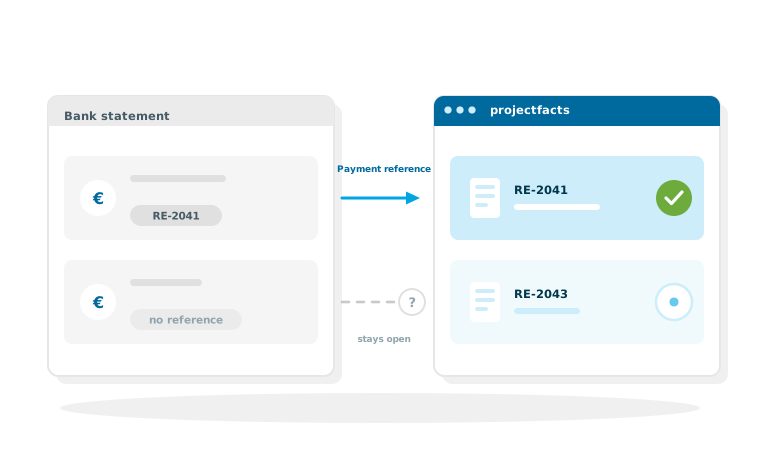
Matching runs through the payment reference. That sounds simple, and it is, as long as the invoice number is in there.
The normal case
Your invoices carry a unique number. If a customer pays and quotes it in the payment reference, projectfacts finds the invoice and assigns the payment. The document changes its status without anyone stepping in.
The exceptions
Not every customer fills in the payment reference properly, and collective transfers covering several invoices happen as well. Cases like these stay open and are displayed instead of being assigned to the wrong invoice. Accounting therefore sees exactly the lines that need a decision, and only those.
Payments that are collected regularly
Anyone billing recurring amounts often collects them directly instead of waiting for bank transfers.
SEPA direct debit
projectfacts manages direct debit mandates and creates SEPA payments from them. For contracts, maintenance flat rates and everything that recurs at the same amount, this is the shorter route: the amounts come in on the agreed date instead of being chased one by one. The invoices that go with them are created as usual in invoicing.
How the connection is set up
The bank interface belongs to the finance area of projectfacts and is configured for your bank and your document numbers during setup.
What we discuss
Which account is connected, how your invoice numbers are structured and how ambiguous cases should be handled. Which functions are included in which product edition is shown in the complete overview of functions. We clarify the technical details together during setup.
An end to ticking off bank statements every day
In a free initial consultation we show you what automatic payment reconciliation would look like in your company and what has to be set up for it.
Request a consultationStill have questions? We have the answer.
Would you like to know how payment reconciliation with your bank works, or which finance functions belong with it? Talk to us.