
MCP server: connecting AI assistants
Your employees put their questions to an AI assistant, and the assistant fetches the answer out of projectfacts. Through the Model Context Protocol you connect Claude, ChatGPT or an agent of your own, without anyone being able to see more than before.
Enquire nowCan I connect Claude or ChatGPT to projectfacts?
Yes. projectfacts comes with an MCP server of its own. MCP stands for Model Context Protocol, an open standard through which AI applications reach external data and functions. Once the access is set up, an assistant can query data from projectfacts and, within the rights granted, create cases. Questions are asked in ordinary language, not in a query language.
The practical difference from a report: a report answers the question somebody anticipated when the report was built. An assistant answers the question you have right now. The protocol was presented by Anthropic at the end of 2024 and then published as an open standard, and the common AI applications have supported it ever since.
What the MCP server is good for
Questions instead of reports
Analyses come out of a conversation, even when nobody built a matching report beforehand.
Your rights still apply
An MCP access extends no permissions. Everyone sees exactly what they are allowed to see on screen.
Tailored access
Instead of one master access you set up several small ones, by department and by task.
The most important sentence first: there are no extra rights
With every AI connection, the first question is the one about the data. With MCP the answer is clear and easy to check: an MCP access can never do more than the user behind it.
What that means in practice
When you call a tool through the assistant, projectfacts checks your personal rights profile, exactly as it does when you log in on screen. Two employees using the same tool therefore get different results, each their own. So the fact that a tool is there says something about the range of functions, not about anything being released to you.
That takes much of the weight out of the introduction. You do not have to build a second permissions concept or maintain special rules. The rights system you have anyway continues to apply.
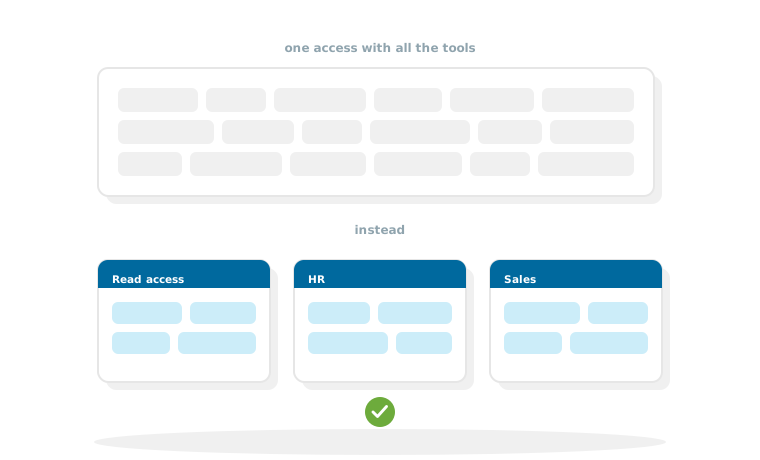
Several small access points instead of one big one
The MCP server of projectfacts is built in modules. You do not set up one access with all the tools, but several, each of them cut to one task.
Why that is the better design
Before every answer, an assistant has to work through the list of available tools. The longer that list, the more attention it takes up and the less precise the answer becomes. An access with twelve fitting tools delivers better results than one with a hundred, ninety of which have nothing to do with the question.
What such a set-up looks like in practice
Three to four access points are usual: a general read access for all employees, one with HR topics for personnel administration, one with customer and sales topics for CRM and, where it makes sense, one for project work. Which tools an access contains is set by an administrator and can be changed again at any time.
How the connection is set up
The route is short and needs no development work.
Three steps
First an administrator creates an MCP configuration in projectfacts and selects which tools it contains and which user groups may use it. After that, every employee enters the address of this access in their AI client. Logging in runs through OAuth, so the connection hangs on their own account and no passwords are handed on.
Which assistants can be connected
MCP is an open standard. Every application that supports it can be connected, among them Claude and ChatGPT as well as agents of your own that you run yourself. Because the standard is open, you connect projectfacts once and stay free in your choice of assistant.
What you should know about it
An MCP access belongs to one tenant. Anyone who works in several tenants sets up one access per tenant. If an administrator changes the tools of an access, the change takes effect as soon as the AI client connects again.
MCP or REST API?
Both routes lead out of projectfacts, but they solve different tasks. The rule of thumb: the REST API is for software that always does the same thing. MCP is for questions you do not know in advance.
How to tell which is which
If something is to run reliably and identically every night, the API is the right route. If somebody in a department should be able to ask a question that nobody knew about beforehand, it is MCP. The effort differs as well: MCP needs a configuration, while an API connection brings development, testing and operation with it.
In practice the two sit side by side: the API keeps the fixed processes running, MCP answers the questions in between.
Connect AI assistants to your data, safely
In a free initial consultation we will look at which access points make sense for your departments and how the tools should be cut.
Request a consultationStill have questions? We have the answer.
For MCP there is a free sandbox to try things out and an open consultation hour. You will find the dates and the technical description in the help centre.