
ERP for vibe coding

An application of your own comes about in hours today rather than in weeks: you describe it to an AI model, and the model writes the code. What is missing is rarely the front end. It is the data behind it. That is exactly what projectfacts brings, through an open interface and with the permissions that apply in your company anyway.

Enquire now

What is an ERP for vibe coding?

Vibe coding means programming in dialogue with an AI: you describe in plain language what a program should do, and the model writes the code for it. An ERP for vibe coding is accordingly a business software whose data and processes are available through a documented interface, so that applications of your own can be built on that basis without anyone having to rebuild customer management, projects, time recording or invoicing.

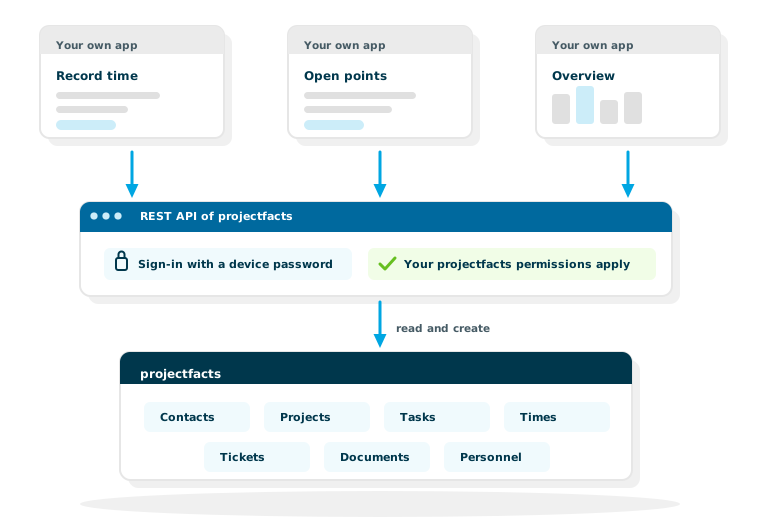
projectfacts can take on that role. Through the REST API, an application you have built yourself accesses the same data your employees work with in the interface. Logging in runs through a device password that a user creates for themselves in projectfacts. And one rule applies that makes everything else simpler: through the interface, and therefore in your own application too, someone has exactly the permissions they would have in projectfacts anyway. No more.

What projectfacts brings to the table

An open interface

Contacts, projects, tasks, times, tickets and documents can be read and created, through fixed addresses with described fields.

Described fields

A model only writes usable code if it knows the counterpart. The structure of the addresses, the formats and the field references are in the OpenAPI description of the server and in the help centre.

Your permissions still apply

Your own application only sees what the logged-in user is allowed to see in projectfacts. There is no separate permissions system.

One interface for everyone rarely suits everyone

A business software covers many tasks and therefore shows a great deal. The individual employee often needs only a narrow slice of it, and everyone needs a different slice.

The technician out on site

Select the customer, open the job, start the timer, attach a photo, done. Five steps on a mobile phone, with poor reception, wearing gloves.

The project management

My projects, open points, booked times, remaining budget. An overview that is read in twenty seconds in the morning.

The management

Revenue, utilisation, outstanding invoices. A few figures, big enough for a glance between two meetings.

What follows from that

Not everyone has to work with the same front end. Where an application of your own, tailored to one process, makes daily work noticeably easier, it can be built, and it accesses the same body of data as everyone else. No second truth arises, only a second view.

How your own application works together with projectfacts

Between the application you have built and projectfacts lies exactly one layer: the interface. What runs across it is decided by the access with which the application logs in.

Logging in with a device password

For a connection, a user creates their own device password in projectfacts. The application logs in with that, not with the personal password. The advantage shows itself when tidying up: a device password can be withdrawn individually, without anyone having to change their password or set up their two-factor login again.

Permissions come from projectfacts

The application sees what the user behind the access is allowed to see. Anyone who cannot open HR data in projectfacts does not get it through the interface either. For a connection it is therefore advisable to use a separate account with exactly the permissions it needs: a tool that books times needs no access to salaries.

Reading and writing

The interface works in both directions. An application can retrieve projects and tasks and equally create records, for example a time entry, a contact or a document. A front end of your own is therefore not limited to displaying things but can genuinely take work off people's hands.

When projectfacts reports of its own accord

Conversely, projectfacts can call an address at your end as soon as something has happened, through a webhook. That spares your own application the constant asking. And if the questions are different every time and no application is to be built at all, the MCP server is the shorter route: an AI assistant then asks the question directly.

Applications of your own access projects, times and documents through the projectfacts interface | projectfacts

In four steps to your first own application

The route is shorter than it sounds, provided the model gets the right foundation.

1. Create the access

Create a user with the necessary permissions and generate a device password for it, in the German interface of projectfacts under “Persönliche Einstellungen → Geräte → Neues Gerätepasswort” (personal settings, devices, new device password). That is what the application logs in with later.

2. Give the model the documentation

From version 26.2, every projectfacts server provides a machine-readable OpenAPI description of the interface, at its own server address followed by /api/openapi.json. On top of that come the freely accessible guides in the help centre. Name both to the model as sources and you get code that matches the actual addresses and fields, instead of invented ones.

3. Describe what you want to achieve

Do not describe the technology, describe the process: who uses the application, what they see, what they type, what happens afterwards. The more precise the process, the less the model has to guess.

4. Check the result and hand it over

Try it out, work with a test client, and only then take it live. Whatever stays in use belongs in the normal procedures of your IT department, with its own account, checked and owned by someone.

Three example prompts to copy

Each prompt first names the description in the help centre as the source, so the model does not have to guess, and sets out what matters for security: encrypted connections only, no credentials in the code, data from the server as text. From one example to the next, the application grows.

For tools such as Claude Code, Cursor or Codex. Before pasting, replace <server address> with the address at which you open projectfacts in the browser.

Mobile time recording

A single HTML file that books time: page through the days with the times already booked, pick a project, start and stop the clock.

My projectfacts installation has the server address <server address> (the address at which I open projectfacts in the browser). Build a web application for mobile time recording as a single HTML file without external dependencies, connecting to projectfacts through the REST API. The basis is the OpenAPI description of the server at <server address>/api/openapi.json (from version 26.2) and the description of the interface in the help centre at help.teamspace.com (topic API): read both first and stick to the addresses, fields and the device password login described there. Always use the server address the user enters, not the “servers” entry in the OpenAPI description. Users log in with the server address, device ID and token; the device password is created in the German interface of projectfacts under “Persönliche Einstellungen → Geräte → Neues Gerätepasswort” (personal settings, devices, new device password).

After logging in, the user sees today: at the top the times they have already booked on this day (project, start and end where available, duration and description) with the day’s total, below that their projects. With “previous” and “next” they page through the calendar days one at a time and see the entries of each day; a jump back to today is always possible. For today they select a project, start time recording and stop it again. The time entry is created in projectfacts and appears straight away in the day’s list; the mandatory fields of the entry are visible and selectable, and nothing is preset without the user noticing. Keep the interface usable on a mobile phone and manage with as few steps as possible.

Requirements: only allow https addresses; never put credentials in the code, and only store them permanently if the user chooses “Stay logged in”; always output data from the server as text, never as HTML. Interface texts in English. Ask before you assume anything that is not in the documentation.

Open items on your phone

A single HTML file: your own open items by due date, which can be marked as done.

My projectfacts installation has the server address <server address> (the address at which I open projectfacts in the browser). Build a web application as a single HTML file without external dependencies that shows employees their open items from projectfacts on a mobile phone. This means the “Offene Punkte” (open items) module, in the interface the collection issue, not tickets. The basis is the OpenAPI description of the server at <server address>/api/openapi.json (from version 26.2) and the description of the REST API in the help centre at help.teamspace.com (topic API): read both first and stick to the addresses, fields and the device password login described there. Always use the server address the user enters, not the “servers” entry in the OpenAPI description. Users log in with the server address, device ID and token; the device password is created in the German interface of projectfacts under “Persönliche Einstellungen → Geräte → Neues Gerätepasswort” (personal settings, devices, new device password).

After logging in, the user sees a list of the open items assigned to them, sorted by due date; overdue items come first and are highlighted. Tapping an entry shows its subject, project, due date and description. Open items can be marked as done there: ask first whether that is intended, and refresh the list afterwards. The user’s permissions apply unchanged: show only what the server returns.

Requirements: only allow https addresses; never put credentials in the code, and only store them permanently if the user chooses “Stay logged in”; always output data from the server as text, never as HTML; show error messages from the server in an understandable way. Interface texts in English. Ask before you assume anything that is not in the documentation.

Cockpit for project managers

A React application with several views that only reads: projects with a budget traffic light, and a detail view with hours and open items.

My projectfacts installation has the server address <server address> (the address at which I open projectfacts in the browser). Build a web application for project managers with React, TypeScript and Vite that connects to projectfacts through the REST API. The basis is the OpenAPI description of the server at <server address>/api/openapi.json (from version 26.2) and the description of the interface in the help centre at help.teamspace.com (topic API): read both first and stick to the addresses, fields and the device password login described there. Always use the server address the user enters, not the “servers” entry in the OpenAPI description. Users log in with the server address, device ID and token; the device password is created in the German interface of projectfacts under “Persönliche Einstellungen → Geräte → Neues Gerätepasswort” (personal settings, devices, new device password). The application only reads; it changes nothing in projectfacts.

Structure: 1. An overview of the projects the logged-in user manages: status, budget, effort booked so far and a traffic light: green below 80 per cent of the budget, amber up to 100 per cent, red above. Filter by status and customer, search by name. 2. A detail view per project: budget against actual as bars, hours booked per employee and per week for the last twelve weeks, open items (collection issue) and tickets, and the invoicing status, as far as the interface provides this information. 3. Every view has its own address via the part after # and can be shared as a link.

Technical requirements: no dependencies other than React, React DOM and Vite; draw charts yourself as simple SVG, no chart, router or UI library. The build produces static files with a relative base path that run in a subdirectory without server logic; all files local, nothing from a CDN. Bundle API access in a module of its own, type the responses, send requests in parallel where possible, and show loading state and errors per view. Only allow https addresses; never put credentials in the code, and only store them permanently with “Stay logged in”; always output data from the server as text, never as HTML. Interface texts in English; easy to read on desktop and tablet, usable on a mobile phone.

If a piece of information, such as the project manager, budget or invoicing status, is not clear from the documentation, ask instead of inventing it.

Four applications that can be built this way

The following examples are not finished products but the kinds of cuts most frequently asked for in practice.

Mobile time recording

Log in, choose a project, start and stop the timer. The entry ends up in working time recording and therefore in the same body of data as every other booking.

Open points on a mobile phone

Your own tasks and tickets in a reduced view, tickable right there. The data comes from task management and the ticket system.

Overview for the project management

Status, budget, booked times and open points brought together on one screen, with the figures supplied by project controlling.

Your own portal for customers

Project status, documents, tickets and invoices in a front end of your own. If you would rather not build one: projectfacts already comes with a customer portal.

What you should keep an eye on

Software that has come about in dialogue with an AI is software like any other, with the same obligations.

Checking remains your job

Code that nobody has read can work and still be wrong. Before an application goes live it should be checked, ideally by someone who can also adjust it if need be.

A separate account per application

Not the managing director's account for everything. A separate user with as few permissions as possible and its own device password makes the difference later, when something has to be withdrawn.

What comes about quickly has to run for a long time

An application that came about in a single afternoon will still be in use in two years. Anyone who settles at build time who is responsible for it is spared the awkward question later.

Would you like to connect an application of your own to projectfacts?

In a free initial consultation we look at which data should flow, which access is the right one for it and whether the interface, a webhook or the MCP server is the shorter route.

Request a consultation

Still have questions? We have the answer.

Would you like to see the description of the interface or discuss a specific project? Talk to us.

Frequently asked questions about vibe coding with projectfacts

Can I develop my own front ends with projectfacts?
Yes. Through the REST API, an application you have built yourself accesses the same data your employees work with in the interface, reading and writing. That way you can build views and apps of your own that are tailored to a particular process.
Can I use projectfacts as the backend for my own apps?
Yes. Customer management, projects, tasks, times, tickets and invoicing stay in projectfacts, and your own application fetches exactly what it needs through the interface. So you do not have to rebuild those functions, only the front end for your case.
Can I develop applications for projectfacts with tools such as Claude Code, Cursor or Codex?
Yes. Such tools write code for any interface whose structure they know. Name the OpenAPI description of your server (from version 26.2 at /api/openapi.json) and the guides in the help centre to the model as sources, as they hold the structure of the addresses, the login and the fields. On this page you will find three example prompts to copy, from a single HTML file to a React application.
How does an application I have built log in?
Through a device password that a user creates in projectfacts (in the German interface under “Persönliche Einstellungen → Geräte → Neues Gerätepasswort”), not through the personal password. Such a device password can be withdrawn individually. For accounts that belong to no person, at a terminal for instance, there are also neutral access credentials.
Do the permissions apply in my own application too?
Yes, and that is the most important point. Through the interface, and therefore in your own application too, someone has exactly the permissions they would have in projectfacts. The interface has no permissions system of its own and opens no additional doors.
Can a web app access the interface directly from the browser?
Yes, direct access from a web application is possible. Do pay attention to where the credentials sit: a device password that is openly visible in the browser can be read by anyone who opens the application. For applications used by several people, a small service of your own in between is the cleaner route.
Do I have to book anything extra for the interface?
The interface is part of the range of functions of projectfacts. Which functions are included in which product edition is shown by the complete overview of functions.
Is software created this way suitable for productive use?
For small, clearly defined tools, often yes. The same requirements apply as for any other software, though: the code should be checked, the application should have its own account with few permissions, and someone should be responsible for it. Skipping that only shifts the effort to a later date.