
The REST API of projectfacts
Whatever projectfacts does not already connect to your systems on its own, you connect yourself. Through the open programming interface you read and write data, automate recurring processes and connect applications for which no ready-made integration exists.
Enquire nowWhat can the REST API of projectfacts do?
The REST API is the open programming interface of projectfacts. Through it, other programs reach the same data your employees work with on screen: contacts, projects, times, documents, expenses and more. Whatever is possible in the user interface can also be triggered from outside through the interface.
That closes the gap between the ready-made integrations and your own system landscape. For DATEV, Microsoft 365 or your bank there are ready-made connections. For your industry system, your online portal or the tool a department built for itself, there is the API. The difference between the two is quickly explained: an interface is the technical connection through which two systems exchange data. An integration is the finished, ready-to-use connection of one particular system.
What the REST API is good for
Read data
Hand key figures, projects, times or contacts to another system, for analyses, portals or reports.
Create data
Create records from outside, for example contacts from a web form or documents from an upstream system.
Automate processes
Recurring steps run on a schedule and without anyone lifting a finger: overnight, hourly or with every case.
How logging in to the interface works
Access to the API is not a master key. It carries exactly the rights its task requires, and it can be withdrawn on its own at any time.
Device password and API token
Logging in works through a separate device password, or an API token, and not through the employee's personal password. There is a practical reason for that: a token can be withdrawn on its own, without anyone having to change their password or set up two-factor authentication again.
Only as many rights as necessary
For a connection it is best to set up a dedicated access with exactly the rights it needs. A script that only reads out project times needs no access to HR data. Those rights come from the same rights system that applies on screen: the interface has no special rights of its own.
Access outside the user context
Not every connection belongs to a person. For those cases there is a separate access authorisation that permits access to certain API resources at system level rather than in the context of a user. A typical case is time recording terminals that hang in the entrance area and that many employees log in at. Access of this kind can additionally be restricted to certain IP addresses.
What you typically do through the interface
Three use cases come up particularly often in practice.
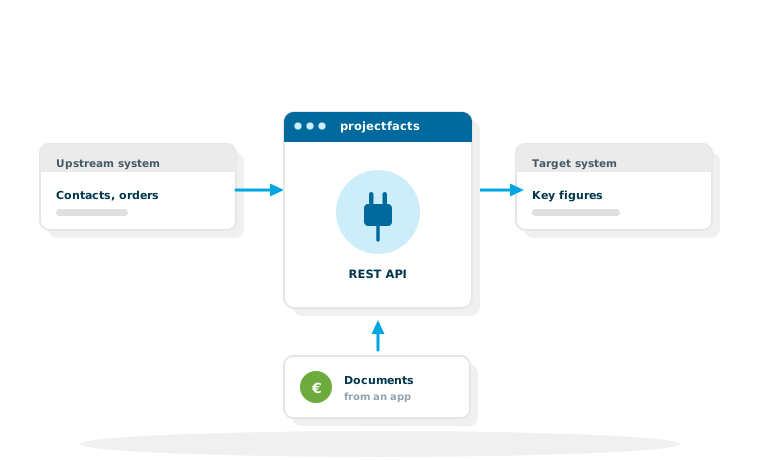
An upstream system feeds projectfacts
Enquiries from a web form, contacts from an online shop or orders from an industry system arise where they occur and land through the interface straight in CRM or in order administration. Nobody types them in a second time.
projectfacts delivers figures to a target system
Key figures from project controlling or times from working time recording go to a reporting tool, a group report or an overview of your own. How that plays together with a reporting tool is described on the page about Power BI.
Documents are created automatically
Expenses and documents can be created through the interface, for example out of a travel app or a point of sale system. From there they take the usual route through incoming invoices and financial accounting.
The other way round: webhooks
With the interface, another system asks projectfacts. It also works the other way round: through a webhook, projectfacts calls an address at your end of its own accord as soon as something has happened, on a change of status, when a document is created or validated, or on an incoming call.
When to take which
For single events that should be reacted to quickly, the webhook is the shorter route. For reconciliations where nothing may go missing, and for larger volumes of data, regular retrieval through the interface remains more reliable. In practice the two often sit side by side: the webhook makes sure something happens immediately, a nightly reconciliation makes sure that nothing is missing at the end.
API or MCP: which one when?
Since the MCP server arrived, two routes lead outwards. They do not rule each other out, they solve different tasks. The shortest rule of thumb: the API is for software that always does the same thing. MCP is for questions you do not know in advance.
Take the API when …
… a process is to run regularly and unattended, hourly or overnight. When the result has to be exactly the same every time. When another system is to be connected for good. When larger volumes of data are moved. Or when the access is to exist independently of any single person.
Take MCP when …
… the questions are different every time. When you need a single result and not a recurring report. When it has to be quick and development effort is not worth it. The difference lies less in the technology than in the question of whether you are building a fixed process or asking an open question.
Building your own applications in dialogue with AI
Small departmental applications are often created today by someone describing to a language model what they need, and the model writing the code for it. The term vibe coding has become established for this way of working.
Why a documented interface makes the difference here
A language model only writes usable code if it knows what the other end looks like. That is exactly what a documented REST interface provides: fixed addresses, described fields, comprehensible formats. The more clearly the interface is described, the less the model has to guess.
That makes two things possible for which a development contract used to be needed: a small analysis that answers exactly your question, and a small tool that takes exactly your task off your hands. How this runs with projectfacts, from access through the description of the interface to an example prompt to copy, is described on the page ERP for vibe coding.
Where the description of the interface lives
The technical documentation belongs in the help centre and not on this page, because that is where it is maintained and stays up to date. There you will find, among other things, an introduction, the structure of the API addresses, logging in with a device password and token, notes on security and permissions, field references and worked examples such as creating a contact or a document.
Which edition includes the interface
The API is part of the range of functions in projectfacts. Which functions are included in which product edition is shown by the complete overview of functions.
Would you like to connect a system of your own to projectfacts?
In a free initial consultation we will look at which data should flow and whether the open interface, a ready-made integration or the MCP server is the shorter route.
Request a consultationStill have questions? We have the answer.
Would you like to look at the technical description of the interface or discuss a specific connection? Talk to us.