
Microsoft 365 & Outlook integration
Connect projectfacts to Microsoft 365. Contacts, calendars and emails stay in sync, at your desk and on your smartphone. For collaboration that simply fits together.
Enquire nowWhat the Microsoft 365 integration does
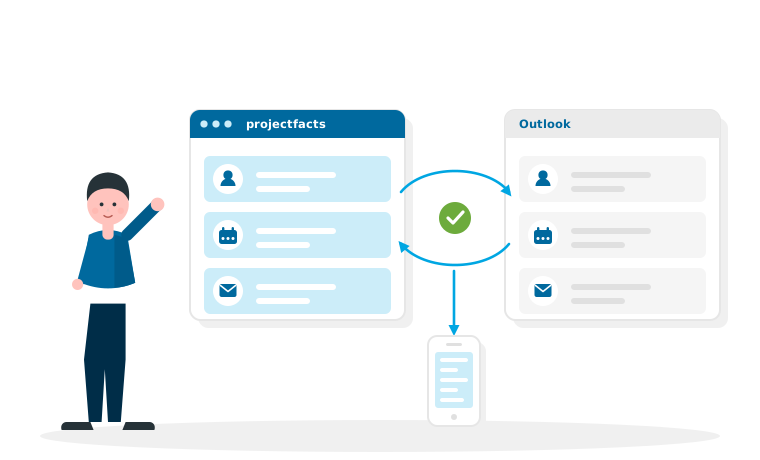
Many teams work with Microsoft 365 every day: Outlook for emails and appointments, Teams for working together. projectfacts fits smoothly into that world. The integration keeps your contacts, calendars and emails at the same level in projectfacts and in Microsoft 365.
So you only maintain your data in one place. A new customer contact created in projectfacts is available in Outlook as well, an appointment is visible on every device, and incoming emails can be assigned straight to the right project or customer.
What the integration is good for
Appointments wherever you are
Keep the calendars in projectfacts and Outlook in sync, at the desk and on your smartphone.
One place to maintain contacts
A single address book for everyone: contacts are synced between projectfacts and Microsoft 365.
Emails in context
Assign messages directly to projects, customers and cases, with no hunting through the inbox.
What you can do with it
Outlook and projectfacts working together
Keep contacts and calendars in sync with Outlook in both directions. Appointments you plan in projectfacts appear in Outlook, and the other way round. Incoming emails can be linked to customers, projects or tickets, so the whole conversation stays traceable in one place.
- Sync contacts with Outlook and your smartphone
- Synchronise calendars and appointments
- Assign emails to projects and contacts
- The same set of data on every device

Working together with Microsoft Teams
Stay connected without losing the context
projectfacts and Microsoft Teams are closely linked. That lets you combine structured project work in projectfacts with quick conversations in Teams, and makes your team's collaboration smoother and more effective.
How the connection works
Sign in securely, set it up once
The connection to Microsoft 365 runs through Microsoft's secure sign-in procedure. Once it has been set up and authorised, projectfacts synchronises the agreed data automatically in the background.
Which objects are synchronised and how the sign-in works in detail is something we set up together. That way the integration is ready to go quickly and then keeps running reliably.
Your benefits at a glance
No duplicate maintenance
Data is synced instead of being entered more than once.
Always up to date
Contacts and appointments in sync on every device.
Familiar tools
Carry on using Outlook and Teams, now connected.
Connect Microsoft 365 with projectfacts?
In a free initial consultation we will show you how to synchronise Outlook, Teams and your calendar with projectfacts.
Request a consultationStill have questions? We have the answer.
Would you like to know more about the Microsoft 365 integration and the collaboration features in projectfacts? Talk to us.