
Sync calendars and contacts
Appointments belong where you can see them: at your desk, on your phone and in projectfacts. CalDAV keeps both sides at the same level, without anyone entering an appointment twice.
Enquire nowHow are appointments from projectfacts synced with your calendar?
projectfacts syncs appointments over CalDAV, the open standard for calendar synchronisation. Because it is open, the connection is not tied to one particular program: Outlook at your desk, the calendar on the Mac, the iPhone and Android devices all speak the same language.
The sync is set up through a sync profile in your personal settings. There you decide what is transferred and in which direction. On the mobile device you create a matching counterpart, and projectfacts shows the details you need for it in your personal settings.
What the sync is good for
One diary instead of two
Project appointments and private entries sit side by side. Double bookings show up straight away.
Up to date on the move as well
The appointment just created in projectfacts is on your phone moments later.
You decide the direction
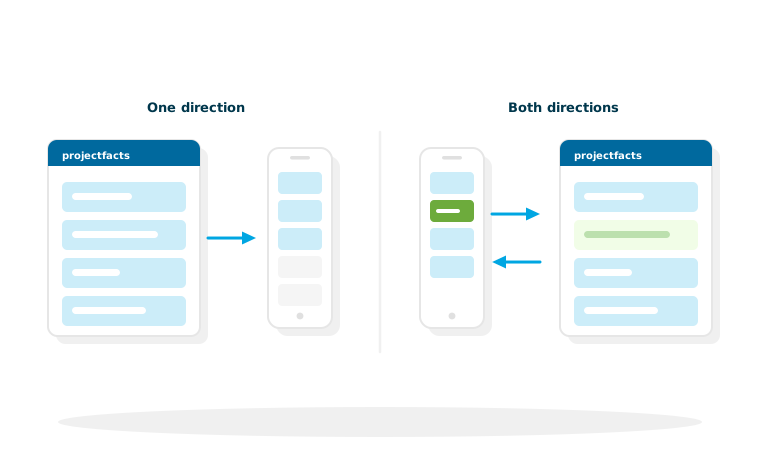
For each profile you set what is synced and whether it runs one way or both ways.
Why the direction deserves a conscious decision
The most common mistake when setting up a calendar sync is to simply let everything run in both directions. That reliably produces a cluttered calendar.
When one direction is enough
If you use projectfacts as the leading system for project appointments and want to keep your private calendar separate, sync from projectfacts outwards only. Your phone then holds everything work related, without private entries travelling into the company software.
When both directions make sense
If you often accept appointments while out and about and enter them straight on your phone, you need the way back. The appointment is then created wherever you happen to be and afterwards also appears in the team calendar, so colleagues can see when you are busy.
Time zones
If your employees work in different time zones, that is taken into account during the sync, including recurring appointments that run across the change between summer and winter time. Whatever else depends on the country is covered under internationalisation.
Contacts on every device
The same principle applies to address books as to appointments: a contact maintained in projectfacts should be on your phone when that person calls.
Why this is more than convenience
An incoming call that shows a name instead of an unknown number changes the conversation. Together with the telephone system it becomes one continuous process: the caller is recognised, the call is recorded against the contact, and times or tickets can be created from it. Maintaining the contacts themselves happens in contact management.
With Microsoft 365
If you work with Outlook and Microsoft 365 anyway, you will usually use the integration built for it. It covers contacts, calendars and email together, and the details are on the page about Microsoft 365.
What you should know before setting it up
Setting it up takes a few minutes, and two points save you asking questions later.
Two sides, two profiles
A sync always needs both sides: a sync profile in projectfacts under your personal settings and a counterpart on the device. On Apple devices CalDAV is already built in. On Android devices you also need a CalDAV app that provides the standard.
Personal, not central
The profiles belong to the personal settings, so every employee decides for themselves what travels to their device. For administration that means there is nothing to roll out centrally here, though a short set of instructions that takes the setup off your colleagues' hands is well worth having.
Appointments and contacts at the same level everywhere
In a free initial consultation we will show you how the sync is set up and which variant suits the way you work.
Request a consultationStill have questions? We have the answer.
Do you need instructions for setting this up on a particular device? You will find the step by step description in the help centre.