
Connect your email inbox
The most important information of the day is often sitting in an email, in one person's inbox. Connect your inboxes to projectfacts and the message sits where the case sits.
Enquire nowWhat do you gain by connecting an inbox to projectfacts?
Email is still the way most business matters begin. The problem is not the email but where it sits: in a personal inbox, invisible to colleagues, with no link to the project or the customer it is about.
Connecting the inbox to projectfacts changes that. Incoming messages are assigned to the right contact and the right case, and colleagues can see the history without having to ask anyone. Inboxes are connected through the usual standards, IMAP for receiving and SMTP for sending.
What connecting an inbox is good for
Nothing sits on its own any more
Messages sit with the case, not in the inbox of a colleague who happens to be on leave.
At the right contact
Emails are assigned to the customer they belong to, alongside the quotes and invoices.
Enquiries become tickets
A support enquiry by email gets a ticket number, a named owner and a deadline.
Three inboxes, three different jobs
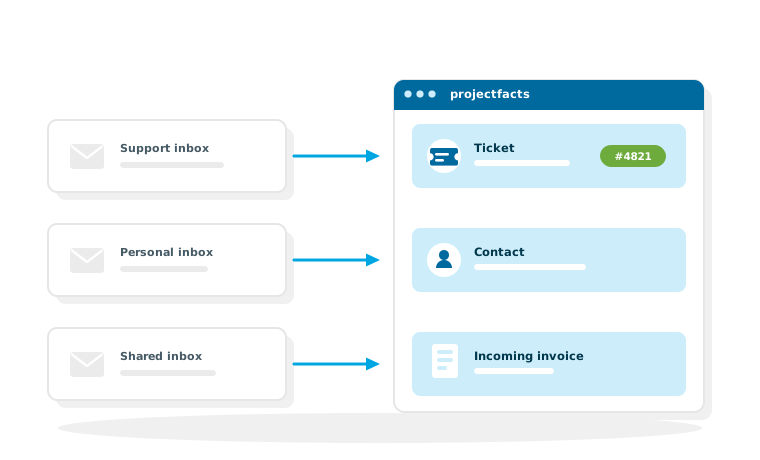
In most companies there is not one inbox but several kinds of inbox. They are connected in different ways because they do different jobs.
The support inbox
Enquiries sent to a general address should not end up in a shared inbox where nobody knows who is taking care of them. Connected to projectfacts, every enquiry becomes a ticket with its own number, a named owner and a deadline that the system monitors itself. The details are under ticket system and helpdesk.
The personal inbox
What an employee discusses with a customer belongs to the customer history. Once the inbox is connected, that correspondence lands at the contact in CRM, so nobody has to start from scratch in the next conversation. What is private stays private: what gets assigned is what belongs to the case.
The shared inbox in accounting
Incoming invoices arrive by email these days. Instead of downloading, renaming and filing them, they run straight into document entry. See incoming invoices and digital document entry.
What this changes for working together
The real gain does not show on the first day, but the first time someone has to stand in for a colleague.
Leave and sickness
When a case and its correspondence hang off the project, a colleague takes it over without anyone having to forward an inbox. That is the difference between cover that works and cover that only exists on paper.
Handovers
When responsibility for a customer changes, it changes together with the history. Nobody has to gather up old messages or rely on memory.
Traceability
What was promised, and when, sits with the case. For follow up questions that is the fastest answer available, and in a dispute the only one that holds up.
If you work with Microsoft 365
For companies that use Outlook and Microsoft 365 anyway, there is a shorter route than connecting a single inbox.
The Microsoft 365 integration
It covers contacts, calendars and email together and comes with an add-in for Outlook, so messages can be assigned from inside Outlook. What it includes in detail is on the page about Microsoft 365. Which variant is the right one in your case is something we clarify during setup.
No more cases disappearing into inboxes
In a free initial consultation we will look at which inboxes should be connected in your company and how incoming messages are best assigned.
Request a consultationStill have questions? We have the answer.
Would you like to know how an inbox is connected, or how emails turn into tickets? Talk to us.