
Telephone system (CTI)
You know who is calling before you pick up. The phone interface connects your system to the CRM, the ticket system and time recording in projectfacts.
Enquire nowWhat is the CTI integration in projectfacts?
CTI stands for computer telephony integration, the coupling of your telephone system with the software you already work in. When a call comes in, the projectfacts phone interface automatically searches your existing contacts for the number and assigns the call to the right customer.
That puts an end to the searching. Instead of pulling up the customer record while the phone rings, you see the contact and its service notes before you answer, and you deal with whatever follows straight from the call.
What the telephone integration is for
Identify callers at once
The number is checked against your contacts, so the customer is identified before you answer.
Carry straight on
Book time, raise a ticket, set an appointment or record a CRM activity without switching windows.
Nothing gets lost
Every call lands in the call list and can be traced back from the contact afterwards.
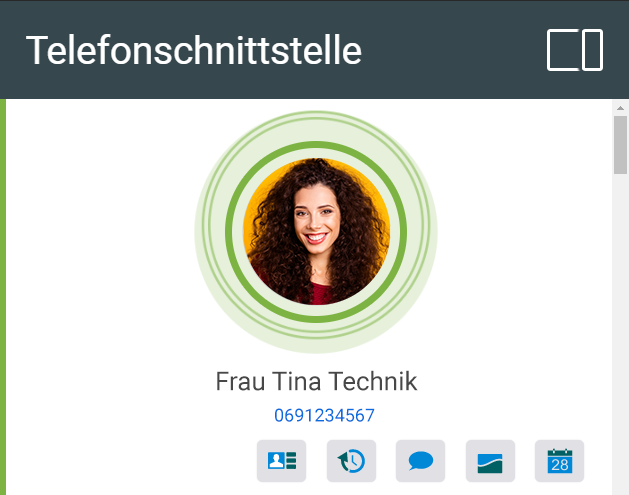
What you see when it rings
The customer is identified before you answer
projectfacts matches the incoming number against your stored contacts and shows you the right record. Additional service notes place the call immediately, so you take it prepared.
- The customer's current priority from the ABC analysis
- The key account manager responsible
- The nature and scope of the customer's order
- Service notes on the contact
What you can handle straight from the call
The call pop-up offers the actions that usually follow a phone call. No switching to another module, no sticky note in between.
Jump to the contact
One click takes you to the contact, where every activity relating to the customer is listed in chronological order, including the history of your communication. Which activities are shown depends on your settings.
Create a new contact
If the number is not yet stored, you create a new contact straight from the call and attach it to an existing organisation or set up a new one. That keeps contact management current so new prospects are not lost.
Book time
Support work is often billed by the time invested. You record the working time at the push of a button and assign it to the contact, and ticket billing then carries on automatically.
Record a CRM activity
For callbacks and follow ups you create a follow up item with a date. When the time comes, the system notifies you automatically.
Raise a ticket
If the customer has a specific issue, one click creates a ticket and assigns it to a channel and an agent. Should the request turn out to be larger, the ticket can be converted into a project at any time.
Create appointments
If the call is about arranging a meeting, you create the appointment directly in the team calendar and forward it internally or externally. The contact from the call is assigned to the appointment automatically.
Connect your phone system, stop the searching
In a free initial consultation we look together at how your telephone system can be connected to projectfacts and what that changes in your team's day to day work.
Request a consultation
For support and helpdesk
Call escalation across several levels
Where several people staff the helpdesk at once, the phone rings in many places at the same time. The phone interface maps several escalation levels of your system for exactly that case.
When someone takes the call, it shows as picked up for everyone else involved. The call list later shows who was involved at the last escalation level and who answered.
- Several escalation levels can be mapped
- Answered calls are visible to everyone involved
- Traceable who was involved and when
Your benefits at a glance
Prepared for the call
Customer, priority and order situation are on screen before you answer.
No follow up work
Time, ticket, appointment and note are created during the call, not after it.
Analysable
Filter and sort the call list, trace calls back from the contact.
Still have questions? We have the right answer!
Would you like to connect your telephone system to projectfacts? Talk to our consulting team and we will work through the details of your system together.