
Single sign-on
One password fewer that can be forgotten, written down or reused. Your employees sign in to projectfacts with the Microsoft account they sign in to every morning anyway.
Enquire nowWhat does single sign-on mean in projectfacts?
Single sign-on means that the sign-in no longer happens in projectfacts itself, but at your identity provider. projectfacts supports Microsoft Entra ID for this, the directory service behind Microsoft 365 that used to be called Azure AD. Anyone signed in there gets into projectfacts without entering another password.
The gain lies less in convenience than in control. Accounts are managed where they are managed anyway. When someone leaves, their Microsoft account is blocked, and with it their access to projectfacts, without anyone having to remember it.
What single sign-on is good for
One password fewer
No additional account that gets written down, reused or forgotten.
Centrally revocable
Anyone who leaves the company loses access where you block it anyway.
Set per employee
Disabled, allowed or enforced: you decide that per user, not for everyone at once.
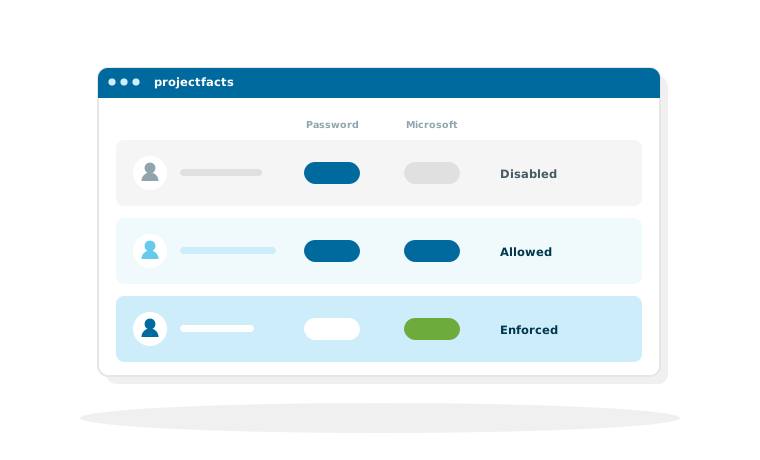
Three settings per user
Single sign-on is not switched on across the board for the whole client, but per user. That allows a rollout in stages instead of changing everything on a single day.
Disabled
The employee signs in as before, with username and password. This is the starting point and the right setting for everyone who does not yet have a Microsoft account, such as external staff or colleagues on the production floor.
Allowed
Both routes work side by side. That is the sensible setting during the changeover: whoever wants to can already use the Microsoft account, and nobody is left standing at a locked door if something is not set up yet.
Enforced
Only the sign-in via Microsoft is possible. This is the end state for everyone who is meant to work through SSO permanently. Only in this setting does the actual benefit take full effect, because there is no longer a second password that could be overlooked.
How the setup works
The setup is a job for your IT team and needs a Microsoft account with administrator rights.
Grant access to Microsoft Graph
In the first step, projectfacts is granted access to Microsoft Graph, the interface through which Microsoft provides user data. An administrator confirms this once. Anyone who already uses their own app registration in Microsoft can use that instead.
Map the users to each other
Next, it is defined which Microsoft user belongs to which projectfacts user. The mapping is done for each employee individually through a selection menu.
What that means for your planning
This mapping is a manual step, not an ongoing sync. For the rollout that means a manageable one-off effort: with twenty employees, half an hour. For day-to-day operation it means that a new employee has to be created in projectfacts and mapped; they do not appear by themselves just because they were created in Microsoft. This expectation should be settled during the rollout project so that it does not catch anyone out later.
What single sign-on does not do
Two points that IT departments ask about regularly and that deserve a clear answer.
Signing in is not user administration
Single sign-on governs who is allowed to sign in, not who gets created. On the route described here via Microsoft Entra ID, the users are mapped to each other once, and a new employee is created in projectfacts. If you need an ongoing transfer of user data from a directory service on top of that, do talk to us: what is possible in your environment is something we clarify together rather than answering it across the board here.
Permissions stay in projectfacts
Microsoft decides who is allowed to sign in. What they may see and do afterwards is still decided by the permission system in projectfacts. This separation is deliberate: the business roles in a company software rarely follow the structure of a directory service.
What else runs through Microsoft
Signing in is only one part of the connection to Microsoft 365.
Contacts, calendar, email and Teams
Keeping contacts and appointments in sync, assigning emails, an add-in for Outlook: that is covered by the page on Microsoft 365. For calls and meetings there is also the connection to Microsoft Teams.
One account fewer for your employees
In a free initial consultation we clarify what is needed to set up single sign-on in your environment and what a changeover in stages could look like.
Request a consultationStill have questions? We have the answer.
Would you like to read up on the setup step by step, or check the prerequisites in your Microsoft environment? Talk to us.