
Webhooks
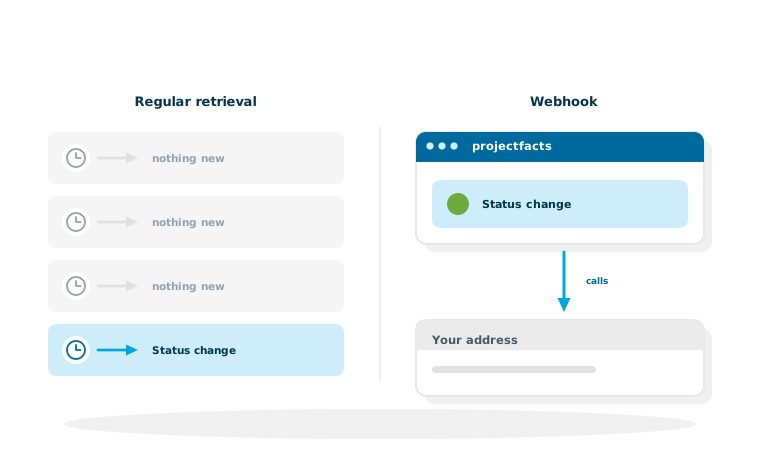
With an interface, another system asks projectfacts for data. With a webhook it works the other way round: projectfacts gets in touch of its own accord as soon as something has happened.
Enquire nowWhat is a webhook in projectfacts?
A webhook is an address at your end that projectfacts calls as soon as a particular event has occurred. Instead of another system asking every few minutes whether anything has happened, it finds out at the moment it does.
The practical difference is bigger than it sounds. Anyone who keeps asking creates load for answers that usually say nothing new, and still only learns about it on the next run. A webhook turns that around. Webhooks are set up in the interface configuration like every other connection, and nothing has to be programmed on the projectfacts side.
Three triggers are available
Report events
Particular events go to the interface of another system, a status change, for example.
React to a document
When a document is created or validated, a stored address is called.
Calls as a trigger
The telephone connection has a webhook of its own with an action URL.
The three types in detail
Which type is the right one depends on what the event is attached to: a process, a document or a call.
Reporting events to another system
This type reports particular events to the interface of a third-party system, for example that a project has changed its status. Typical use: a customer portal, a sales system or an internal tool is meant to learn that something has been decided in projectfacts, without having to keep asking.
Reacting to a document
Here the trigger sits on the next steps for a document. You create a template of the URL type, store the address and assign it to a document or a document template. It is triggered by hand at the click of a button, when the document is created or when it is validated, for instance when a portal is to be informed about an approved invoice or an archive needs a notification.
The telephone webhook
The telephone connection has a webhook of its own with an action URL. It lets you attach a follow-up action to a call. What projectfacts brings for telephony in any case is described on the page about the telephone system.
When a webhook is the right route, and when it is not
Webhooks are not a replacement for the interface, they complement it. The choice is easier if you pin it to one question: is this about an event or about a body of data?
Choose a webhook if ...
... another system should quickly learn that something particular has happened. If it is meant to respond with an action. And if being informed about that one event is enough.
Choose retrieval through the interface if ...
... a reconciliation has to be complete. A webhook reports a single event, and if a call comes to nothing because the receiving end happened to be unavailable, that one message is missing. For data where nothing may be missing, such as billing, accounting and group reporting, regular retrieval through the REST API is the more reliable route. The same applies to larger volumes of data.
Both together is often the best answer
The webhook makes sure that something happens immediately. A nightly reconciliation through the interface makes sure that nothing is missing at the end. In practice this combination is more robust than either route on its own.
What you should clarify when setting it up
A webhook is quickly created. The questions that should be answered beforehand concern the other side.
Who receives the call?
You need an address that is reachable and that can process the call. That side belongs to you or to your service provider, projectfacts calls it and nothing more. Clarify in advance what should happen there and what happens if a call does not arrive.
Which event exactly?
The more precisely the trigger is chosen, the less noise it creates. A webhook that fires at every trivial change is soon ignored at the other end, and then the important message goes unnoticed too.
Should other systems learn what happens at your end?
In a free initial consultation we look at which events should be reported and whether a webhook or a regular reconciliation is the better route.
Request a consultationStill have questions? We have the answer.
Would you like to know how a webhook is set up in practice, or which events are available? Talk to us.