
Time recording terminals
Not everyone starts the day at a computer. In the workshop, the warehouse or on the production floor, terminals record working time where it begins, and those times sit in the same system as everyone else's.
Enquire nowHow does time recording at a terminal work?
A terminal is a permanently installed device, usually in the entrance area. When an employee arrives in the morning, one tap on their profile or a badge at the reader is enough to clock in. The same applies when they leave. The booking lands in projectfacts immediately and sits there in the same time management as the times of all their colleagues.
The point of this way of recording is that it leaves nobody out. Anyone sitting in the office books in the browser. Anyone working from home books there. Anyone out and about books on the move. And anyone who starts the day in the workshop books at the terminal. Four routes, one time management, see working time recording.
What terminals are good for
For workplaces without a computer
Workshop, warehouse, production, reception: anywhere the working day does not begin at a screen.
Quick and unmistakable
One tap on the profile. No logging in, no searching, no queue in the morning.
One time management for everyone
Terminal bookings run into the same accounts as browser and app bookings.
What comes of it in the background
A booking at the terminal is not an isolated record. It feeds into the same reports as every other time booking.
Overtime and time accounts
Clocking in and out produces attendance times, and from those come overtime and time accounts. A traffic light system shows where accounts are running out of line, long before that turns into a discussion.
Breaks and working time models
Break rules and working time models apply regardless of where the booking was made. Whether someone clocks in from home or at the terminal changes nothing about which rules apply to them.
Absences in the same picture
Leave, sickness and other absences sit alongside the recorded times, so that a complete picture emerges, see absences. For the records drawn from that, the time sheet is the usual route.
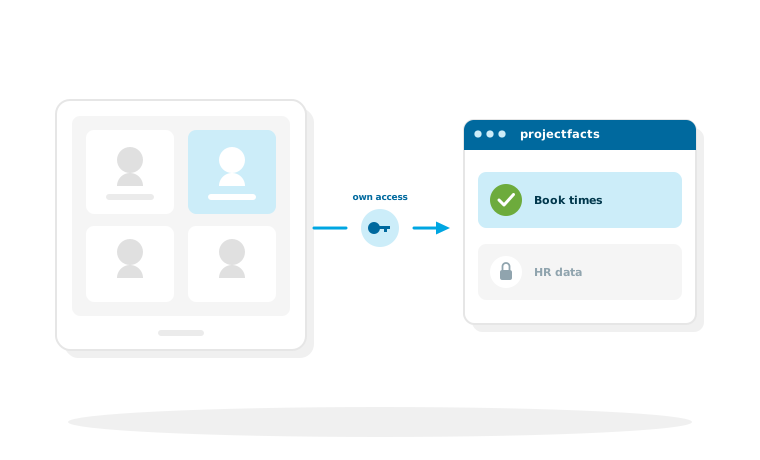
Why a terminal needs an access account of its own
A terminal does not belong to any single employee. It hangs in the entrance area and many people use it. For the connection that means it cannot work with a personal account.
Neutral access accounts
For devices of this kind there are neutral access accounts with an access key of their own and exactly the rights needed for booking times. The device does not need access to HR data, and it does not get it. How such accounts are built is described on the page about the REST API.
What that means for security
An access account that may only book times can do only that. If a device is lost or replaced, its access is withdrawn individually, without affecting anyone else.
What to clarify before setting up
Terminals are quickly installed. The questions that should be answered beforehand concern the process rather than the technology.
How many devices, and where
One terminal at the main entrance is often enough. With several entrances or sites spread across locations it becomes more than one, and then the question arises whether someone clocks in at one device and out at another. Both are possible, but it should be a conscious decision.
Which hardware is used
Which devices suit your case and how they are connected is something we clarify together during setup. That depends on the conditions on site and cannot be answered in general terms. The same goes for clocking in with a badge: whether RFID, NFC or chip is used is decided by the reader on the terminal, not by projectfacts. At 5 POINT we use RFID ourselves.
What the law requires
Separate requirements apply to the recording of working time in Germany. What follows from that in practice is set out under time recording obligation.
Time recording for every workplace
In a free initial consultation we look at where terminals make sense in your business and how they work together with recording at the computer and on the move.
Request a consultationStill have questions? We have the answer.
Would you like to know which devices can be connected, or how the setup works? Talk to us.