
Skribble integration
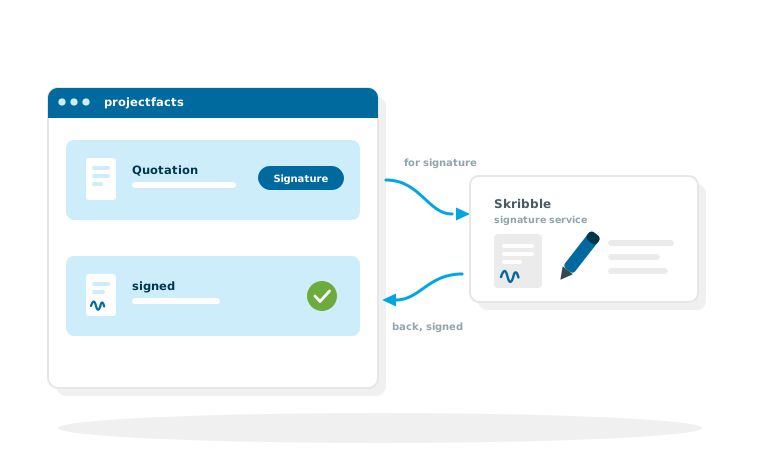
A quotation is ready, and then the detour begins: print it, sign it, scan it, send it back. The Skribble integration removes that detour. The quotation goes straight from projectfacts for signature and comes back signed to the business document.
Enquire nowCan I have quotations signed straight from projectfacts?
Yes. Through the connection to the Skribble signature service you send a document for electronic signature, and that means any PDF, not just certain types of business document. The recipient signs online, without using projectfacts and without installing anything. The signed PDF then sits back in projectfacts, in the very place it was sent from.
This is particularly useful for quotations, because the signature is built into the process there: the option to have the quotation signed with Skribble sits in the business document itself. If the customer says yes, the acceptance is no longer a sentence in an email but a signature on the document, and projectfacts turns it into an order in the usual way. The integration has been available since version 2023.1.
What the Skribble integration is good for
Built into the process
With business documents, sending for signature sits on the process itself, so with a quotation it sits directly in the quotation.
Any PDF at all
Through the file module any other PDF can go out for signature too, not just business documents.
No more return trip
Printing, signing, scanning, sending back: the whole detour falls away. That shortens the time to closing.
The quotation process with an electronic signature
The integration takes hold exactly where sales already work, in the quotation. Three steps where there used to be five.
The quotation is created in projectfacts
Items, prices and texts come from the master data, and the PDF is produced from your template. How that works in detail is described under quotation preparation.
Send it for signature
Instead of emailing the PDF and waiting for the scanned reply, it goes to Skribble for signature. The recipient receives a link and signs online.
Signed and back, then on to the order
The signed document then sits on the business document in projectfacts. The accepted quotation becomes the order, with the project, the times and the later billing behind it, the familiar route through order management and invoicing, just without the paper loop.
Two routes to a signature, not just quotations
More than the quotation needs signing. That is why there are two routes into the signature, and both end the same way: the signed PDF comes back to projectfacts.
From the business document
With business documents the signature is built into the process. The quotation carries the option to have it signed; once it is back signed, it continues along the familiar route to the order. The same applies to everything else that is created as a business document.
From the file module
Any PDF in file management can be sent for signature: framework agreements, maintenance agreements, non-disclosure agreements, minutes. The signed document then sits back there and can be linked to QM documents. Anyone looking for the signature later finds it on the document itself instead of in a mailbox.
You can see what is in transit
The document shows that it has been sent for signature. Nobody has to look in the outbox or ask whether the contract has gone out yet, and anyone who wants to follow up also sees open quotations in offer tracking.
Signing on the spot
If the customer is sitting in front of you, you do not need a signature service: the signature can be captured directly on a tablet or smartphone and attached to the document, see digital document entry.
How long does a signature take in your company?
In a free initial consultation we look at your quotation process, from preparation through to acceptance, and at where the electronic signature saves the most time.
Request a consultationSet-up and requirements
The integration is part of the standard and is set up in the configuration, not developed as a project.
Through the interface configuration
Skribble is connected in projectfacts through the interface configuration. After that, the option to have something signed is available in the business documents.
Your own Skribble account
Skribble is an independent service that you obtain from its provider. projectfacts brings the integration, not the signature service itself. Which signature level you use, what it costs and in which countries it is recognised depends on your contract with Skribble. You clarify that there, or together with us in the consultation.
Which editions include it
The Skribble interface is included in the Enterprise and projectfacts editions. The full comparison is in the overview of functions, the prices under prices.
Skribble or Scrive?
projectfacts connects to both signature services. The choice is not a technical decision but a question of the service you want to work with.
In projectfacts the route is the same
Both services are connected through the interface configuration, in both cases the document goes out for signature from the business document and comes back there signed. If you already have an account with one of the two, you connect that one. What distinguishes the services themselves, meaning signature levels, identification methods, prices and countries, is answered by the respective provider. For the second integration see Scrive.
Still have questions? We have the answer.
Would you like to know how the integration is set up, or whether it suits your quotation process? Talk to us.