
Your online team calendar
Get insights into your online team calendar, anywhere and anytime. Test now!
Enquire nowA central online team calendar for your employees
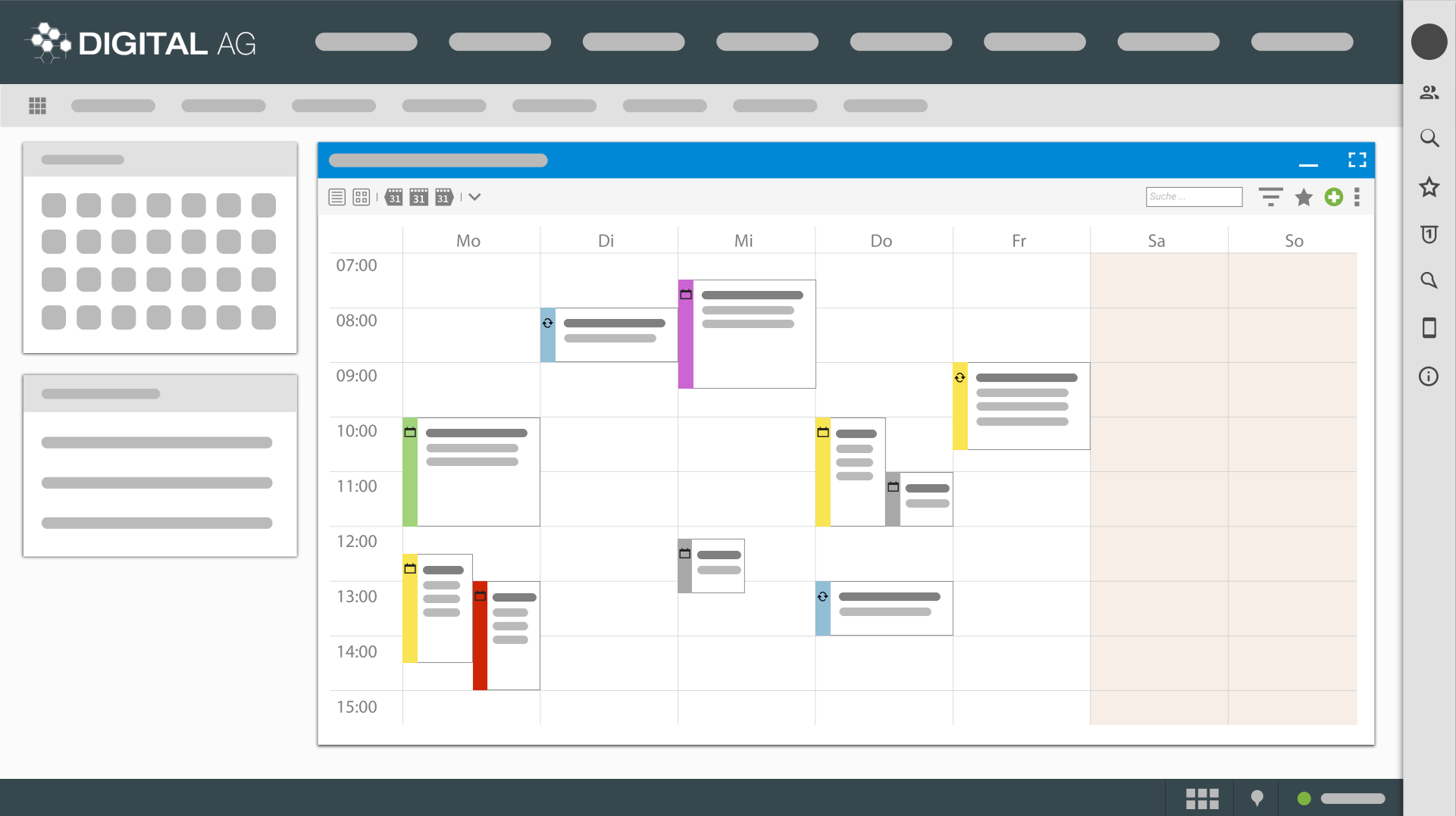
A team calendar is a shared online calendar in which an entire team plans appointments, attendances and resources centrally and sees them in sync across all devices. As team calendar software for companies, projectfacts bundles these functions into a single system, from each employee's personal calendar through to the shared online group calendar.
projectfacts offers you a central, integrated system for all company processes. The digital team calendar provides an ideal basis for planning and automatically adds important events. With the projectfacts team calendar, you get a fully-fledged online calendar that you can also use on the move.
Advantages of the online team calendar tool
Online calendar in the cloud
The projectfacts team calendar is a fully-fledged online calendar for your team. Access it anytime and anywhere. Whether from the office computer, your home PC or on the go from your smartphone. With the team calendar, you always have your appointments with you. You can also see which employees are available or absent.
Synchronisation with devices
Easily synchronise your projectfacts team calendar with Outlook and your smartphone. This gives you maximum flexibility for your scheduling. The team calendar is also fully integrated within the software: transfer contact data from the CRM or book times directly to your appointments.
Project work in a team
Integrate the team calendar seamlessly into your project work. Plan team and employee capacities for your projects, display the current project phase or important milestones. If you wish, you can also grant external partners access to project appointments.
YouTube blocked due to privacy settings
We use cookies and similar technologies on our website and process personal data about you (e.g. IP address), e.g. to personalize content and ads, to integrate media from third-party providers or to analyze access to our website. Data processing may also take place as a result of cookies being set. We share this data with third parties that we name in the privacy settings.
Data processing may take place with your consent or on the basis of a legitimate interest, which you can object to in the privacy settings. You have the right not to consent and to change or revoke your consent at a later date. Further information on the use of your data can be found in our privacy policy.
Are you under 16 years old? Unfortunately, you are not allowed to consent to this service yourself. Please ask your parents or guardians to consent to the service with you.
If you load the blocked content, your privacy settings will be adjusted. Content from this service will no longer be blocked in the future.
MANAGE APPOINTMENTS
Scheduling made easy
Cumbersome team scheduling is annoying. With the projectfacts team calendar, we have a convenient solution for this. You save time, nerves and no longer need any additional tools, just the team calendar.
True to the motto 'Everything in one system', with the projectfacts team calendar you have a central software for your online scheduling. Access it anytime and anywhere, whether in the office, home office or on the move. New appointments can be created or transferred from tickets and project modules. This makes scheduling quick and easy. Important project events such as milestones or project phases are displayed directly in the calendar if required.
Added value for your company
Manage contacts
The contact details of the participants are important for every appointment. In projectfacts, you create new contacts directly in the CRM. When creating an appointment, you simply add the contact and have their telephone number and email address directly to hand. Even directly from the team calendar.
Project calendar
Keep track of your projects in the projectfacts team calendar. If you wish, the current project phase and important milestones in the course of the project can be displayed. You can also see the relevant appointments directly within the project.
Capacity planning
The projectfacts team calendar is an ideal basis for the capacity planning of your employees. Internal company resources such as teams or individual employees can be planned directly on a daily, weekly or monthly basis.
Presence & absence
If you wish, you can also integrate private appointments and absences due to illness or holiday into the projectfacts team calendar. This means that you and your team always have an overview of who is available and who is not.
Networked working thanks to the team calendar
Absences, home office and external appointments
You can always see when colleagues are absent. Home office, external appointments, illness or holiday are automatically transferred to the central calendar if desired. You decide for yourself whether you want to make the details of the absences visible or just make it generally clear that an employee is currently not in the office.
Send invitations and involve partners
You can create appointments for individuals or different teams. The team calendar doesn't just work internally. You can send appointment invitations and connect external partners. You can also display the birthdays of your customers, provided they are documented in the CRM.
Useful features for your team
Recurring appointments
Simply create recurring appointments in the projectfacts calendar. You are completely free to choose the rhythm.
Filter appointments
Do you only want to see your own appointments? Or only appointments with customer XY? No problem with the filter function in projectfacts.
Reminders & alarms
Receive automatic reminders of important appointments, by internal message, email or SMS.
Holidays & birthdays
The projectfacts calendar shows you public holidays exactly as they apply at your location. Team birthdays can also be easily integrated.
Authorisations
With a comprehensive authorisation system, you can easily control which employees are allowed to view, change or delete appointments.
Colour system
With projectfacts, you can assign individual colours to your appointments. This allows you to recognise relevant appointments at a glance.
Visibility and privacy in the team calendar
You have full control over the visibility of your appointments. Appointments marked as private are only marked as private appointments. You can restrict visibility individually and make appointments visible only to individual teams or employees, for example.
With projectfacts, every employee has their own personal calendar and a team calendar at the same time.
Team calendar checklist
- Recurring appointments
- My appointments
- Reminders and alarms via internal email or SMS
- Week view / Month view
- Appointment management with acceptances/cancellations
- Synchronisation with smartphone and computer
- Recurring appointments and appointments over several days
- Display of milestones
- Time zones
- Display of sick days and holiday
- Resource management
- Group appointments, individual appointments and private appointments
- Calendar function
- Various appointment types and freely configurable categories
- Colours
- External participants
- Holiday calendar
- Birthday announcement
- Appointment surveys
- Appointment categories
- Access rule via authorisation system
- Resources
- Linking with many projectfacts elements
- Last booked
- Status of individual time bookings
- Availability display
Test your next online team calendar, quick & easy with projectfacts
With the online team calendar tool from projectfacts, you always have an overview of all your team's appointments. And in compliance with data protection regulations. See for yourself and test projectfacts!
Enquire nowStill have questions? We have the right answer!
Give us a call, send us an email or take a look at our FAQ section! We will be happy to answer your questions!