
Digital document entry: capture receipts online and via app
Simply digitise receipts – online or mobile. With the help of digital document entry, your documents land directly in the software.
Enquire nowWhat is digital document entry?
Digital document entry refers to capturing, digitising and managing documents such as receipts and incoming invoices with software instead of on paper. With projectfacts, you photograph receipts on the move with the pfScan web app or drag and drop PDF invoices into the system. Automatic text recognition (OCR) reads out texts and amounts and transfers all the relevant data straight into the software, where you process the documents further online.
What is a supporting document and what types are there?
A supporting document is the written evidence of a business transaction, in other words the document that shows money has changed hands or a service has been provided. No posting without a supporting document: that is one of the principles of proper bookkeeping. With document entry, exactly this evidence goes into the software instead of into a folder.
The types of document you deal with day to day
These documents differ in form and format, but not in how they are handled: every one of them has to be captured, assigned to a transaction and retained. The incoming documents go into the pfScan web app; outgoing invoices are created in projectfacts directly in invoicing.
- Incoming invoices from suppliers, by post or as a PDF
- Receipts and till receipts from cash transactions
- Entertainment receipts, tickets, fuel and hotel receipts from business trips
- Outgoing invoices that you have issued yourself
Analogue and digital document entry compared
Analogue means collecting, filing, sorting at the end of the month and typing everything out. Digital means photographing or uploading once, after which the software takes over reading, assigning and filing. The document can be found from the very first moment, rather than only once it has been posted.
Capture receipts with software – quick and easy online
Are you out and about, busily collecting your receipts? projectfacts makes life easier for you. Simply photograph receipts directly with the pfScan web app or use the images already on your smartphone. Click "Upload" and let the text recognition read out texts and amounts automatically. Your receipts and all the relevant information land seamlessly in the software. That is how easy digital document entry with software can be.
Open pfScan.app → photograph the receipt → upload the receipt
By the way: as a web app, pfScan runs on many devices. All you need is a smartphone with a camera and access to the internet.
- Simply photograph and digitise receipts
- Upload receipts in the app and manage them online
Mobile travel expense report – document entry via smartphone
After their trips, employees often have to spend an unnecessary amount of time scanning receipts individually and managing them digitally. No wonder that preparing a travel expense report is the unloved chore for many employees.
With digital document entry from projectfacts, you save a great deal of time and effort. Using the pfScan web app, you can capture receipts digitally anytime and anywhere. All you need is a smartphone and internet access. Simply photograph your receipts on the spot. The automatic text recognition does the rest for you. All the relevant data is transferred to the software automatically. From there, you can carry on working with it online without any trouble.
Instead of spending valuable time behind the scanner, you deal with the tiresome part while you are still on the move – quickly and easily. Whether in the hotel lobby, at the bakery or in the taxi on the way to the airport.
Thanks to projectfacts, your travel expense report is always up to date. Your employees will thank you for it too.
- Online document entry anytime and anywhere
- Automatic text recognition and digital management in the software
- Settle travel expenses on the move
Benefit from simple digital document entry with software
Would you like to capture travel receipts or your incoming invoices digitally? No problem with the projectfacts web app. Simply photograph the receipt or drag and drop it into the system. Done!
Enquire nowWhat pfScan takes in and what becomes of it
The pfScan app is more than a receipt scanner. It sends a whole range of document types straight to projectfacts, and what happens afterwards largely runs by itself.
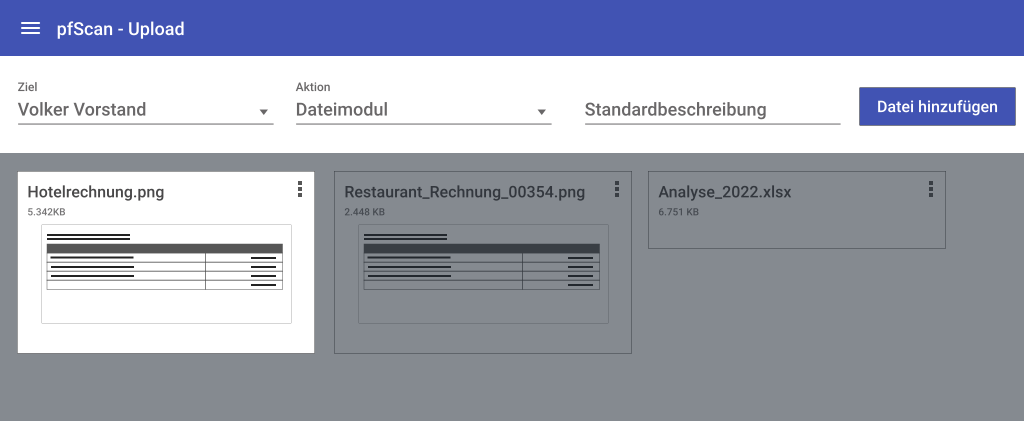
The document types the app accepts
On Android, documents can additionally be passed to pfScan straight from other apps, instead of first filing them somewhere and then digging them out again.
- New expense and new incoming invoice
- Profile picture and background image
- Additional graphics for documents
- Signatures for documents
From the photo to the finished expense claim
Automatic text recognition reads the receipt, whether it is a fuel receipt or a train ticket. projectfacts turns it into a cost item that carries on through the travel expense report as usual.
Once all the cost items for a trip are together, projectfacts combines them with the scanned receipts, so that a PDF printout for your tax adviser, for instance, is produced automatically. For frequent travellers and for the back office, the most tedious part of expense reporting simply falls away.
Capturing receipts in four steps
The process is the same for every document, whether it is a fuel receipt or a supplier invoice.
1. Capture the document
Photograph the document with the pfScan web app or drag and drop a PDF file into the software. Paper and digital documents therefore take the same route.
2. Let text recognition read it out
The automatic text recognition, also known as OCR, reads texts and amounts from the image and transfers the values into the appropriate fields. There is no more typing out of invoice numbers and supplier data.
3. Check and assign
You check the values that have been read out and assign the document to a customer, a project or a trip. This creates a cost item or an incoming invoice.
4. File and process further
The document is stored centrally in the software, linked to the transaction it belongs to. From there it moves on into billing, into the travel expense report or, via the DATEV export in financial accounting, to your tax adviser.
Online document entry – for every kind of incoming invoice
Letter
It is not only travel expense reports that benefit from digital document entry. Incoming invoices are also still often sent by post. Thanks to the pfScan app, digitising such paper invoices is no problem. Simply photograph them and upload them to the system.
Do you often receive invoices from your suppliers by email? No problem. The online document entry from projectfacts also helps you effectively with PDF documents. As the invoice is already available digitally, you save yourself the photographing step. Simply drag and drop the file into the software.
Of course, you always benefit from the automatic text recognition. This spares you the tedious copying or typing out of invoice numbers and supplier data. Your next step towards digital accounting: with document entry from projectfacts, you gain time for what really matters.
- Automated software solution for capturing digital PDF documents
- No more copying invoice numbers thanks to automatic text recognition
Digital document entry and management – all in one software
All receipts online at a glance
Once your receipts have been captured digitally, you enjoy all the benefits of our integrated billing. projectfacts automatically creates cost elements for your travel expense report or incoming invoices for your accounting department. This means you always have a complete overview of your receipts and can carry on working with them.
Flexible billing of receipts
Submit the travel expenses for billing, post incoming payments against the captured invoices or carry out statistical analyses. With projectfacts, there are no limits to what you can do.
As a service company, do you often have to pass incoming invoices on to customers? Here too, projectfacts can support you perfectly. Thanks to the integrated project management, receipts can be assigned to a customer project with just a few clicks.
In the next step, your captured receipts can simply be brought to billing. The software automatically ensures that invoicing is always based accurately on the current project progress.
- All receipts online – with secure access for employees
- Easily manage travel expenses and incoming invoices digitally
- Charge costs on to projects or customers
Retaining receipts digitally: what matters
Capturing is one half, retention the other. Digitally captured documents are subject to the same requirements as paper ones: they must remain complete, traceable and legible throughout the statutory retention period.
Traceable rather than altered after the fact
projectfacts stores your documents centrally and keeps a separate history for your invoices, in which every change can be viewed without gaps. The software thus supports the GoBD requirements for retention and traceability. How you set up your processes in detail is something to agree with your tax adviser.
Keeping an eye on the retention period
Invoices must be retained for several years, electronic invoices for eight years in their original format. Digitally filed documents meet this requirement without lever arch files: they are kept in one place, are searchable and can be output again at any time.
- Central filing instead of scattered folders and email inboxes
- Separate change history for your invoices
- DATEV export of documents and posting data to your tax adviser
Where your receipts are stored
Your documents contain business data and often personal data as well. projectfacts is developed in Germany. All hosted versions run in an ISO 27001 certified data centre in Frankfurt am Main, in compliance with the GDPR. If you wish, you can also run projectfacts on your own servers.
Test the online document entry
Digitise your accounting with projectfacts document entry. Capture and store incoming receipts systematically, securely and sustainably. See for yourself with your personal test account.
Enquire nowIs digital document entry from projectfacts right for you?
Digital document entry at a glance
All-in-One Software
Your complete solution for digital document entry online
Upload photos
Simply photograph and upload receipts
Process documents directly
Post and manage all receipts online
Assign costs
Easily bring the costs incurred to billing on a project- or customer-specific basis
Still have questions? We have the right answer!
Give us a call, send us an email or take a look at our FAQ section! We will be happy to answer your questions!