
Billing software for your company
Create billing for your customers quickly & easily online with the projectfacts billing software.
Enquire nowWhat is billing software?
Billing software is a program that creates, sends and tracks invoices and e-invoices largely automatically. Instead of adapting a template by hand for every invoice, the billing program collects all the relevant data on the customer, order and service and enters it automatically into the invoice.
A good billing software for small and medium-sized businesses meets four criteria:
- Automatic invoice creation from the order and recorded times, instead of maintaining templates manually
- Flexible billing types: fixed price and effort with individual hourly and daily rates
- Recurring invoices and billing rules that are stored centrally with the order
- All-in-one instead of an isolated solution: quotation, order, invoice and receivables management in one system, GDPR-compliant from Germany
More than just billing software
Billing is an important, albeit often unpleasant, task. Especially when you struggle with templates from invoice to invoice or from e-invoice to e-invoice. In most cases, extensive changes are necessary, which take a lot of time.
We have the right solution for you: with the projectfacts billing software, you save time and effort by letting the software write your invoices and e-invoices for you. Instead of adapting templates each time, projectfacts collects all the relevant data and automatically enters it into the invoice.
Simply select the customer or the associated project. With projectfacts, billing takes just seconds. The software takes a multitude of tasks off your hands:
- Predefined customer address and salutation
- Automatic generation of invoice numbers according to your requirements
- Uniform layout in the style of your company
- Automatically transfer invoice items from the order
- Expense-based billing according to hours worked
- And much more …
Let our online program take care of the billing for you and concentrate on the nicer part of the job: posting revenue.
Our billing software: as simple as possible, as flexible as necessary
Service companies in particular face special challenges when it comes to billing, as they offer different types of billing: by effort or as a fixed price.
Fixed price
Invoice items that always have the same price (for example material products/articles).
In projectfacts, you can access a catalog of all your items and simply select the appropriate one. The software automatically transfers the item to the invoice. Quantities and prices can be adjusted as required.
Expense items
Invoice items that are billed individually according to the effort incurred.
In combination with projectfacts time recording, expense items are no longer a problem. The billing software automatically offsets the booked working time against the relevant hourly rates. The result: time-accurate billing with minimal effort.
In addition, different hourly and daily rates often have to be taken into account when invoicing. With the projectfacts billing software, you can keep track of this. Simply store your hourly and daily rates in the system. The software automatically handles the calculation for you.
You enjoy full flexibility. Create individual hourly and daily rates for customers, employees or projects and define, for example, the billing of night and weekend work.
Your complete workflow in one software: from quotation to invoice
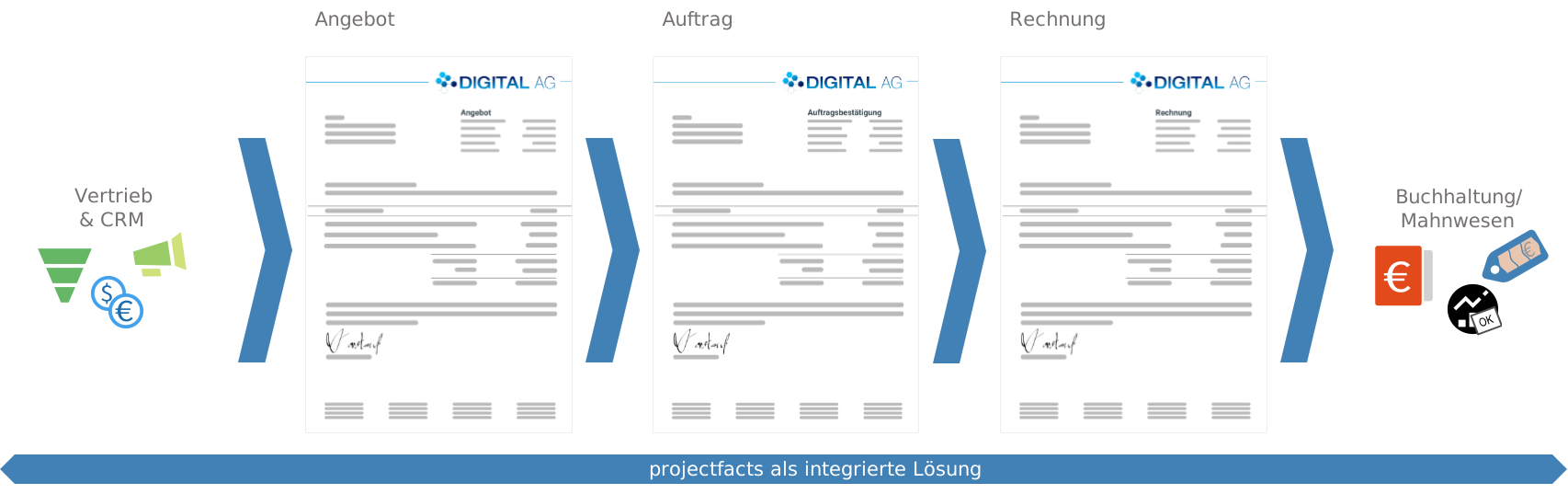
With projectfacts, you can digitize your entire billing. Starting with the quotation. The same mechanisms that simplify invoicing also apply here. If the customer decides to purchase, projectfacts automatically generates an order from the quotation.
The order forms the basis for the customer project as well as for the invoice and e-invoices. All framework conditions and billing rules are automatically adopted for every invoice that you create from the order.
1 Quotation
Several quotations may be created in the sales process. The version that is ultimately commissioned can be converted into an order in projectfacts at the touch of a button.
2 Order
The order is the basis for your project work and subsequent billing. You can store individual payment plans and billing rules here.
3 Invoice
With the invoice, you automatically bill the customer either the total amount of the service or a specific advance payment.
Find out about the five billing types you can use in your order in the following video!
YouTube blocked due to privacy settings
We use cookies and similar technologies on our website and process personal data about you (e.g. IP address), e.g. to personalize content and ads, to integrate media from third-party providers or to analyze access to our website. Data processing may also take place as a result of cookies being set. We share this data with third parties that we name in the privacy settings.
Data processing may take place with your consent or on the basis of a legitimate interest, which you can object to in the privacy settings. You have the right not to consent and to change or revoke your consent at a later date. Further information on the use of your data can be found in our privacy policy.
Are you under 16 years old? Unfortunately, you are not allowed to consent to this service yourself. Please ask your parents or guardians to consent to the service with you.
If you load the blocked content, your privacy settings will be adjusted. Content from this service will no longer be blocked in the future.
Digitize your billing workflow with projectfacts
Are you looking for a solution for your billing? Then projectfacts is the right place for you. Get started now with the intelligent billing workflow for your company.
Enquire nowBilling rules automatically under control
It is often helpful not to have to write and send invoices manually every time. Instead, you may want to create the billing automatically at a specific point in time.
Flexible billing times
With the projectfacts billing software, you can create invoices
- on a specific date,
- after a certain period of time or
- after completion of certain tasks
Customer-specific payment terms
Customer-specific invoicing and payment conditions can thus be easily mapped. And so that you don't have to think about it every time you issue an invoice, the corresponding billing rules are stored centrally with the order.
create and send automatically. Recurring invoices in the form of subscriptions or support contracts can also be handled in this way. Simply specify the billing interval and the billing software will take care of everything else for you.
“projectfacts is the billing basis for a large part of the consulting revenue at kwsoft®. It is a very strategic tool for us.” – Jochen Schorn, Project Manager in Consulting, kühn & weyh Software

Many questions – one solution: online billing with projectfacts
Document for each order item how it is to be billed. Different requirements can quickly accumulate within a single order.
With projectfacts, you can meet these requirements in no time and never forget to create a bill. You define the framework conditions for payments, billing bases and rules once in the order. If a billing rule is then fulfilled, you are automatically reminded to issue the invoice.
- License costs that must be billed annually.
- Support services that are to be billed monthly on a time-and-effort basis and on the basis of a performance record.
- Different hourly and daily rates for different employees, customers and projects.
- Fixed prices for installations that are incurred once but may only be invoiced on a specific date.
- Advance invoices for an individual service, which are to be invoiced after completion of certain work packages.
Simple billing of project work
With integrated project management, you can convert your order items into sub-projects and work packages. Depending on the degree of completion of the respective projects, projectfacts automatically notifies you when you can issue a new invoice.
Bill completed work packages
For example, if a work package that forms the basis for an advance payment is set to "completed", projectfacts informs you of this. The system then notifies you that you can issue a new invoice. The billable amount is also displayed.
Billing at the touch of a button
As you have stored all the important information for billing in the order, invoicing is done at the touch of a button. projectfacts also makes it easier for you to send invoices, which are sent directly from the system. You can use text templates for this, which make online billing even faster.
Create your invoices digitally and automatically from now on
Invoices generate revenue, but also cost time and money. Optimize your invoicing with a digital solution. The projectfacts software helps you to issue invoices faster and more efficiently.
Enquire nowWrite, send and track invoices
In addition to creating and sending invoices and e-invoices, professional billing software also includes tracking them. With projectfacts, you can easily keep track of your invoices.
Post incoming payment
The software also does most of the work for you here. When you receive a payment for an invoice on your account, you can quickly and easily post the corresponding incoming payment – whether a partial or full amount. Invoices that have already been paid are displayed, as are open ones.
Initiate dunning process
If the payment deadline passes without receipt of payment, projectfacts supports you in enforcing your invoice. With automated receivables management, you can create payment reminders or dunning letters at the touch of a button. This allows you to keep control of your revenue at all times.
Specialised billing types in projectfacts
Alongside general billing, projectfacts also covers specialised billing types. For the effort- and progress-based billing of projects, use project accounting; for your employees' expenses, travel expense reports; and for classic invoice creation and billing, the invoice module. All of them draw on the same billing software, so that your data comes together in one place.
Billing at a glance
All in one system
Online billing software – fast, simple and flexible
Billing rules
Easy adoption of all types of billing rules (fixed price/expense items etc.)
Hourly and daily rates
Individual hourly and daily rates for customers, employees and projects
Billing process
Complete billing workflow in one software solution
Reminder function
Automatic notes on invoicing and integrated receivables management
Hourly and daily rates
Individual hourly and daily rates for customers, employees and projects
Own design
Customized layouts for your invoices
Still have questions? We have the right answer!
Give us a call, send us an e-mail or take a look at our FAQ section! We will be happy to answer your questions!