
projectfacts in your system landscape
Hardly any company starts from scratch. There is an IT setup that has grown over the years, along with contracts, habits and systems that are meant to stay. This page answers the question that comes before all the others: where exactly does projectfacts sit in our organisation, and what happens to everything else?
Enquire nowHow does projectfacts fit into an existing IT setup?
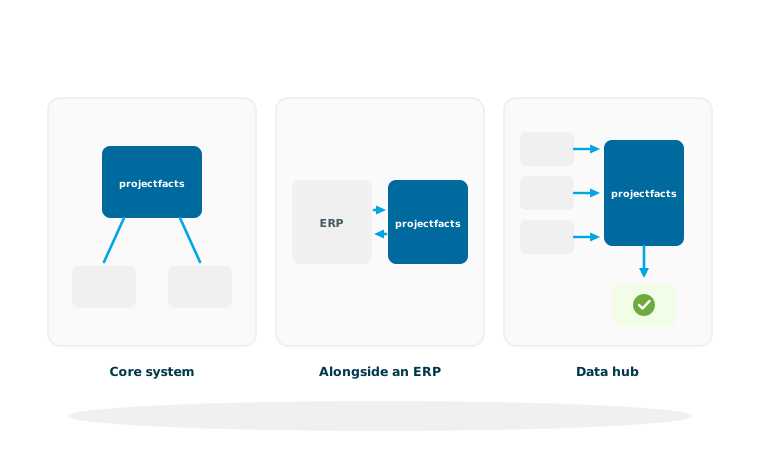
As a rule, projectfacts takes on one of three roles. It becomes the core system in which day to day business runs. It complements an existing ERP with the areas that the ERP does not cover. Or it acts as a hub that brings data together from several systems and passes it on.
Which role is the right one depends less on the size of the company than on the question of where your actual business takes place. If projects, times, tickets and invoices are the heart of your work, projectfacts as the core system serves you best. If you run a deeply established merchandise management system, you are more likely to complement it.
If you are not yet sure what your landscape even looks like, that is the best place to start. The system check lets you quickly rate twelve areas and shows how many tools you work with and at which handovers data still travels by hand today. It asks for no address and does its sums in your browser.
Three roles projectfacts can take on
Core system
Day to day business runs in projectfacts. Other systems hang off it and receive their data from there.
Alongside an ERP
The ERP stays in place for merchandise management and accounting. projectfacts takes over projects, times and tickets.
Data hub
projectfacts brings together what sits in several systems today and passes it on in an orderly form.
The three roles in detail
The differences show less in the technology than in who owns which data and where a figure first comes into being.
projectfacts as the core system
The most common case among service providers. Quote, project, time recording, ticket and invoice arise in one system and belong together. Only two things go outside: the financial data to accounting through the DATEV interface and appointments, contacts and emails to Microsoft 365. Everything else stays inside. What comes together in the process is shown in the complete overview of functions.
projectfacts alongside an existing ERP
Where a merchandise management system is deeply established, replacing it would be a project in its own right, and it is rarely necessary. projectfacts then takes over the areas that classic ERP systems cover poorly: project management, time recording, ticket handling and the billing of services. The connection runs through the REST API, which brings master data in and sends results back.
projectfacts as a hub
If figures sit in five systems today and nobody brings them together, the hub is the real task. projectfacts collects the data, links it up and passes it on in an orderly form, either to a reporting tool through Power BI and the export or to a higher level system. If whole siloed tools are to disappear in the process, the page on replacing siloed tools is the right place to start.
Four ways in and out
Whichever role projectfacts takes on, the data exchange always runs through one of these four routes. They differ above all in the effort involved.
Ready-made integrations
For the most common systems the connection has already been built and only needs to be set up: DATEV, BMD for Austria, Microsoft 365 and Teams, the bank interface, calendar and contacts, email and the telephone system. That is always the shortest route, so check it first.
The REST API
For everything without a ready-made connection. Through the open interface, other programs read and write the same data your employees work with. The right route for fixed, recurring processes that are meant to run unattended.
The MCP server
The youngest of the four routes. Through the MCP server, an AI assistant accesses projectfacts and answers questions that would otherwise require someone to build a report. Not a replacement for the API, but the complement for everything that cannot be planned in advance.
Export
The least spectacular route and often the quickest. Lists and reports go out as CSV or Excel and from there into any tool that can handle them. For one off questions and for recipients who do not want a connection.
Sign-in, permissions and data ownership
Three points every IT department asks about, and they are best raised early in the conversation.
Sign-in through your identity provider
There are two routes to choose from. If your accounts sit in Microsoft 365, your employees sign in through single sign-on with their Microsoft account. If you manage your users in your own directory service, projectfacts checks the sign-in through Active Directory and LDAP. In both cases, access is withdrawn in the place where you administer it anyway.
One permission system that applies everywhere
The permissions you maintain in projectfacts apply in the interface, through the API and through the MCP server alike. No access route gets special rights simply because it comes from outside. That saves you a second permissions concept, which otherwise quickly drifts apart from the first.
Your data stays yours
Everything held in projectfacts can be exported, through the API and through the export functions. That is not a footnote for the event of a parting of ways, but a practical question: a system you can only get data out of with difficulty makes every later decision expensive.
From the decision to running operation
A system landscape is not changed over a weekend. In practice, a staged approach has proved itself.
The core first, then the edges
First the area where the greatest pain sits, usually time recording and project management. Then the adjoining areas follow, and only at the end the connections to neighbouring systems. Anyone who works the other way round and starts with the interfaces builds connections to processes that are still going to change. How an implementation actually runs is described under implementation process.
Several countries and companies
If you work across borders, currencies, tax rates, leave and public holiday rules come into play. These building blocks do not hang off the country but off the master data, as described under international use. If your company belongs to a group or has been acquired, the page on group integration is the right place to start.
All connections at a glance
Connect your own applications and automate processes.
Find out moreMCP serverConnect AI assistants such as Claude or ChatGPT.
Find out moreAI featuresUse artificial intelligence with your own endpoint.
Find out more DATEV
DATEV Hand accounting records and documents over to your tax adviser.
Find out more Microsoft 365
 Contacts, calendar, email and sign-in through SSO.
Find out more Bank interface
 Read in account movements and match payments to them.
Find out morePower BI and exportAnalyse key figures graphically and pass data on as a defined report.
Find out moreNetwork drive (WebDAV)Mount the file storage as a drive in your operating system.
Find out moreAll integrationsThe complete overview of all connections and interfaces.
To the overviewWhere does projectfacts sit in your IT setup?
In a free initial consultation we look at your system landscape and clarify which role projectfacts should sensibly take on and which systems stay.
Request a consultationStill have questions? We have the answer.
Would you like to talk through a specific connection, or find out what an implementation means for your IT department? Talk to us.